You published a product review 18 months ago. It ranked on page one, drove steady traffic, and earned consistent affiliate commissions for months. Then, quietly, the clicks slowed. Rankings slipped. Revenue dropped. And now that post sits somewhere on page two, collecting dust while a competitor’s fresher version takes the traffic you used to own.
This happens to every affiliate blogger eventually. And most respond in the worst possible way: they ignore the old post and write something new instead.
That’s a mistake. Updating existing content is almost always faster, easier, and more effective than creating something from scratch. Your old post already has backlinks, domain authority, indexed pages, and (probably) some residual rankings. Throwing that away to start over is like demolishing a house because the kitchen needs remodeling.
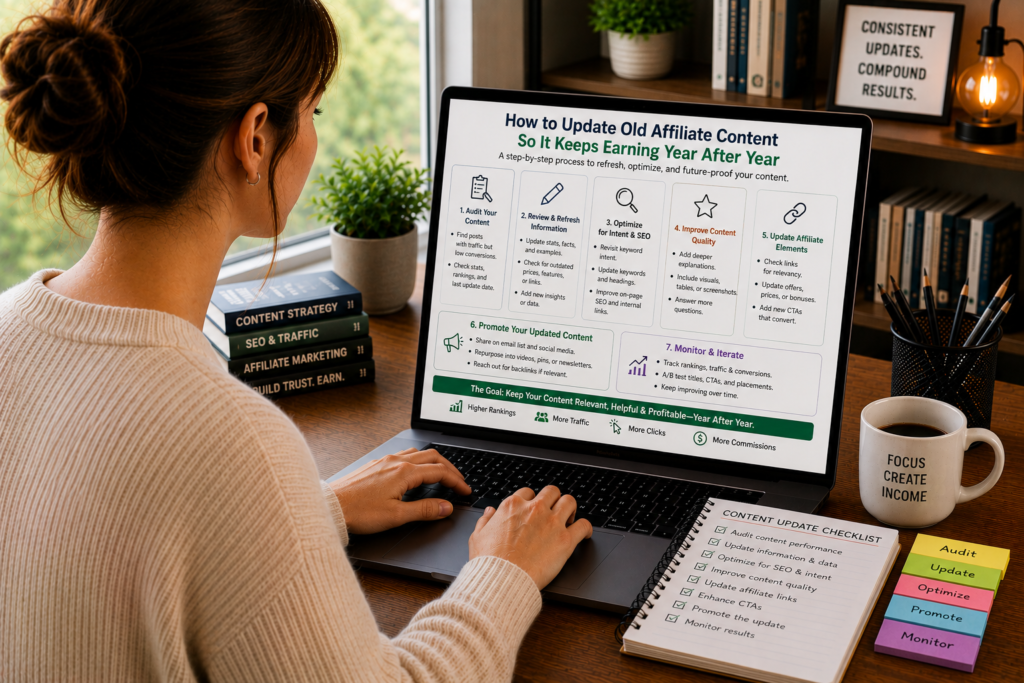
This guide walks through a complete system for auditing, updating, and republishing old affiliate content so it keeps generating revenue for years, not months.
Why Old Affiliate Content Decays
Before you fix anything, it helps to understand why affiliate content stops performing. The decay isn’t random. It follows predictable patterns.
Product changes outpace your content. The tool you reviewed raised its prices six months ago. A major feature was added. The free plan was eliminated. Your post still quotes the old numbers, and readers who notice the discrepancy lose confidence in everything else you’ve written.
Competitors publish fresher content. Google rewards freshness for commercial queries. If three competitors have published updated reviews in the past six months and your post hasn’t been touched in two years, search engines have good reason to rank their content above yours.
Search intent shifts. The way people search for a product category changes over time. Two years ago, readers might have searched “best email marketing tool.” Now they search “best email marketing tool for Shopify stores” or “best email marketing tool with AI.” If your post doesn’t match the current intent, it loses relevance.
Your affiliate links break. Products get acquired, rebrand, or shut down. Affiliate programs change their link structures. A post full of dead links or redirects signals neglect to both readers and search engines.
The competitive field changes. New products enter the market. Old products pivot or decline. A roundup post that doesn’t include the current category leader looks incomplete to anyone who’s done five minutes of research.
Design and formatting standards evolve. A post that looked modern in 2022 might feel dated now. Missing comparison tables, no table of contents, tiny images, or outdated formatting can make otherwise solid content feel untrustworthy.
Understanding these decay patterns tells you exactly what to look for when you audit your content. Each pattern maps to a specific type of update.
Step 1: Identify Which Posts to Update First
You probably have dozens (or hundreds) of affiliate posts. You can’t update them all at once, and you shouldn’t try. The goal is to find the posts where a refresh will generate the biggest return on your time.
Start by sorting your affiliate posts into four categories:
Category A: Declining performers. These posts used to drive significant traffic and revenue but have dropped in the past 6 to 12 months. They’re your highest-priority updates because the infrastructure is already in place. The post has authority, backlinks, and historical ranking data. It just needs a refresh to climb back.
Pull up your analytics and look for posts that have lost 20% or more of their traffic compared to the same period last year. Check your affiliate dashboard for posts where click-through rates or conversions have dropped. These are your Category A candidates.
Category B: Stagnant mid-performers. These posts rank on page two or the bottom of page one. They get some traffic but have never reached their full potential. A strategic update could push them over the edge into the high-traffic positions (spots one through five) where the real revenue lives.
Category C: Outdated but still relevant. These posts cover products or topics that people still search for, but the content is clearly outdated. Old screenshots, discontinued features, wrong pricing. They need factual corrections more than structural overhauls.
Category D: Dead content. These posts cover products that no longer exist, categories that have fundamentally changed, or topics with zero remaining search volume. Don’t update these. Either redirect them to a relevant current post or let them go.
Focus your energy on Category A first, then B, then C. Ignore D entirely unless a redirect makes strategic sense.
Step 2: Run a Content Audit on Each Post
Once you’ve identified your priority posts, audit each one systematically. Don’t just skim the post and fix what looks wrong. Use a checklist that covers every dimension of decay.
Here’s the audit checklist:
Factual Accuracy
- Are all product prices current?
- Have any features been added, removed, or significantly changed?
- Are the products still available and actively maintained?
- Has the affiliate program changed its terms, commission structure, or link format?
- Are there any factual claims that were true when you published but aren’t anymore?
Link Health
- Do all affiliate links still work and redirect correctly?
- Do all internal links point to live pages?
- Do all external reference links (reviews, studies, data sources) still load?
- Are you linking to the correct product pages (not outdated landing pages or sunset products)?
Search Performance
- What keywords does this post currently rank for?
- What keywords has it lost rankings on?
- Are there new keywords (long-tail variations, related questions) that the post should target?
- What does the current SERP look like for your primary keyword? What are the top three results doing that you’re not?
Content Quality
- Does the introduction still hook the reader?
- Are there sections that feel padded, repetitive, or irrelevant?
- Is the post structured with clear subheadings, comparison tables, and scannable formatting?
- Does the writing match the quality standards you hold yourself to today? (Your writing has probably improved since you published the original.)
- Are there competitor posts that cover angles you missed entirely?
Visual and Technical Elements
- Are screenshots current? Do they show the product’s current interface?
- Are images optimized for page speed?
- Does the post load quickly on mobile?
- Is the formatting responsive and readable on phone screens?
This audit takes 30 to 60 minutes per post. It’s tedious work. But it gives you a precise map of what needs to change, which prevents you from wasting time on updates that don’t move the needle.
Step 3: Update Pricing, Features, and Product Information
This is the most straightforward type of update, and it should happen first because inaccurate information actively damages your credibility.
Go through the post line by line and verify every factual claim against the product’s current website, documentation, and pricing page.
Common things that change:
Pricing tiers. SaaS products adjust pricing frequently. A tool that cost $15/month when you reviewed it might now cost $25/month, or might have introduced a new free tier. Update every price reference in your post, including comparison tables.
Feature sets. Products add and remove features constantly. If you praised a tool for its integration with a specific platform and that integration no longer exists, remove the reference. If the tool has added a feature that directly addresses a weakness you mentioned in your review, update your assessment.
Plan structures. Products often restructure their plans. The “Pro” plan you recommended might now be called “Business,” or the features it included might have been moved to a higher tier. Make sure your recommendations still align with what readers will actually get at the price point you’re quoting.
Ownership and branding. Products get acquired, merge, or rebrand. If the tool you reviewed has been acquired by a larger company, that’s worth mentioning. It affects trust, support quality, and future development direction.
Availability. Some products restrict availability by region or industry. If a tool you recommended has changed its availability, note the restriction.
A small but meaningful detail: update the “last updated” date on your post only after you’ve made substantive changes. Some bloggers update this date after fixing a typo, which is misleading. Readers and search engines interpret the updated date as a signal that the content has been meaningfully refreshed.
Step 4: Fill Content Gaps Your Competitors Have Covered
This is where you shift from maintenance to competitive strategy.
Open the top three or four results for your target keyword and read them carefully. Not to copy them, but to identify angles, sections, or information they include that your post doesn’t.
Common gaps you’ll find:
New products in the category. If a significant new competitor has entered the market since you published and the top-ranking posts mention it but yours doesn’t, your content looks incomplete. Add a section covering the new entrant, including an honest assessment of where it fits in the competitive picture.
New use cases or audience segments. Maybe your post covers “best CRM for small businesses” but the top results now include sections on specific use cases like “best CRM for real estate agents” or “best CRM for solopreneurs.” Adding audience-specific recommendations makes your content more relevant to long-tail searches.
Comparison sections or tables. If competing posts have added detailed comparison tables that your post lacks, create one. Tables are high-value structural elements that improve both readability and SEO.
FAQ sections. Check the “People Also Ask” box in Google for your target keyword. If your competitors have added FAQ sections that address these questions and you haven’t, you’re missing an opportunity for additional keyword coverage and featured snippet eligibility.
Data and benchmarks. If competitors have included original data, speed tests, or performance benchmarks that make their content more authoritative, consider whether you can add similar evidence to your post. First-hand testing data is one of the strongest trust signals in affiliate content.
Don’t add content just to match your competitors’ word count. Add it because it makes your post more complete and more useful to readers. Every new section should earn its place by addressing a genuine reader need.
Step 5: Improve the Writing and Structure
When you reread a post you wrote a year or two ago, you’ll probably wince at certain passages. Your writing has improved. Your understanding of what works has deepened. Use that growth to elevate the post.
Areas to focus on:
Tighten the Introduction
Old introductions tend to be too long and too generic. Cut anything that doesn’t directly serve the reader’s immediate need. If your intro runs past 150 words, trim it. Make sure the first two sentences create enough pull to keep readers scrolling.
Strengthen Subheadings
Replace flat, descriptive subheadings with engaging ones that create curiosity or promise a specific insight. “Pricing” becomes “What You’ll Actually Pay After the Free Trial Ends.” “Features” becomes “The Three Features That Separate the Leaders from the Rest.”
Cut Filler Paragraphs
Every post has them. Paragraphs that restate something you’ve already said. Paragraphs that provide context nobody needs. Paragraphs that exist only because you needed to hit a word count. Cut them ruthlessly. A shorter, tighter post that respects the reader’s time outperforms a bloated one.
Upgrade Your CTAs
Look at every call-to-action in the post. Are they specific? Do they address objections? Do they reduce friction? “Check it out” should become “Start a free 14-day trial (no credit card needed).” “Learn more” should become “See current pricing and plan details.”
Add Visual Elements
If your original post was a wall of text, add structure: comparison tables, pro/con lists, callout boxes for key recommendations, and updated screenshots. These elements improve scannability and give readers multiple ways to engage with your content.
Improve Transitions Between Sections
Read the post from top to bottom and pay attention to how each section flows into the next. Abrupt jumps between topics make the post feel disjointed. Add brief transition sentences that connect one section’s conclusion to the next section’s opening.
Step 6: Refresh Your Affiliate Links and Disclosures
Affiliate link maintenance is boring but non-negotiable. Broken or outdated links cost you money directly (lost commissions) and indirectly (lost credibility).
For each post you update:
Test every affiliate link. Click each one and verify it lands on the correct product page. Check for redirect chains (multiple redirects before reaching the final page), which can slow load times and sometimes break tracking.
Verify your affiliate tracking. If you use a link management tool like ThirstyAffiliates or Pretty Links, make sure the underlying affiliate URL is still valid. Affiliate programs change their link structures, and old links may not track properly even if they still redirect to the right page.
Check for better affiliate offers. The affiliate program might now offer higher commissions, exclusive discount codes, or special landing pages that convert better than the generic product page. Update your links to point to the highest-converting destination.
Update your disclosure language. Affiliate disclosure requirements evolve, and best practices change. Make sure your disclosure is prominent (near the top of the post), clearly worded, and compliant with current FTC guidelines or equivalent regulations in your market.
Replace dead products. If a product you recommended has been discontinued, don’t just remove it and leave a gap. Replace it with a current alternative and explain the switch. “We previously recommended Tool X, which has been discontinued. The closest alternative is Tool Y, which offers similar functionality at a comparable price.”
Step 7: Optimize for Current Search Intent
Search intent, what a person actually wants when they type a query, evolves over time. A keyword that once triggered informational results might now trigger commercial results, or vice versa.
To optimize for current intent:
Analyze the current SERP. Search your target keyword in an incognito browser and study what Google shows. Are the top results listicles, in-depth reviews, comparison posts, or video content? Your post format should match what Google is rewarding right now.
Check “People Also Ask.” The PAA box reveals related questions that searchers are asking. If your post doesn’t address these questions, add them as sections or include them in an FAQ at the bottom.
Look at featured snippets. If a featured snippet appears for your keyword, study its format. Is it a paragraph, a list, or a table? Structure a section of your post to match that format, which gives you a shot at capturing the snippet position.
Review Google Search Console data. Look at the queries that are actually sending traffic to your post. You might discover that your post ranks for terms you didn’t intentionally target. If those terms are relevant, weave them into your content more deliberately.
Consider new keyword modifiers. Search trends add new modifiers over time. “Best X for remote teams,” “best X with AI features,” or “best X in 2026” are the kind of modifiers that appear as products and work patterns evolve. Incorporate relevant modifiers naturally into your content.
Step 8: Republish Strategically
Once you’ve made your updates, how you republish matters. This isn’t just about hitting “save.” A strategic republish maximizes the SEO and traffic impact of your work.
Update the publication date. Change the post’s published date to the current date. This sends a freshness signal to Google and makes the post appear current in search results. Only do this after substantial updates. Changing the date after fixing two typos is deceptive and can backfire if readers notice the old content.
Keep the same URL. Never change the URL of a post you’re updating. Your existing URL has accumulated backlinks, social shares, and search authority. Changing it throws all of that away. If your current URL contains a year (e.g., “best-crm-2024”), and you can’t change the URL without losing authority, consider removing the year from the URL going forward and using the year only in the title and body text where it’s easy to update.
Submit for reindexing. After republishing, use Google Search Console to request indexing for the updated URL. This prompts Google to recrawl the page and process your changes faster than waiting for the next scheduled crawl.
Share the updated post. Treat the republished post like new content in your distribution strategy. Share it on social media, include it in your email newsletter, and mention the update in relevant community discussions. A subject line like “I just updated my guide to [topic] with current pricing and three new tools” gives people a reason to click even if they’ve read the original.
Update internal links. Check other posts on your site that link to the updated content. Make sure the anchor text and surrounding context still make sense with the refreshed version.
Building a Refresh Schedule That Runs Itself
Updating content shouldn’t be a one-time project. It should be a recurring process built into your editorial calendar.
Here’s a practical schedule:
Monthly: Link checks. Run all your affiliate posts through a broken link checker. Fix any dead links immediately. This takes 15 to 30 minutes and prevents the most obvious form of content decay.
Quarterly: Price and feature verification. Check the pricing and feature sets of every product mentioned in your top-performing affiliate posts. Update any discrepancies. This is a two-to-four-hour task depending on how many posts you maintain.
Biannually: Competitive analysis. Every six months, search your primary keywords and compare your posts against the current top results. Identify content gaps and plan updates accordingly.
Annually: Full content audit. Once a year, run a comprehensive audit of your entire affiliate content library. Categorize posts into the A/B/C/D system described earlier. Plan a refresh schedule for the coming year based on your findings.
Trigger-based updates. Some updates can’t wait for a schedule. If a product you recommend raises prices by 40%, gets acquired, or launches a major new feature, update your content within a week. Readers searching for that product during a major change are actively looking for current information, and the site that provides it first wins the traffic.
To keep yourself accountable, create a spreadsheet that tracks each affiliate post with columns for: URL, primary keyword, last updated date, current monthly traffic, monthly revenue, next scheduled review date, and notes on needed updates. Review this spreadsheet at the start of each month and batch your update tasks.
What to Do When a Product You Recommend Declines
This is the uncomfortable scenario that separates trustworthy affiliate sites from the rest.
A product you’ve recommended for two years starts getting negative user reviews. The company’s support quality drops. New bugs appear and don’t get fixed. The product is clearly declining, but it still pays you affiliate commissions.
What do you do?
Update your recommendation. If the product has genuinely declined to the point where you wouldn’t recommend it to a friend, change your recommendation. Adjust your rating, move it down in your rankings, or replace it with a better option entirely.
Be honest about the change. Add a note explaining why your recommendation has changed. “When I first reviewed Tool X in 2024, its customer support was responsive and its feature set was competitive. Over the past year, I’ve seen consistent reports of longer support wait times and several features being deprecated without replacement. As of this update, I now recommend Tool Y for most users.”
This kind of honesty is rare in affiliate content, which is exactly why it builds so much trust. Readers who see you change a recommendation against your financial interest will trust your future recommendations implicitly.
Redirect if necessary. If the product shuts down entirely or becomes so poor that your review is no longer useful, consider redirecting the post to a broader roundup or comparison that covers the category. This preserves the SEO value of the URL while giving readers current, useful information.
The Compound Effect of Consistent Updates
Here’s what happens when you make content refreshes a regular habit:
Your top posts stay on top. Instead of a six-month spike followed by a slow decline, your best content maintains its rankings for years. A post that stays in the top three for a high-intent keyword can generate consistent revenue for as long as you maintain it.
Your site builds topical authority. Search engines recognize sites that keep their content current. Over time, this freshness signal compounds with your existing authority, making it easier to rank new content in the same topic area.
Your audience comes back. Readers who find your content current and accurate bookmark your site. They return when they need to make their next purchase decision. They recommend your content to colleagues. This repeat traffic is the highest-converting traffic you’ll ever get.
Your backlink profile grows. Updated, comprehensive content attracts more backlinks than stale content. Other bloggers and journalists are more likely to reference a post that reflects the current market than one that’s obviously outdated.
Your conversion rates improve. Current pricing, accurate feature descriptions, and honest assessments of how products have changed over time all reduce friction between the reader and the click. Readers convert at higher rates when they trust the information is current.
The math is straightforward. Spending three hours updating a post that already has authority and backlinks will almost always generate more revenue than spending ten hours creating a new post from scratch. You’re not starting from zero. You’re improving something that already works.
Advanced Update Strategies for High-Value Posts
For your top ten or twenty earning posts, consider going beyond basic updates:
Add original research. Run your own tests, surveys, or benchmarks. Original data gives your post something no competitor can replicate by simply rewriting their content. A deliverability test across five email marketing platforms, a speed comparison of six website builders, or a survey of 200 users about their CRM preferences creates lasting competitive advantage.
Create supporting content. Write deeper articles on subtopics related to your main post and link between them. A “best CRM” roundup can link to individual reviews, a CRM pricing comparison, a CRM migration guide, and a “how to choose a CRM” educational post. This content cluster approach strengthens every post in the group.
Add multimedia. Record a video walkthrough, create an infographic summarizing your recommendations, or produce a podcast episode discussing your findings. Different formats reach different audiences and create additional ranking opportunities (video results, image search, podcast directories).
Build interactive elements. A quiz that helps readers find the right product (“Answer 5 questions to find your perfect project management tool”) or a calculator that estimates costs based on their needs (“Enter your email list size to see what each platform would cost you”) increases engagement and time on page while providing genuine value.
Translate or localize. If your content performs well in English, consider creating localized versions for other markets. A product comparison for the UK, Australian, or Canadian market (with local pricing, availability, and payment options) can capture traffic that English-language competitors in other regions aren’t targeting.
Measuring the Impact of Your Updates
After each update, track performance changes to understand what’s working and refine your approach:
Rankings. Monitor your position for primary and secondary keywords. Rankings typically respond to content updates within two to six weeks. If you don’t see movement after six weeks, the update may not have been substantial enough or the competitive gap may require a different approach.
Organic traffic. Compare monthly traffic before and after the update. Use a 90-day window for comparison to account for seasonal fluctuations.
Click-through rate from search. Check Google Search Console for changes in CTR for your target keywords. An updated title tag or meta description (which you should refresh as part of your update) can improve CTR even without a ranking change.
Affiliate conversions. Track the number of clicks, conversions, and revenue from the post before and after the update. This is the metric that matters most. A post that gains 20% more traffic but loses 30% of its conversion rate hasn’t actually improved.
Engagement metrics. Check bounce rate, time on page, and scroll depth. If your update added substantial new content or structural improvements, you should see positive movement in these metrics.
Keep a log of what you changed in each update and the resulting performance shift. Over time, this log becomes a playbook showing you exactly which types of updates generate the biggest returns for your specific site and audience.
Making the First Move
If you’ve been ignoring your old affiliate content, today is the day to stop. You don’t need to overhaul your entire content library. Start with one post.
Pick the affiliate post that used to perform best but has declined the most. Run the audit checklist. Update the pricing. Fix the broken links. Add a comparison table if it doesn’t have one. Cut the fluffy paragraphs. Tighten the CTAs. Republish it with today’s date and share it with your audience.
Then watch what happens over the next 30 days. Watch the rankings. Watch the traffic. Watch the affiliate dashboard.
Most bloggers who try this once get hooked. Because the return on time invested is so much higher than writing from scratch. Because seeing a declining post climb back to page one feels like finding money in an old coat pocket. And because, once you build the habit, you stop losing revenue to content decay entirely.
Your old affiliate posts aren’t dead weight. They’re assets waiting to be reactivated. Every one that you refresh is another revenue stream restored, another reader served, and another signal to search engines that your site is the one worth ranking.