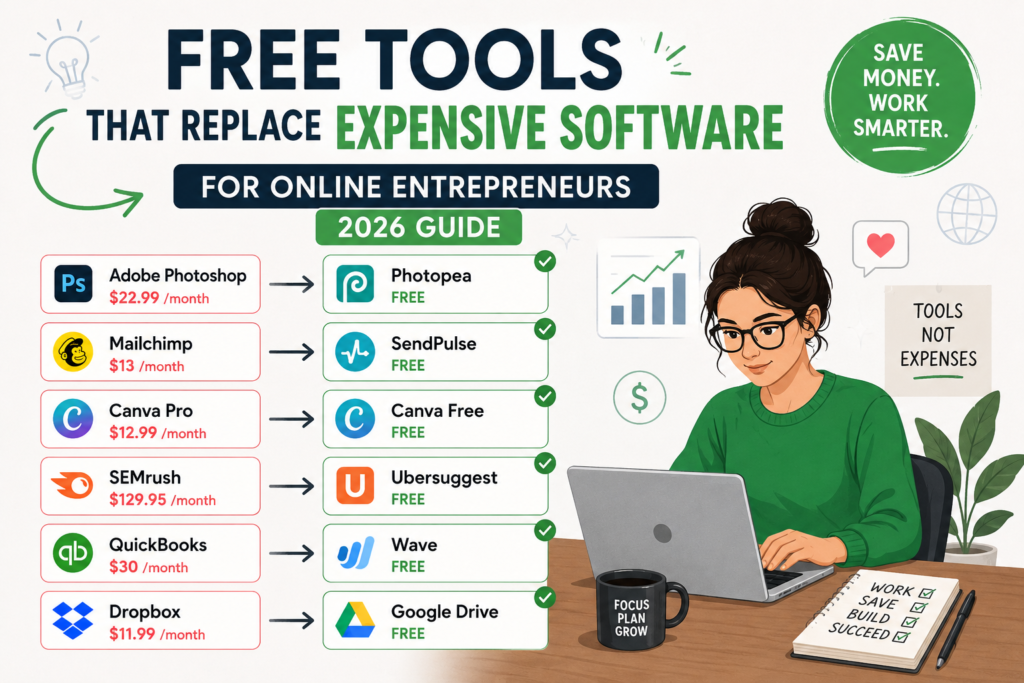
Running an online business can drain your bank account fast, especially when every platform seems to charge $20, $50, or $100 per month. Subscriptions pile up. Before you know it, you’re spending more on software than on growing your actual business.
Here’s the good news: you don’t have to.
A new generation of free tools has caught up to (and in some cases passed) the premium software that dominated for years. Whether you’re launching your first side project or scaling a full-time online business, these free alternatives deliver real results without the price tag.
This guide breaks down the best free tools across every category an online entrepreneur needs, from graphic design to accounting, email marketing to video editing. Each recommendation includes what it replaces, what you get for free, and where the limits are.
Why Free Tools Are a Smart Move for Online Entrepreneurs
Let’s do quick math. A typical online entrepreneur might pay for:
- Graphic design software: $12.99/month
- Email marketing: $29/month
- Project management: $10/user/month
- Video editing: $20.99/month
- Accounting software: $30/month
- CRM: $25/user/month
- Website builder: $16/month
That’s over $140/month or roughly $1,700/year, and that’s a conservative estimate. Many entrepreneurs spend double or triple that amount.
Free tools let you redirect that money into advertising, inventory, content creation, or simply keeping more profit. And with the quality of today’s free options, you’re not giving up much in return.
Graphic Design and Visual Content
Canva Free (Replaces Adobe Photoshop and Illustrator)
Canva has become the go-to design platform for non-designers and professionals alike. The free plan includes:
- Over 250,000 templates for social media, presentations, flyers, and more
- Thousands of free stock photos, icons, and illustrations
- Drag-and-drop editor with no learning curve
- Real-time collaboration with team members
- Export in PNG, JPG, PDF, and MP4
Where it falls short: The free plan locks some premium templates, brand kit features, and background removal. But for 90% of daily design tasks, the free version handles everything.
Best for: Social media graphics, blog images, simple logos, presentations, and marketing materials.
Photopea (Replaces Adobe Photoshop)
If you need actual photo editing power (layers, masks, RAW file support), Photopea runs entirely in your browser and supports PSD files natively. It looks and feels like Photoshop, accepts the same file formats, and costs nothing.
Best for: Product photo editing, banner design, and working with layered design files from freelancers or agencies.
Figma Free (Replaces Adobe XD and Sketch)
Figma’s free tier gives you three active projects with full design and prototyping capabilities. For entrepreneurs building websites, apps, or landing pages, it’s a professional-grade tool.
Best for: Website mockups, UI design, and collaborative design projects.
Email Marketing
Mailchimp Free (Replaces ConvertKit and ActiveCampaign)
Mailchimp’s free plan supports up to 500 contacts and 1,000 email sends per month. You get:
- Pre-built email templates
- Basic audience segmentation
- Signup forms and landing pages
- Marketing CRM
- Reporting and analytics
Where it falls short: Automation is limited on the free plan, and 500 contacts is a tight ceiling for growing businesses. Once you pass that threshold, paid plans start at $13/month.
Best for: Entrepreneurs in the early stages who are building their first email list.
MailerLite Free (Replaces Mailchimp Paid)
MailerLite’s free tier is more generous: up to 1,000 subscribers and 12,000 emails per month. It includes:
- Drag-and-drop email editor
- Automation workflows (up to basic sequences)
- Landing pages and signup forms
- A/B testing
- Email analytics
Best for: Creators and small business owners who want automation features without paying for them.
Brevo Free (Replaces Constant Contact)
Formerly Sendinblue, Brevo offers unlimited contacts on its free plan with a cap of 300 emails per day. It combines email marketing, SMS marketing, and CRM in one platform.
Best for: Entrepreneurs who want a multi-channel marketing tool without juggling separate subscriptions.
Project Management and Productivity
Trello Free (Replaces Monday.com and Asana Premium)
Trello’s Kanban-style boards are intuitive enough for solo entrepreneurs and flexible enough for small teams. The free plan includes:
- Unlimited cards and lists
- Up to 10 boards per workspace
- Built-in automation (limited to 250 runs/month)
- File attachments up to 10MB
- Mobile apps for iOS and Android
Best for: Visual thinkers who want a simple, drag-and-drop way to manage tasks and projects.
Notion Free (Replaces Evernote, Confluence, and Airtable)
Notion is part note-taking app, part database, part wiki, and part project manager. The free plan for individuals includes:
- Unlimited pages and blocks
- Shareable pages with guests (up to 10)
- Templates for everything from content calendars to CRM trackers
- API access for integrations
Where it falls short: File uploads are capped at 5MB per file on the free plan. Team features require a paid subscription.
Best for: Solo entrepreneurs who want one tool to replace several. Notion can serve as your knowledge base, task manager, content planner, and client tracker simultaneously.
ClickUp Free (Replaces Asana and Monday.com)
ClickUp’s free plan is surprisingly full-featured:
- Unlimited tasks and members
- 100MB storage
- Multiple project views (list, board, calendar, Gantt)
- Time tracking
- Sprint management
Best for: Entrepreneurs who need more structure than Trello offers but don’t want to pay for a premium project management tool.
Website Building and Hosting
WordPress.org with Free Hosting (Replaces Squarespace and Wix)
WordPress powers over 40% of all websites on the internet. The open-source software is free. Pair it with a free hosting provider like InfinityFree or 000webhost to launch a site at zero cost.
Where it falls short: Free hosting comes with limitations (ads, slower speeds, limited support). For a serious business site, budget hosting starting at $3-5/month is worth the investment.
Best for: Bloggers, content creators, and entrepreneurs comfortable with a small learning curve.
Carrd (Replaces Leadpages for Simple Landing Pages)
Carrd lets you build beautiful one-page websites for free. It’s perfect for landing pages, link-in-bio pages, and simple portfolio sites. You get up to 3 sites on the free plan.
Best for: Entrepreneurs who need a clean landing page fast, without building an entire website.
Google Sites (Replaces Basic Website Builders)
Google Sites is completely free, requires zero technical skill, and integrates natively with Google Workspace. It won’t win any design awards, but for internal wikis, simple business pages, or project hubs, it gets the job done.
Best for: Quick informational pages, internal documentation, and portfolio sites.
Video Creation and Editing
DaVinci Resolve (Replaces Adobe Premiere Pro and Final Cut Pro)
DaVinci Resolve is a full professional video editing suite, and its free version includes tools that rival software costing $300 or more:
- Multi-track timeline editing
- Color grading (industry-leading Resolve color tools)
- Audio post-production (Fairlight)
- Visual effects and motion graphics (Fusion)
- Export in multiple formats and resolutions
Where it falls short: The free version lacks some collaboration features, a few advanced codecs, and GPU-accelerated processing for certain effects. For most online entrepreneurs creating YouTube videos, course content, or social media clips, you’ll never hit these limits.
Best for: Entrepreneurs serious about video content who want broadcast-quality editing at no cost.
CapCut (Replaces Premiere Pro for Short-Form Content)
CapCut (by ByteDance) has become the default editor for TikTok, Instagram Reels, and YouTube Shorts. It’s free, runs on desktop and mobile, and includes:
- Auto-captions and subtitles
- Trendy effects and transitions
- Music library
- Green screen and background removal
- Direct export to social platforms
Best for: Short-form video creators who want quick, polished edits.
OBS Studio (Replaces Paid Streaming and Screen Recording Software)
OBS Studio is the gold standard for live streaming and screen recording. It’s completely free and open source:
- Stream to YouTube, Twitch, and other platforms simultaneously
- Record your screen in high quality
- Multiple scene and source support
- Custom overlays and transitions
Best for: Course creators, live streamers, and entrepreneurs who record tutorials or webinars.
CRM and Sales
HubSpot CRM Free (Replaces Salesforce and Pipedrive)
HubSpot’s free CRM is genuinely generous:
- Unlimited users and up to 1,000,000 contacts
- Contact management and deal tracking
- Email tracking and notifications
- Meeting scheduling
- Live chat and chatbots
- Reporting dashboards
Where it falls short: Marketing automation, custom reporting, and advanced sales tools require paid plans starting at $20/month.
Best for: Entrepreneurs managing leads, client relationships, or a sales pipeline.
Bitrix24 Free (Replaces Salesforce for Small Teams)
Bitrix24 combines CRM, project management, and communication tools in one platform. The free plan supports unlimited users with:
- Lead and deal management
- Email marketing (up to limits)
- Task and project management
- Video conferencing
- Website builder
Best for: Small teams that want an all-in-one business platform.
Accounting and Finance
Wave (Replaces QuickBooks and FreshBooks)
Wave is 100% free accounting software built for small businesses and freelancers:
- Unlimited invoicing
- Income and expense tracking
- Financial reporting (profit & loss, balance sheet, cash flow)
- Receipt scanning
- Multi-currency support
Wave makes money through paid add-ons (payroll and payment processing), so the core accounting features stay free with no catch.
Best for: Freelancers, solopreneurs, and small businesses that need professional accounting without the QuickBooks price tag.
GnuCash (Replaces QuickBooks Desktop)
GnuCash is open-source accounting software that runs on your desktop. It uses double-entry bookkeeping and handles:
- Business and personal finances
- Invoicing and accounts receivable
- Accounts payable
- Financial reports
- Tax preparation support
Best for: Entrepreneurs who prefer desktop software and want full control over their financial data.
Communication and Collaboration
Slack Free (Replaces Microsoft Teams Paid)
Slack’s free plan gives small teams everything they need to communicate:
- Unlimited messages (with a 90-day history limit)
- One-on-one video calls
- 10 app integrations
- File sharing
Where it falls short: The 90-day message history limit means older conversations disappear. If searchable history matters to you, consider the paid plan or use a different tool.
Best for: Small teams and freelancers collaborating on projects.
Discord (Replaces Slack for Communities)
Originally built for gamers, Discord has become a legitimate business communication tool. It’s completely free with:
- Unlimited messages and history
- Voice and video channels
- Screen sharing
- Community features (roles, permissions, bots)
- Forum-style channels
Best for: Entrepreneurs building communities, running masterminds, or managing team communication on a budget.
Zoom Free (Replaces Paid Video Conferencing)
Zoom’s free plan includes:
- Unlimited one-on-one meetings
- Group meetings up to 40 minutes with up to 100 participants
- Screen sharing and virtual backgrounds
- Basic recording
Best for: Client calls, team meetings, and webinar rehearsals.
SEO and Marketing Analytics
Google Analytics 4 (Replaces Paid Analytics Platforms)
GA4 is the most powerful free analytics tool available. It tracks:
- Website traffic and user behavior
- Conversion events and goal tracking
- Audience demographics and interests
- Traffic sources and attribution
- Real-time reporting
Best for: Every online entrepreneur. If you have a website, GA4 should be installed on it.
Google Search Console (Replaces Paid SEO Monitoring)
Search Console shows you exactly how Google sees your website:
- Search queries bringing traffic to your site
- Click-through rates and average position
- Indexing issues and crawl errors
- Mobile usability problems
- Core Web Vitals performance
Best for: Anyone doing SEO who wants to understand their search performance.
Ubersuggest Free (Replaces Ahrefs and SEMrush for Basic Research)
Ubersuggest offers limited free daily searches for:
- Keyword ideas and search volume
- Domain analysis
- Content ideas
- Backlink data
Where it falls short: The free version limits you to a few searches per day. For heavy research, you’ll need a paid tool. But for quick keyword checks and competitor peeks, it works.
Best for: Entrepreneurs doing basic keyword research without a dedicated SEO budget.
AnswerThePublic Free (Replaces Paid Keyword Research Tools)
AnswerThePublic visualizes search questions people ask around any keyword. The free version gives you a limited number of daily searches, but each search produces dozens of content ideas.
Best for: Content planning, blog topic brainstorming, and understanding what your audience is asking.
File Storage and Document Collaboration
Google Workspace (Free Tier)
Google Docs, Sheets, Slides, and Drive give you:
- 15GB free cloud storage
- Full document, spreadsheet, and presentation creation
- Real-time collaboration
- Comment and suggestion features
- Version history
Best for: Document creation, collaboration, and cloud storage. It replaces Microsoft Office for most everyday tasks.
Notion (Double Duty)
Already mentioned for project management, Notion handles document creation and collaboration beautifully. Write SOPs, build wikis, create client-facing documents, or draft content, all in one workspace.
Social Media Management
Buffer Free (Replaces Hootsuite and Sprout Social)
Buffer’s free plan lets you connect up to 3 social channels and schedule up to 10 posts per channel. It includes:
- Post scheduling and publishing
- Basic analytics
- Link shortening
- Landing page builder
Best for: Solo entrepreneurs managing a small number of social accounts.
Later Free (Replaces Planoly and Hootsuite for Instagram)
Later focuses on visual content planning with:
- 1 social set (1 profile per platform)
- 5 posts per social profile per month (on the free plan)
- Visual content calendar
- Linkin.bio landing page
- Media library
Best for: Instagram-focused entrepreneurs who want a visual planning tool.
Form Building and Surveys
Google Forms (Replaces Typeform and SurveyMonkey)
Google Forms is completely free with:
- Unlimited forms and responses
- Multiple question types
- Conditional logic
- Automatic response collection in Google Sheets
- Custom themes
Best for: Customer surveys, feedback forms, quizzes, and data collection.
Tally (Replaces Typeform for Beautiful Forms)
Tally creates forms that look and feel like Typeform, but with a generous free plan:
- Unlimited forms and submissions
- Conditional logic
- File uploads
- Payment collection (via Stripe integration)
- Custom domains
Best for: Entrepreneurs who want polished, conversion-optimized forms without paying for Typeform.
Automation
Zapier Free (Replaces Paid Automation Plans)
Zapier’s free plan includes:
- 5 single-step Zaps (automations)
- 100 tasks per month
- Core app integrations
Where it falls short: 100 tasks/month is limited, and you can’t build multi-step automations on the free plan. For basic connections (new email subscriber triggers a welcome email, new form submission creates a Trello card), it’s enough.
Best for: Entrepreneurs automating a few repetitive workflows.
Make (Formerly Integromat) Free
Make offers more power on its free plan than Zapier:
- 1,000 operations per month
- Multi-step automations (scenarios)
- Visual automation builder
- Hundreds of app integrations
Best for: Entrepreneurs who need more complex automations without paying for them.
Password Management and Security
Bitwarden Free (Replaces LastPass and 1Password)
Bitwarden is open-source and offers a generous free plan:
- Unlimited passwords on unlimited devices
- Password generator
- Secure notes
- Two-factor authentication
- Cross-platform apps
Best for: Every entrepreneur. Password security isn’t optional, and Bitwarden makes it free.
How to Build Your Free Tool Stack
Picking tools at random leads to a disconnected mess. Here’s a strategic approach:
Step 1: Map your workflows. Write down every recurring task in your business: content creation, email marketing, client communication, bookkeeping, social media posting, project tracking.
Step 2: Match tools to workflows. Assign one free tool to each workflow. Avoid overlap. You don’t need Trello AND ClickUp AND Notion for task management. Pick one.
Step 3: Connect your tools. Use Zapier or Make to link tools together so data flows automatically between them. New email subscriber? Automatically add them to your CRM. New blog post published? Automatically share it on social media.
Step 4: Set upgrade triggers. Decide in advance what would make you upgrade to a paid plan. “When I hit 1,000 email subscribers, I’ll upgrade MailerLite.” This prevents both premature spending and staying on a free plan that’s holding you back.
A Sample Free Stack for Online Entrepreneurs
Here’s what a complete free tool stack could look like:
| Category | Free Tool | Replaces |
|---|---|---|
| Design | Canva Free | Adobe Creative Suite |
| Email Marketing | MailerLite Free | ConvertKit |
| Project Management | Notion Free | Asana + Evernote |
| CRM | HubSpot Free | Salesforce |
| Video Editing | DaVinci Resolve | Premiere Pro |
| Accounting | Wave | QuickBooks |
| Communication | Discord or Slack Free | Microsoft Teams |
| Analytics | Google Analytics 4 | Paid analytics tools |
| SEO | Google Search Console + Ubersuggest | Ahrefs |
| Social Media | Buffer Free | Hootsuite |
| Forms | Tally | Typeform |
| Automation | Make Free | Zapier Paid |
| Passwords | Bitwarden | LastPass |
Estimated annual savings: $1,500 to $5,000+, depending on which paid tools you would have used.
When Free Tools Aren’t Enough
Free tools work well up to a point. Here are signs it’s time to upgrade:
- You’re hitting limits daily. If you’re constantly bumping against subscriber caps, storage limits, or feature restrictions, the free plan is slowing you down.
- You need team features. Most free plans are built for individuals. Once you hire help, collaboration features on paid plans become worth the cost.
- Customer experience suffers. If a free tool makes your business look unprofessional (limited branding, ads on your site, slow performance), it’s costing you more than a subscription would.
- You’re spending time on workarounds. When you spend 30 minutes doing something manually that a paid tool would handle in 30 seconds, the math stops working in your favor.
The goal isn’t to stay on free tools forever. It’s to use them strategically while you build revenue, then invest in upgrades that match your growth.
Final Takeaway
The gap between free and paid software has never been smaller. Online entrepreneurs in 2026 have access to tools that would have cost hundreds of dollars a month just five years ago.
Start with free. Build with free. Grow with free. And when a paid upgrade will genuinely accelerate your business, you’ll have the revenue to afford it, because you didn’t waste it on software you didn’t need yet.