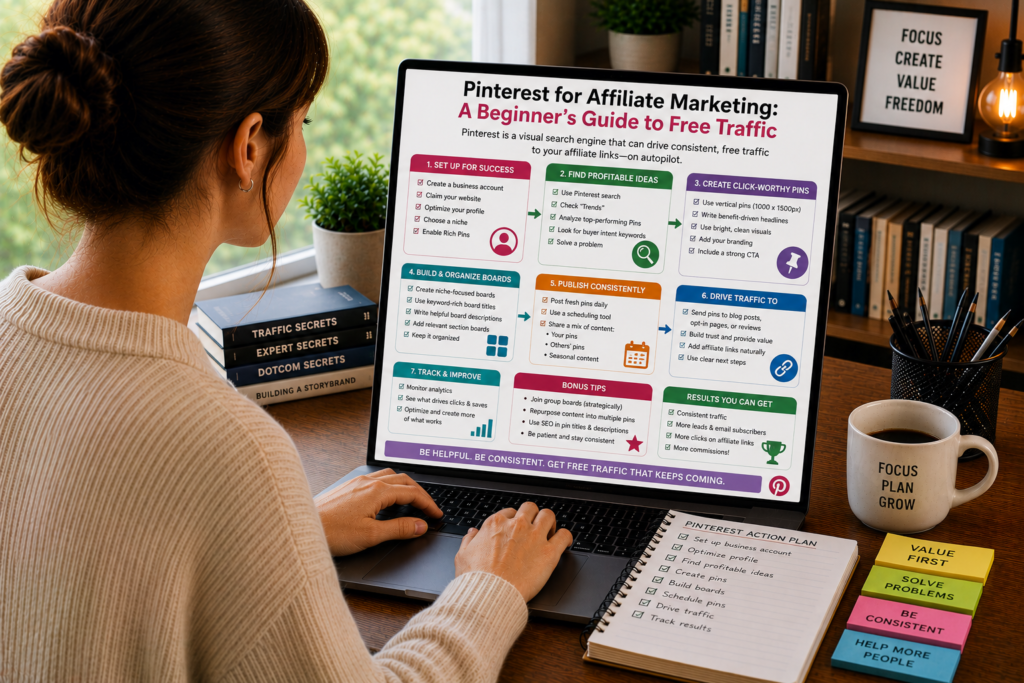
Most affiliate marketers chase traffic from two places: Google and social media. Google takes months of SEO work before you see results. Social media platforms like Instagram and TikTok demand constant posting, and your content disappears within 48 hours.
Pinterest sits in a different category entirely. It looks like social media, but it behaves like a search engine. People come to Pinterest with intent. They search for solutions, products, and ideas. And unlike an Instagram post that dies after a day, a single Pinterest pin can drive traffic to your affiliate content for months or even years after you publish it.
For affiliate marketers, especially beginners without a big budget, Pinterest offers something rare: a steady stream of free, buyer-intent traffic without needing to master paid ads or wait a year for SEO to kick in.
This guide covers everything you need to start using Pinterest as an affiliate traffic source, from setting up your account to creating pins that click, and avoiding the mistakes that get accounts suspended.
Why Pinterest Works for Affiliate Marketing
To understand why Pinterest is so effective for affiliates, you need to understand how people use it differently from other platforms.
On Instagram, people scroll to be entertained. On Twitter, they scroll to stay informed. On Pinterest, they scroll to plan and buy. The platform’s own data consistently shows that the majority of its users come to Pinterest to discover products and make purchasing decisions.
That behavioral difference changes everything for affiliate marketers.
Buyer intent is baked into the platform. Someone searching “best wireless earbuds under $100” on Pinterest is in the same mental state as someone typing that query into Google. They want recommendations. They’re ready to click through and potentially buy. Your affiliate content is exactly what they’re looking for.
Content has a long shelf life. A pin you create today can appear in search results and feeds for 6, 12, or even 24 months. Compare that to a Facebook post (lifespan: roughly 5 hours) or a tweet (lifespan: roughly 18 minutes). Pinterest rewards consistency over time rather than viral moments.
You don’t need a following to get visibility. Pinterest distributes content based on relevance, not follower count. A brand-new account with zero followers can have a pin shown to thousands of users if the pin matches what people are searching for. This makes Pinterest one of the most level playing fields in digital marketing.
The audience skews toward spending. Pinterest users over-index on household income compared to other social platforms. They’re planners and buyers. They use the platform to decide what to purchase, which projects to start, and which products fit their lifestyle. That’s the exact audience an affiliate marketer wants to reach.
Multiple content formats work. Standard image pins, video pins, idea pins, and carousel pins all give you different ways to showcase affiliate products. You’re not locked into one format the way you might be on a platform like YouTube (which demands video production skills and equipment).
Setting Up Your Pinterest Account the Right Way
Your account setup determines how easily Pinterest can categorize and distribute your content. Cut corners here, and you’ll spend months wondering why your pins aren’t getting traction.
Switch to a Business Account
If you have a personal Pinterest account, convert it to a business account. If you’re starting fresh, create a business account from the beginning.
Business accounts give you access to Pinterest Analytics (which shows you what’s working), rich pins (which pull extra information from your website), and the ability to run ads if you decide to invest in paid promotion later. There’s no cost to switch or create a business account.
Optimize Your Profile
Your profile is a landing page. Treat it like one.
Username. Choose something recognizable and related to your niche. If your blog is called “Budget Kitchen Finds,” use that as your username, not a random handle. Your username appears in your profile URL (pinterest.com/budgetkitchenfinds), so make it clean and memorable.
Display name. Include your primary niche keyword in your display name. Instead of just “Sarah Miller,” try “Sarah Miller | Budget Kitchen Tools & Reviews.” Pinterest’s search algorithm indexes your display name, so keywords here help your entire profile appear in relevant searches.
Profile description. You get 500 characters. Use them to clearly state what your content covers, who it’s for, and what readers can expect. Include two to three relevant keywords naturally. Skip vague language like “I love sharing great stuff.” Be specific: “I test and review kitchen gadgets under $50 so you can cook better without spending more.”
Profile image. Use a clear, professional-looking photo or logo. Accounts with real photos tend to earn more trust than those with generic graphics, especially when the content includes product recommendations.
Claim Your Website
Claiming your website connects your Pinterest account to your blog or affiliate site. This does three things: it adds your profile photo and a follow button to any pin that links to your site, it gives you access to analytics about how pins from your site perform, and it signals to Pinterest that you’re a legitimate content creator with a real web presence.
The claiming process involves adding a meta tag or uploading an HTML file to your site. Pinterest walks you through it step by step in the settings menu.
Enable Rich Pins
Rich pins automatically pull metadata from your website and display it on your pins. For affiliate bloggers, article rich pins are the most relevant type. They display your post’s headline, description, and author information directly on the pin.
Rich pins make your content look more professional and credible in the feed. They update automatically when you change information on your website, which means if you update a blog post title or description, the pin reflects those changes without any manual work.
To enable rich pins, you’ll need to add Open Graph or Schema markup to your website (most WordPress SEO plugins handle this automatically) and then validate your pins through Pinterest’s rich pin validator tool.
Understanding Pinterest SEO
Pinterest is a visual search engine. And like any search engine, it uses an algorithm to decide which content to show for any given query. Understanding how that algorithm works is the difference between pins that get buried and pins that drive traffic.
How Pinterest Decides What to Show
Pinterest’s algorithm evaluates several factors when determining which pins to display:
Keyword relevance. Pinterest reads text from your pin title, pin description, board title, board description, and the text overlay on your pin image. If someone searches “meal prep containers,” Pinterest looks for pins where those words (or close variations) appear across these text fields.
Pin quality. Pinterest measures how users interact with your pins. Saves, clicks, and close-ups (when someone taps a pin to see it larger) all signal quality. Pins that consistently earn engagement get shown to more people. Pins that get scrolled past without interaction get suppressed.
Domain quality. Pinterest evaluates the website your pins link to. Sites with consistent pinning activity, healthy engagement rates on their pins, and no history of spam or policy violations get a trust boost. This is why consistency matters more than volume.
Freshness. Pinterest favors fresh content. This doesn’t mean you need to create entirely new pins every day. It means the algorithm rewards accounts that consistently add new pins rather than accounts that pin 100 images in one day and disappear for three months.
Pinner quality. Your account’s overall track record matters. Accounts that pin consistently, create original content, and earn engagement over time build a quality score that makes every new pin more likely to be distributed widely.
Keyword Research for Pinterest
Pinterest keyword research is simpler than Google keyword research, but it follows the same basic principle: find out what your audience is searching for and create content that matches those queries.
Pinterest search bar. The easiest research method. Start typing a relevant term in the Pinterest search bar and look at the autocomplete suggestions. These suggestions represent real, popular searches on the platform. “Affiliate marketing” might autocomplete to “affiliate marketing for beginners,” “affiliate marketing tips,” “affiliate marketing on Pinterest,” and “affiliate marketing products.” Each of these is a potential pin topic.
Pinterest Trends. Pinterest offers a trends tool (trends.pinterest.com) that shows trending search terms over time. This helps you identify seasonal trends and rising topics. If you’re in the home decor niche, you might notice that “fall mantel decorating ideas” starts trending in August, giving you time to create content before the peak search period.
Guided search filters. When you search a term on Pinterest, the platform shows colored filter tiles below the search bar. These tiles represent popular modifiers and related terms. Searching “coffee maker” might show tiles for “small spaces,” “aesthetic,” “with grinder,” “under $50,” and “gift.” These modifiers tell you exactly how people refine their searches, and each one is a keyword opportunity.
Competitor analysis. Find successful Pinterest accounts in your niche and study their most-saved pins. What keywords appear in their pin titles and descriptions? What topics generate the most engagement? You’re not copying their content, but you’re learning what their audience responds to.
Where to Place Keywords
Once you’ve identified your target keywords, place them strategically across these locations:
Pin title. Include your primary keyword naturally in every pin title. “7 Budget Coffee Makers That Taste Like Expensive Ones” is better than “My Coffee Recommendations” because it contains the keywords people actually search for.
Pin description. Write a 2-to-3 sentence description that includes your primary keyword and one or two related keywords. Make it readable, not stuffed. “Looking for a great coffee maker without the premium price tag? These 7 budget-friendly options brew café-quality coffee at home. Perfect for small kitchens, dorm rooms, and anyone who refuses to overpay for their morning cup.”
Board titles. Name your boards with keyword-rich titles. “Best Kitchen Appliances” performs better in search than “Kitchen Stuff I Like.” Each board should have a clear, keyword-focused name that tells Pinterest (and users) exactly what the board is about.
Board descriptions. Fill out every board description with 2-3 sentences that include relevant keywords. Many people skip this step, which is a wasted opportunity. Pinterest reads board descriptions to understand the context and theme of the pins inside.
Image text overlay. Text on your pin image is indexed by Pinterest’s visual search technology. Make sure the text on your pin reinforces your target keyword in a natural, readable way.
Creating Pins That Get Clicks
A pin has roughly 1-2 seconds to capture attention as someone scrolls through their feed. In that moment, it needs to communicate enough value that the person stops scrolling, reads the text, and decides to click through to your content.
That’s a lot to ask of a single image. Here’s how to design pins that consistently earn those clicks.
Pin Design Fundamentals
Use vertical images. Pinterest’s feed is built for vertical content. The ideal pin aspect ratio is 2:3 (1000 x 1500 pixels). Vertical pins take up more visual space in the feed, which means more attention per impression. Square or horizontal images get lost in the scroll.
Make text readable at thumbnail size. Many people browse Pinterest on their phones, where pins appear small. If your text overlay requires zooming in to read, it’s too small. Use large, bold fonts for your main headline. Limit text to 6-10 words on the pin itself. The pin’s job is to create enough curiosity that someone clicks, not to tell the whole story.
Choose high-contrast color combinations. Pins with strong contrast between background and text stand out in the feed. Dark text on a light background or light text on a dark background both work. Avoid low-contrast combinations (light gray text on a white background, for example) that become invisible in the scroll.
Use clean, uncluttered layouts. Resist the urge to pack your pin with multiple images, icons, and text blocks. The most clickable pins have a clear visual hierarchy: one strong image, one headline, and your website URL or logo. Simplicity wins in a feed environment.
Include your brand URL or logo. Add a small, subtle URL or logo to every pin. This builds brand recognition over time and prevents other accounts from reposting your content without attribution. Keep it small enough that it doesn’t compete with your headline.
Pin Types That Work for Affiliate Content
The listicle pin. “9 Best Standing Desks Under $500” with a clean image and bold text. Listicle pins perform well because the number creates specificity (the reader knows exactly what they’ll get) and the format promises an easy-to-scan post.
The problem-solution pin. “Neck Pain From Your Desk? These 5 Monitor Stands Fix Your Posture” pairs a relatable problem with a specific solution. This format connects with readers who are experiencing the problem right now and are motivated to find an answer.
The comparison pin. “AirPods Pro vs Sony WF-1000XM5: Which Sounds Better?” targets readers who are between two products and need help deciding. These pins attract high-intent clicks because the reader has already narrowed their options and wants a final recommendation.
The “best for” pin. “Best Laptops for College Students (2026)” targets a specific audience with specific needs. The more specific the audience, the higher the conversion rate tends to be, because readers feel the content was written for them personally.
The tutorial pin. “How to Set Up a Home Coffee Bar for Under $200” combines instructional content with product recommendations. The reader clicks to learn the process, and your affiliate links are woven into the tutorial as recommended tools and supplies.
Writing Pin Titles and Descriptions That Drive Action
Your pin title and description do the heavy lifting between “that looks interesting” and “I’ll click through.”
Pin titles should be specific and benefit-driven. Compare “Kitchen Tools” (vague, no reason to click) with “5 Kitchen Tools That Cut Meal Prep Time in Half” (specific number, clear benefit, defined audience). The second title answers the reader’s unspoken question: “What’s in it for me?”
Descriptions should expand on the promise and include a soft CTA. “These five kitchen tools cost less than $30 each and will seriously speed up your weeknight cooking routine. I tested each one for a month before adding it to this list. Click through to see my top pick and where to get the best price.”
Notice the description includes keywords naturally (“kitchen tools,” “weeknight cooking”), adds credibility (“tested each one for a month”), and closes with a gentle nudge to click through. It doesn’t scream “BUY NOW.” It invites.
Affiliate Link Strategies on Pinterest
Pinterest allows affiliate links, but the rules around how you use them have evolved over the years. Getting this right protects your account and maximizes your earnings.
Direct Affiliate Links vs. Blog Post Links
You have two options for linking your pins:
Option 1: Link directly to the affiliate product. Your pin links straight to the merchant’s website through your affiliate link. The reader clicks the pin, lands on the product page, and if they buy, you earn a commission.
Option 2: Link to your blog post. Your pin links to your own website where you’ve written a review, comparison, or roundup that contains affiliate links. The reader clicks the pin, lands on your content, reads your recommendations, and then clicks through to the product.
Option 2 is almost always the better choice. Here’s why:
Linking to your blog post gives you control over the reader’s experience. You can provide context, build trust, address objections, and recommend multiple products (earning you commissions regardless of which option the reader chooses). You can retarget visitors who land on your site. You build your own domain authority rather than sending all your traffic directly to merchants. And if an affiliate program changes or shuts down, your pin still works because it points to your content, not a dead affiliate link.
Direct affiliate links have their place for simple, impulse-friendly products. If you’re pinning a $15 kitchen gadget on Amazon, a direct link can work because the price point is low enough that readers don’t need a full review before purchasing. But for anything above impulse-buy pricing, route traffic through your content first.
Disclosure Requirements
The FTC requires disclosure of affiliate relationships, and Pinterest has its own policies around transparency. Both apply to you.
On pins with direct affiliate links: Add clear disclosure language in the pin description. Something like “This pin contains an affiliate link. I may earn a commission if you make a purchase, at no extra cost to you.” Pinterest asks that you don’t hide or obscure this disclosure.
On pins linking to blog posts: Your blog post should contain a clear affiliate disclosure near the top. Your pin description should indicate that the linked content includes product recommendations or reviews. “Full review with pricing details and my honest take on each option” is transparent without being heavy-handed.
Don’t use link cloakers or redirects that obscure the destination. Pinterest wants users to know where they’ll land when they click a pin. Masking affiliate URLs through multiple redirects can trigger spam filters and get your account flagged.
Programs That Work Well on Pinterest
Not every affiliate program performs equally well on Pinterest. The platform’s audience and behavior patterns favor certain product categories:
Amazon Associates. Amazon’s massive product catalog, universal brand trust, and 24-hour cookie window (short, but offset by the sheer volume of traffic you can drive) make it the most popular affiliate program on Pinterest. Physical products in home, kitchen, fashion, beauty, and tech niches perform particularly well.
Home and lifestyle brands. Wayfair, Target, Etsy, and similar retailers have strong Pinterest audiences. Their products photograph well (which matters on a visual platform), and their audiences actively use Pinterest for shopping inspiration.
Digital products and courses. Online courses, ebook bundles, and software tools convert well through Pinterest because the audience includes planners and self-improvers. Pin topics like “best online courses for graphic design” or “tools to start a freelance business” attract readers who are actively investing in themselves.
Subscription services. Meal kits, beauty boxes, book subscriptions, and similar recurring-purchase products work well because Pinterest users are in discovery mode. They’re open to trying new services, especially when the pin highlights a free trial or introductory offer.
Building a Pinterest Content Strategy
Random pinning produces random results. A deliberate strategy produces consistent traffic growth.
How Many Pins to Create
Consistency outperforms volume on Pinterest. Pinning 5 to 10 fresh pins per day is more effective than pinning 50 in one sitting and then going quiet for a week.
“Fresh pins” means new images, even if they link to the same blog post. Pinterest treats each new image as a separate piece of content. So for a single blog post about “best budget blenders,” you might create five different pin designs, each with a different layout, color scheme, or headline angle. Each pin links to the same post but gives you five chances to appear in search results and feeds.
This approach lets you test what resonates. You might discover that your audience responds more to listicle-style pin titles than question-style ones, or that certain color combinations earn more saves. Use Pinterest Analytics to track which pin designs drive the most clicks and double down on what works.
Board Strategy
Your boards are how Pinterest categorizes your content. A well-organized board structure helps the algorithm understand your niche and show your pins to the right audience.
Create 8 to 15 boards that cover your niche from different angles. If you’re in the personal finance niche, your boards might include: “Budgeting Tips & Tools,” “Best Savings Accounts,” “Side Hustle Ideas,” “Credit Card Reviews,” “Investing for Beginners,” “Frugal Living Hacks,” and “Financial Planning Resources.”
Pin each new pin to the most relevant board first. Pinterest pays the most attention to the first board a pin is saved to. Make sure that board is highly relevant to the pin’s topic. After a few days, you can save the pin to other relevant boards.
Keep boards focused. A board called “Stuff I Like” that contains recipes, workout routines, and laptop reviews confuses the algorithm. Each board should have a clear, focused theme so Pinterest can match its contents to relevant searches.
Write complete board descriptions. Every board should have a keyword-rich description that explains what the board covers. This helps Pinterest index your boards for relevant searches. “The best budgeting tools, apps, and spreadsheets to help you track spending, save money, and reach your financial goals” is a strong board description.
Content Calendar Approach
Map your pinning strategy to seasonal trends, product launches, and your blog’s content calendar.
Plan seasonal content 45 to 60 days in advance. Pinterest users start searching for seasonal content well before the season arrives. Holiday gift guides should be pinned in September. Summer travel content should be pinned in March. Back-to-school content should go live in May. This lead time allows your pins to gain traction before peak search volume hits.
Align pins with your blog publishing schedule. Every time you publish a new affiliate blog post, create three to five pin designs for it immediately. Pin one on publication day and space the others out over the following two weeks. This creates a steady stream of fresh content without requiring you to design pins in bulk.
Repurpose old content with new pins. Your existing blog posts are a content goldmine. Go through your top-performing affiliate posts and create fresh pin designs for them. New images, new headlines, new angles. The blog post is the same, but each new pin gives it a fresh chance to reach new audiences.
Scaling Your Pinterest Traffic
Once your basic strategy is running and you’re seeing initial traction (typically after 3 to 6 months of consistent pinning), you can start scaling.
Analyze and Double Down
Open Pinterest Analytics and identify your top-performing pins. Look at:
- Which pins get the most outbound clicks (not just saves or impressions)?
- Which boards drive the most traffic?
- Which keywords are your pins ranking for?
- What time of day do your pins get the most engagement?
Use this data to make more of what works. If your top 5 clickable pins are all listicle-format pins about kitchen products, create more listicle-format pins about kitchen products. If a specific board drives 40% of your traffic, add more relevant pins to that board and create related boards to expand the topic cluster.
Create Pin Variations Strategically
For your highest-converting blog posts, create 10 to 15 pin variations over time. Each variation should test a different variable:
- Different headlines (benefit-focused vs. curiosity-focused vs. number-focused)
- Different color schemes (bright and bold vs. minimal and clean)
- Different image styles (lifestyle photography vs. flat lay vs. text-only)
- Different CTAs in the description (soft invite vs. specific action vs. question-based)
Track which variations perform best and apply those patterns to pins for other posts. Over time, you’ll develop a clear design and messaging formula that your specific audience responds to.
Tailwind and Scheduling Tools
Manual pinning is fine when you’re starting out, but it becomes a time sink as you scale. Pinterest-approved scheduling tools like Tailwind let you batch-create pins, schedule them across multiple boards, and analyze performance from a single dashboard.
Tailwind’s SmartSchedule feature identifies the optimal times to pin based on when your audience is most active. Its interval pinning feature automatically spaces out pin saves to different boards, which looks more natural to Pinterest’s algorithm than saving to five boards simultaneously.
The investment (roughly $15 to $25/month for a basic plan) pays for itself quickly if your affiliate content is converting. An hour of batch scheduling on Sunday can produce a full week of consistent pinning activity.
Pinterest Ads for Affiliate Content
Once you’ve identified your highest-converting pins organically, consider amplifying them with Pinterest’s advertising platform.
Pinterest ads work on a cost-per-click or cost-per-impression basis, similar to Facebook or Google ads. The advantage of Pinterest ads for affiliates is that you’re promoting content to an audience that’s already in buying mode, which typically results in lower cost-per-acquisition compared to other platforms.
Start with a small daily budget ($5 to $10/day) and promote your top 2-3 performing organic pins. Target keywords related to your affiliate products and limit your audience to demographics that match your ideal buyer. Monitor cost-per-click and downstream conversion rates for at least two weeks before scaling up.
A word of caution: paid promotion only makes sense if your content is already converting organically. Spending money to send traffic to a blog post that doesn’t convert is just accelerating a loss. Get the organic fundamentals right first.
Common Mistakes That Kill Pinterest Affiliate Accounts
Pinterest is generous with free traffic, but it’s strict about its rules. Violate them, and you’ll find your reach throttled or your account suspended. Here are the mistakes to avoid:
Spamming affiliate links. If every single pin on your account links directly to an affiliate product with no original content in between, Pinterest will flag your account as spam. Mix affiliate content with non-affiliate content. Pin helpful tips, inspiration, and educational content that doesn’t have a commercial angle. A healthy ratio is roughly 70% value-driven content to 30% affiliate-linked content.
Using deceptive pin images. Your pin image should accurately represent what the reader will find when they click through. A pin showing a luxurious modern kitchen that links to a blog post about $10 kitchen gadgets creates a disconnect that frustrates users and increases your bounce rate. Pinterest tracks this behavior and penalizes accounts that consistently mislead.
Pinning the same image repeatedly. Saving the same pin image to 20 boards in rapid succession looks like spam to Pinterest. Create distinct images for each board placement, and space out saves to different boards over several days.
Ignoring community guidelines. Pinterest prohibits pins that promote get-rich-quick schemes, make income claims without evidence, or advertise prohibited products. Read the community guidelines thoroughly and check for updates periodically. “Earn $5,000/month in passive income with this one trick” is the kind of claim that gets accounts suspended.
Neglecting your link destinations. If the pages your pins link to are slow-loading, full of pop-ups, or provide a poor mobile experience, Pinterest will reduce your distribution. The platform tracks user satisfaction after clicks, so your website experience directly affects your Pinterest performance.
Buying followers or engagement. Fake followers and engagement services violate Pinterest’s terms of service and provide zero real value. Pinterest distributes content based on relevance and quality, not follower count. An account with 200 real followers and great content will outperform an account with 50,000 fake followers every time.
Tracking and Measuring Your Results
You can’t improve what you don’t measure. Set up tracking from day one so you understand exactly how Pinterest contributes to your affiliate revenue.
Pinterest Analytics
Your built-in analytics dashboard shows impressions, saves, outbound clicks, and audience demographics. Pay the most attention to outbound clicks, which represent actual traffic leaving Pinterest and arriving at your content. Impressions and saves are vanity metrics if they don’t translate to clicks.
Google Analytics
Set up UTM parameters on your Pinterest links so Google Analytics can attribute traffic correctly. A UTM-tagged URL looks like: yourblog.com/best-blenders?utm_source=pinterest&utm_medium=social&utm_campaign=blender-roundup
This lets you see exactly how much traffic Pinterest sends, which blog posts receive the most Pinterest traffic, and how Pinterest visitors behave compared to visitors from other sources (bounce rate, time on page, pages per session).
Affiliate Dashboard Tracking
Most affiliate programs let you track conversions by traffic source or sub-ID. Use this feature to tag clicks that come from Pinterest so you can calculate the actual revenue Pinterest generates. Knowing that “Pinterest drove 3,200 clicks and $1,400 in commissions last month” is infinitely more useful than “Pinterest sent some traffic.”
Metrics That Matter for Affiliates
Outbound click rate. The percentage of people who see your pin and click through. A healthy outbound click rate on Pinterest is 1-3%. Below 0.5% means your pin design or titles need work.
Blog-to-affiliate click rate. The percentage of Pinterest visitors who land on your blog and then click an affiliate link. This measures how well your content converts Pinterest traffic specifically. If Pinterest traffic converts at a lower rate than Google traffic, the issue might be intent alignment or the content structure rather than the traffic source itself.
Revenue per pin. Track which pin designs and topics generate the most affiliate revenue. This tells you where to focus your design and content creation energy.
Cost per click (if running ads). If you’re using Pinterest ads, track CPC against revenue generated. A $0.30 CPC that generates $2.00 in affiliate commissions per click is a profitable campaign. A $0.50 CPC that generates $0.10 per click is not.
Your First 30 Days: A Step-by-Step Action Plan
Here’s a concrete plan to get Pinterest working for your affiliate marketing within the first month:
Days 1-3: Account setup. Create a business account, optimize your profile, claim your website, and enable rich pins. Create 10 boards relevant to your niche with keyword-rich titles and descriptions.
Days 4-7: Keyword research. Spend an hour each day using the Pinterest search bar, Trends tool, and guided search to build a keyword list for your niche. Organize keywords by topic and search volume. Identify 20-30 terms you want to target with pins.
Days 8-14: Initial pin creation. Design 3-5 pin variations for each of your top 5 affiliate blog posts. That gives you 15-25 pins to start with. Schedule them across your boards using a consistent daily cadence (3-5 pins per day).
Days 15-21: Expand and fill boards. Create additional pins for more of your blog content, including non-affiliate posts. Pin relevant third-party content to your boards to fill them out (Pinterest values boards that curate quality content, not just self-promotion). Aim to have at least 15-20 pins on each board.
Days 22-28: Analyze and adjust. Review your first few weeks of Pinterest Analytics. Note which pins are getting impressions, saves, and clicks. Identify any patterns in what’s working. Create new pin designs that lean into the formats and topics showing early traction.
Days 29-30: Build your ongoing system. Set up a repeatable weekly process: design new pins (30 minutes), schedule pins for the week (20 minutes), review analytics (10 minutes). An hour per week is enough to maintain consistent growth once your foundation is in place.
The Long Game: What to Expect Over Time
Pinterest is not a quick win. Most accounts don’t see meaningful traffic for three to six months. That’s normal. The platform needs time to understand your content, build your account quality score, and start distributing your pins to relevant searches.
Here’s a realistic timeline:
Months 1-2. Low impressions, few clicks, minimal affiliate revenue from Pinterest. You’re building your pin library and establishing your account’s presence. This phase tests your patience, but every pin you create is an investment in future traffic.
Months 3-4. Some pins start gaining traction. You’ll notice certain topics and pin styles performing better than others. Traffic begins to trickle in from Pinterest, though it likely won’t be a significant revenue source yet.
Months 5-8. Traffic growth accelerates as your older pins accumulate saves and clicks. Pinterest’s algorithm has enough data to distribute your content effectively. You start seeing consistent daily clicks from the platform.
Months 9-12 and beyond. Pinterest becomes a reliable, low-maintenance traffic source. Your best pins drive traffic with minimal ongoing effort. New pins benefit from your account’s established quality score. The compound effect kicks in: hundreds of pins across dozens of boards, each one a potential traffic source for years.
The bloggers who succeed on Pinterest are the ones who keep pinning consistently through those quiet first few months. The ones who quit after six weeks because they didn’t see immediate results never reach the payoff period.
Treat Pinterest like planting a garden. The work you put in today won’t produce visible results tomorrow. But six months from now, you’ll have a traffic source that keeps producing without needing to be replanted. And a year from now, you’ll wonder why you didn’t start sooner.