You sit down at your desk at 9 a.m. with a clear plan. By 10:30, you’ve answered 14 emails, joined an unplanned video call, helped a coworker troubleshoot a spreadsheet, and scrolled through Slack for “just a minute.” Your actual work? Still untouched.
If that sounds familiar, you’re not alone. Remote workers lose an average of 2.5 hours per day to context switching, digital interruptions, and the constant pull of “just one more quick thing.” Over a five-day week, that’s more than 12 hours of productive time gone.
Time blocking is the antidote. It’s a straightforward scheduling method that assigns every hour of your workday to a specific task or category of work. No guessing what to do next. No drifting between tabs. Just a clear structure that protects your focus and gives your day a backbone.
This guide walks you through how to build a time blocking system that actually works for remote work, where the boundaries between “on” and “off” barely exist and distractions live under the same roof as your office.
What Is Time Blocking (and Why Does It Work So Well Remotely)?
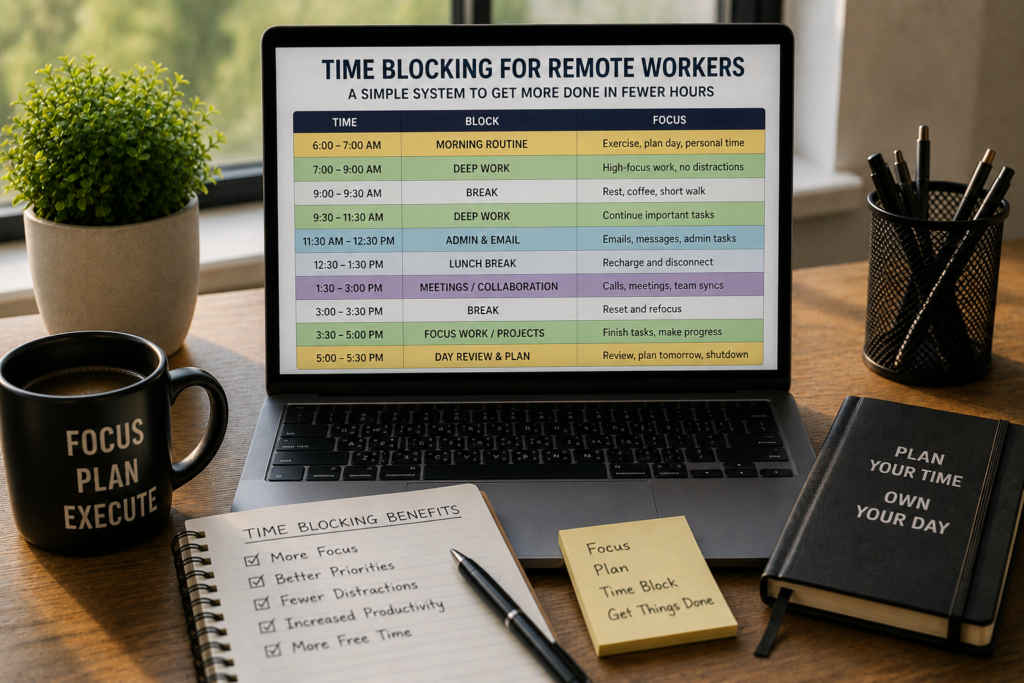
Time blocking means dividing your day into defined chunks, where each chunk is reserved for one type of work. Instead of keeping a running to-do list and hoping you get through it, you assign each task a specific window on your calendar.
Here’s what that looks like in practice:
- 8:00–9:00 a.m. — Deep writing (blog post draft)
- 9:00–9:30 a.m. — Email and Slack replies
- 9:30–11:00 a.m. — Product design review
- 11:00–11:15 a.m. — Break
- 11:15 a.m.–12:30 p.m. — Client calls
- 12:30–1:30 p.m. — Lunch
- 1:30–3:00 p.m. — Deep coding work
- 3:00–3:30 p.m. — Admin and follow-ups
- 3:30–4:30 p.m. — Planning and prep for tomorrow
The reason this approach clicks so well for remote workers comes down to three things.
First, it replaces willpower with structure. When you work from home, nobody is watching. There’s no boss walking by your desk. The fridge is five steps away. A visible schedule removes the “what should I do now?” question that opens the door to procrastination.
Second, it batches communication. One of the biggest drains on remote productivity is the expectation that you’ll respond to messages instantly. Time blocking gives you permission to check Slack and email at set times, rather than all day long.
Third, it creates a hard stop. Remote workers are notorious for overworking. Without a commute or office closing time, the day bleeds into the evening. A blocked calendar gives your workday a defined ending, which protects your energy for the long run.
The Real Cost of Not Having a System
Before we get into the how-to, let’s look at what unstructured remote work actually costs you.
A 2023 study from the University of California, Irvine found that it takes an average of 23 minutes and 15 seconds to regain full focus after an interruption. For remote workers who toggle between Slack, email, Zoom, and actual tasks dozens of times per day, that adds up fast.
Here’s a simple breakdown:
| Interruption frequency | Refocus time lost per day | Weekly loss |
|---|---|---|
| 10 interruptions/day | ~3.8 hours | ~19 hours |
| 15 interruptions/day | ~5.8 hours | ~29 hours |
| 20 interruptions/day | ~7.7 hours | ~38.5 hours |
Those numbers are staggering. Even at the low end, you’re giving up nearly half your workday to recovering from distractions, not to the distractions themselves.
Time blocking doesn’t eliminate interruptions. But it dramatically reduces how often you invite them in by keeping you locked into a defined task during each window.
How to Build Your Time Blocking System (Step by Step)
Here’s a practical, no-fluff process you can set up in about 30 minutes.
Step 1: Audit Your Current Day
Before you block anything, you need to understand where your time actually goes. For three to five days, track what you do in 30-minute increments. Use a simple spreadsheet, a notes app, or a tool like Toggl or Clockify.
You’re looking for patterns:
- When do you do your best focused work?
- When do meetings tend to cluster?
- How much time do you spend reacting (email, Slack, requests) versus creating?
- Where are the dead zones, those stretches where you’re technically “working” but producing nothing?
Most people discover that they only get two to three hours of genuinely focused work per day. The rest is fragmented activity that feels productive but doesn’t move anything forward.
Step 2: Identify Your Big Three
Each day, pick the three tasks that will make the biggest difference if completed. These are your priority blocks, and they get scheduled first.
The Big Three aren’t about volume. They’re about impact. Ask yourself: “If I could only finish three things today, which three would make tomorrow easier or move a project closer to done?”
Write them down before you open your calendar.
Step 3: Map Your Energy Levels
Not all hours are equal. Most people have a peak performance window of about two to four hours, usually in the morning, though this varies.
Build your schedule around your biology:
- Peak hours — Reserve these for deep, creative, or cognitively demanding work. No meetings, no email, no Slack.
- Moderate hours — Good for collaborative work, calls, brainstorming, and semi-focused tasks.
- Low-energy hours — Perfect for admin, email replies, organizing files, and planning.
If you try to write a complex report at 3 p.m. when your brain is running on fumes, you’ll take twice as long and produce half the quality. Match the work to the energy.
Step 4: Create Your Block Categories
Instead of scheduling individual tasks, group your work into categories. This keeps your calendar clean and flexible. Common categories for remote workers include:
- Deep Work — Focused, uninterrupted work on high-value tasks (writing, coding, designing, analyzing)
- Communication — Email, Slack, async messages, short replies
- Meetings — Scheduled calls, stand-ups, one-on-ones
- Admin — Expense reports, file management, tool updates, scheduling
- Learning — Reading, courses, skill development
- Buffer — Intentional gaps for overflow, unexpected requests, or mental rest
- Planning — Reviewing tomorrow’s schedule, weekly reflection, goal setting
Color-code each category on your calendar. At a glance, you should be able to see how your day is balanced.
Step 5: Block Your Calendar
Now place your blocks. Here are the ground rules:
Start with your non-negotiables. Meetings, recurring calls, and deadlines get placed first. These are fixed points.
Schedule deep work during your peak hours. Protect these blocks fiercely. Mark them as “busy” or “do not disturb” on your calendar so others can’t book over them.
Batch your communication. Two to three communication blocks per day (morning, midday, late afternoon) is enough for most roles. Each one should be 20 to 30 minutes.
Add buffers between blocks. Back-to-back scheduling leads to burnout and spillover. A 10 to 15-minute buffer between blocks gives you time to transition, stretch, grab water, or handle a quick unexpected task.
End with a shutdown block. Spend the last 15 to 20 minutes of your day reviewing what you accomplished, updating your task list, and setting up tomorrow’s blocks. This ritual signals to your brain that work is done.
Step 6: Set Your Communication Boundaries
This is the step most remote workers skip, and it’s the one that makes or breaks the system.
Time blocking only works if other people respect your blocks. That means communicating your availability clearly:
- Update your Slack status during deep work blocks (“Focused work until 11 a.m., will reply after”)
- Share your calendar with your team so they can see open slots for meetings
- Let your manager know your preferred communication windows
- Set expectations for response time (“I check messages at 9:30, 12:00, and 3:30”)
You’re not being difficult. You’re being predictable, which is actually more helpful for your team than being “always available” but distracted.
Common Time Blocking Mistakes (and How to Avoid Them)
Mistake 1: Blocking Every Single Minute
If your calendar looks like a game of Tetris with zero white space, you’ll abandon the system within a week. Leave 20 to 25% of your day unblocked for overflow, surprises, and breathing room.
Mistake 2: Ignoring Your Energy Rhythms
Scheduling a two-hour deep work block right after lunch is a setup for failure. Pay attention to when you actually feel sharp and when you don’t.
Mistake 3: Treating Blocks as Unbreakable
Life happens, especially at home. The dog needs out. The delivery person rings the bell. A child has a question. Build flexibility into your system. If a block gets interrupted, shift it rather than scrap it.
Mistake 4: Not Reviewing and Adjusting
Your first time blocking schedule won’t be perfect. Review it at the end of each week:
- Which blocks did you consistently stick to?
- Which ones did you skip or move?
- Are your Big Three actually getting done?
- Do you need longer or shorter blocks for certain task types?
Adjust, iterate, and refine. After two to three weeks, you’ll have a system that fits your real work patterns.
Mistake 5: Forgetting to Block Personal Tasks
Remote work blurs the line between personal and professional time. If you need to run an errand at 2 p.m. or pick up your kids at 3:30, block it. Pretending those commitments don’t exist doesn’t make them go away. It just makes you feel guilty when they inevitably interrupt a work block.
Time Blocking Tools That Work Well for Remote Teams
You don’t need a fancy app to time block. A Google Calendar works perfectly. But if you want additional features, here are some popular options:
Google Calendar — Free, simple, color-coded blocks, easy to share with teams. For most people, this is all you need.
Notion — Combines your task list and calendar in one workspace. Great for remote workers who want to link their blocks to project databases.
Sunsama — A daily planner designed around time blocking. It pulls tasks from Trello, Asana, and other tools and helps you assign them to specific time slots.
Clockwise — An AI-powered calendar tool that automatically protects focus time and optimizes meeting schedules across your team.
Reclaim.ai — Automatically schedules habits, tasks, and breaks around your existing meetings. Good for teams where calendar space is tight.
Pen and paper — Don’t underestimate the power of a physical planner. Writing out your blocks by hand creates a stronger commitment than dragging digital boxes around.
A Sample Time Blocking Schedule for Remote Workers
Here’s a full-day example you can adapt to your own workflow:
| Time | Block | Category |
|---|---|---|
| 7:30–8:00 a.m. | Morning routine, coffee, review today’s plan | Planning |
| 8:00–10:00 a.m. | Deep work (top priority task) | Deep Work |
| 10:00–10:15 a.m. | Break | Buffer |
| 10:15–10:45 a.m. | Email and Slack check-in | Communication |
| 10:45–11:45 a.m. | Second priority task | Deep Work |
| 11:45 a.m.–12:00 p.m. | Quick admin tasks | Admin |
| 12:00–1:00 p.m. | Lunch and offline break | Personal |
| 1:00–2:00 p.m. | Meetings and calls | Meetings |
| 2:00–2:15 p.m. | Break and transition | Buffer |
| 2:15–3:15 p.m. | Third priority task | Deep Work |
| 3:15–3:45 p.m. | Email and Slack (second check-in) | Communication |
| 3:45–4:15 p.m. | Learning or skill development | Learning |
| 4:15–4:30 p.m. | Shutdown routine, plan tomorrow | Planning |
Notice the structure: deep work happens early when focus is highest, meetings are clustered in the early afternoon, and the day ends with planning, not scrambling.
How Time Blocking Changes Your Relationship with Work
Beyond productivity, time blocking does something subtle but powerful: it gives you permission to stop.
When you see that your calendar says “done at 4:30,” and you’ve completed your Big Three, you can close your laptop without guilt. You’re not “leaving early.” You’ve finished.
For remote workers who struggle with the feeling that they should always be doing more, that structure is a relief. It redefines productivity from “hours spent working” to “priorities completed,” which is a healthier, more sustainable way to measure your day.
Making It Stick: Your First Week Plan
If you want to start time blocking this week, here’s a simple rollout plan:
Day 1 (Monday): Track your day as-is. Don’t change anything. Just observe and record.
Day 2 (Tuesday): Identify your Big Three. Identify your peak energy window. Sketch a rough block schedule for Wednesday.
Day 3 (Wednesday): Follow your first blocked schedule. Don’t worry about perfection. Note what worked and what didn’t.
Day 4 (Thursday): Adjust based on yesterday. Tighten or loosen blocks as needed. Communicate your deep work windows to your team.
Day 5 (Friday): Follow your refined schedule. At the end of the day, do a 15-minute review. What will you keep? What will you change next week?
By the following Monday, you’ll have a working system. It won’t be perfect, but it will be light-years ahead of “winging it.”
The Bigger Picture
Remote work gives you a rare advantage: control over your environment and your schedule. Most office workers don’t get to decide when they do their best thinking or when they check email. You do.
Time blocking is how you use that advantage instead of wasting it. It’s a simple system, just blocks on a calendar, but it changes how you think about your day, your energy, and your output.
You don’t need more hours. You need better ones. And a well-blocked calendar is the most reliable way to get them.
Start with one day. Protect one deep work block. See how it feels. Then build from there.