Introduction
Video content has become one of the most powerful forms of communication in the digital age. From YouTube and TikTok to online courses, business promotions, social media campaigns, and documentaries, video dominates modern content consumption.
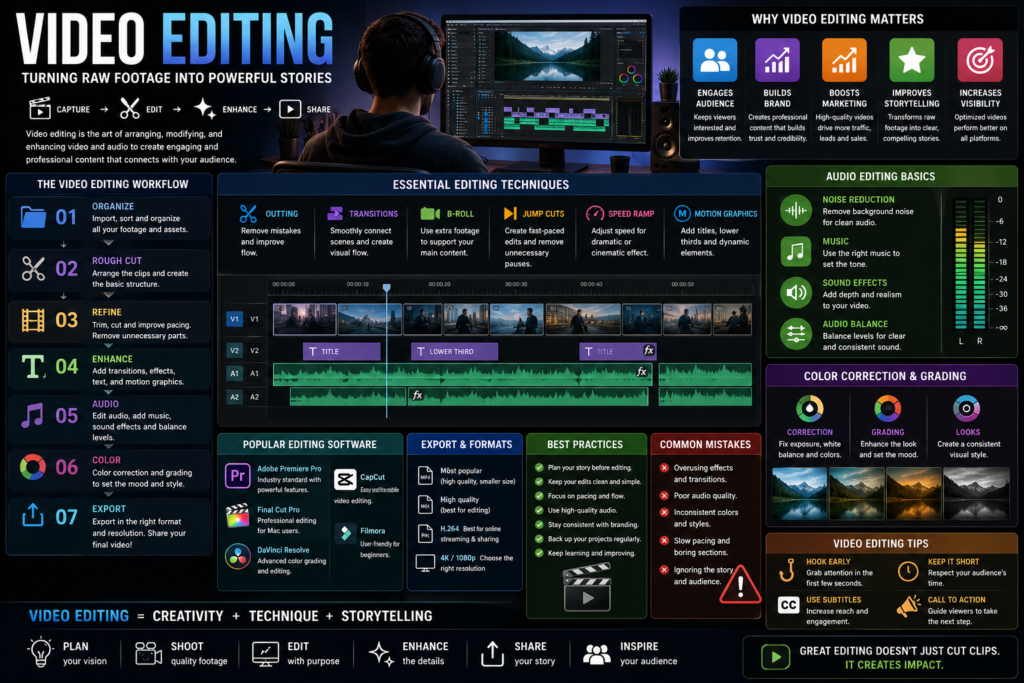
However, recording footage is only the beginning. Video editing is the process that transforms raw clips into engaging, professional, and compelling visual stories. Great editing enhances storytelling, improves viewer retention, strengthens brand identity, and creates a polished final product.
Whether you’re a content creator, marketer, filmmaker, entrepreneur, or aspiring editor, understanding video editing fundamentals can help you create higher-quality content and stand out in a competitive digital landscape.
What Is Video Editing?
Video editing is the process of arranging, modifying, and enhancing video footage to create a finished production.
Video editing typically involves:
- Cutting clips
- Trimming footage
- Adding transitions
- Incorporating music
- Applying visual effects
- Color correction
- Audio enhancement
- Motion graphics
The goal is to create a cohesive and engaging viewing experience.
Why Video Editing Matters
Improves Storytelling
Editing helps organize footage into a clear narrative.
Increases Viewer Engagement
Professional editing keeps audiences interested and reduces drop-off rates.
Enhances Production Quality
Polished videos appear more professional and trustworthy.
Supports Brand Growth
High-quality videos strengthen brand image and credibility.
Boosts Marketing Performance
Well-edited videos often generate more views, shares, and conversions.
Types of Video Editing
YouTube Video Editing
Common elements include:
- Intro sequences
- B-roll footage
- Graphics
- Subtitles
- Sound effects
Social Media Video Editing
Platforms include:
- TikTok
- Instagram Reels
- Facebook Videos
- YouTube Shorts
Short-form content requires fast-paced editing and strong visual hooks.
Corporate Video Editing
Examples include:
- Training videos
- Product demonstrations
- Company presentations
- Promotional campaigns
Film and Documentary Editing
Focuses on:
- Narrative structure
- Emotional impact
- Cinematic storytelling
Event Video Editing
Examples include:
- Weddings
- Conferences
- Concerts
- Sports events
The Video Editing Workflow
Step 1: Organize Footage
Before editing:
- Sort files
- Label clips
- Create folders
- Back up content
Organization improves efficiency throughout the project.
Step 2: Create a Rough Cut
Arrange clips in sequence and establish the basic structure.
Focus on:
- Story flow
- Timing
- Content selection
Step 3: Refine the Edit
Remove unnecessary footage and improve pacing.
Consider:
- Scene transitions
- Visual consistency
- Narrative clarity
Step 4: Add Effects and Graphics
Enhance videos with:
- Titles
- Lower thirds
- Motion graphics
- Visual effects
Step 5: Audio Editing
Improve:
- Dialogue clarity
- Background music
- Sound effects
- Volume levels
Step 6: Color Correction and Grading
Color adjustments improve visual quality and mood.
Step 7: Export and Deliver
Render the final video in the appropriate format and resolution.
Essential Video Editing Techniques
Cutting
Cuts are the foundation of editing.
Good cuts:
- Maintain flow
- Eliminate distractions
- Improve pacing
Transitions
Transitions connect scenes smoothly.
Examples include:
- Fade
- Dissolve
- Wipe
- Zoom transitions
B-Roll Usage
B-roll supports the main footage and adds visual interest.
Examples:
- Product shots
- Environment footage
- Supporting visuals
Jump Cuts
Popular in online content creation.
Benefits:
- Faster pacing
- Improved engagement
- Removal of pauses
Motion Graphics
Motion graphics enhance:
- Explanations
- Branding
- Visual appeal
Audio Editing Fundamentals
Audio quality significantly affects viewer experience.
Noise Reduction
Remove:
- Background noise
- Humming sounds
- Unwanted distractions
Music Integration
Music helps establish mood and emotion.
Sound Effects
Sound effects improve immersion and engagement.
Audio Balancing
Maintain consistent volume levels throughout the video.
Color Correction vs. Color Grading
Color Correction
Focuses on:
- Exposure
- White balance
- Contrast
- Color accuracy
Color Grading
Enhances visual style and mood.
Examples:
- Cinematic looks
- Warm tones
- High-contrast styles
Together, these processes create visually appealing content.
Popular Video Editing Software
Adobe Premiere Pro
Widely used by professionals.
Benefits:
- Industry standard
- Powerful features
- Extensive integrations
Final Cut Pro
Popular among Apple users.
Benefits:
- Fast performance
- Professional tools
- Optimized workflow
DaVinci Resolve
Known for:
- Advanced color grading
- Professional editing tools
- Free version availability
CapCut
Popular for:
- Social media content
- Mobile editing
- Beginner-friendly workflows
Filmora
Suitable for beginners and intermediate creators.
Benefits:
- Easy learning curve
- Creative templates
- Affordable pricing
Video Editing for Social Media
Successful social media videos often include:
Strong Hooks
Capture attention within the first few seconds.
Subtitles
Many users watch videos without sound.
Fast Pacing
Maintain engagement through quick edits.
Vertical Formats
Optimize for mobile viewing.
Clear Calls-to-Action
Encourage engagement, shares, or conversions.
Common Video Editing Mistakes
Avoid these common errors:
Overusing Effects
Too many effects can distract viewers.
Poor Audio Quality
Bad audio often drives viewers away.
Inconsistent Color
Visual inconsistency reduces professionalism.
Slow Pacing
Unnecessary footage lowers engagement.
Ignoring Storytelling
Technical editing should support the narrative.
Best Practices for Professional Video Editing
Keep the Audience in Mind
Edit according to viewer expectations and preferences.
Focus on Story First
Storytelling should guide editing decisions.
Maintain Consistency
Use consistent:
- Fonts
- Colors
- Transitions
- Branding elements
Back Up Projects
Protect work from data loss.
Continue Learning
Editing trends and technologies evolve rapidly.
Video Editing and Marketing
Video editing directly impacts marketing success by:
- Increasing engagement
- Improving retention
- Strengthening brand recognition
- Supporting lead generation
- Boosting conversion rates
High-quality videos often outperform other content formats.
Future Trends in Video Editing
Emerging trends include:
- AI-assisted editing
- Automated captions
- Vertical video growth
- 4K and 8K production
- Virtual reality content
- Interactive video experiences
- Advanced motion graphics
Editors who adapt to new technologies remain highly competitive.
Skills Every Video Editor Should Develop
Successful editors often possess:
- Creativity
- Storytelling ability
- Attention to detail
- Technical software knowledge
- Audio editing skills
- Color grading expertise
- Time management
These skills contribute to professional-quality productions.
Conclusion
Video editing is far more than simply cutting clips together. It is the art of transforming raw footage into compelling stories that engage audiences, communicate messages, and achieve specific goals.
By mastering editing techniques, understanding storytelling principles, learning professional software, and following best practices, creators can produce videos that stand out in an increasingly competitive digital world.
Whether you’re creating content for social media, YouTube, marketing campaigns, or filmmaking projects, strong video editing skills can significantly improve the quality and impact of your work.