Introduction
In today’s digital world, users expect websites, applications, and digital products to be intuitive, visually appealing, and easy to use. This is where UX/UI design plays a critical role. Great design is not only about aesthetics; it is about creating meaningful experiences that help users achieve their goals efficiently and enjoyably.
UX (User Experience) and UI (User Interface) design work together to shape how people interact with digital products. Businesses that invest in high-quality UX/UI design often experience higher customer satisfaction, increased engagement, improved conversion rates, and stronger brand loyalty.
This guide explores the fundamentals of UX/UI design, key principles, processes, tools, and best practices for creating successful digital experiences.
What Is UX Design?
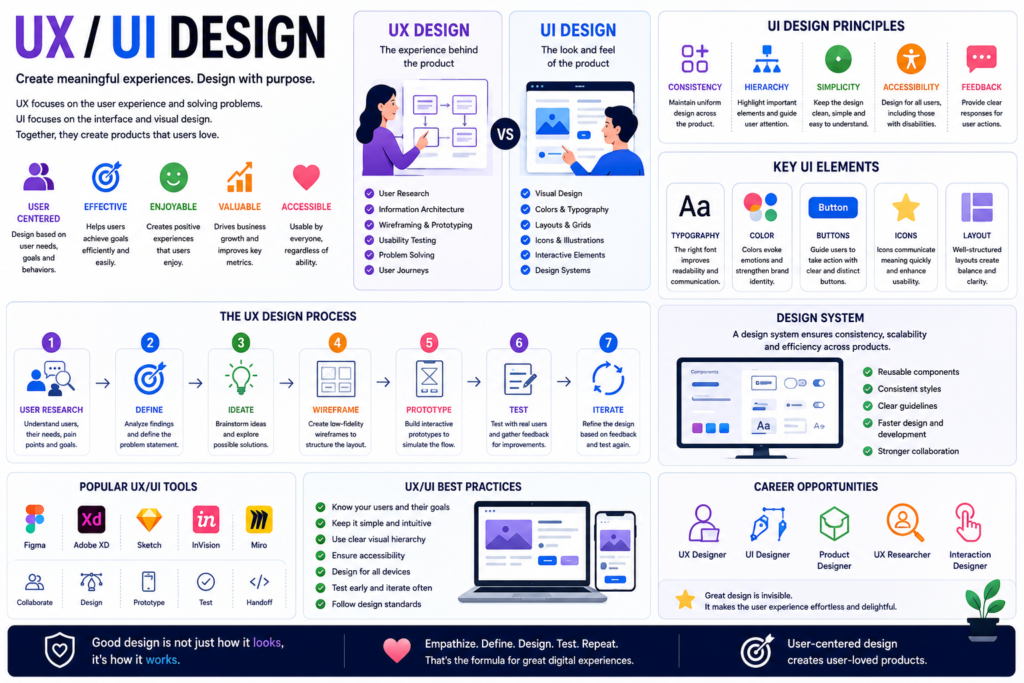
User Experience (UX) Design focuses on how users interact with a product and how they feel during that interaction.
The primary goal of UX design is to create experiences that are:
- Useful
- Intuitive
- Efficient
- Accessible
- Enjoyable
UX designers study user behavior, identify pain points, and design solutions that improve usability and satisfaction.
Key UX Activities
- User research
- User interviews
- Personas creation
- User journey mapping
- Information architecture
- Wireframing
- Prototyping
- Usability testing
What Is UI Design?
User Interface (UI) Design focuses on the visual and interactive elements users see and interact with.
UI designers create:
- Layouts
- Buttons
- Navigation menus
- Typography
- Color schemes
- Icons
- Forms
- Interactive components
The goal is to create attractive, consistent, and functional interfaces that support a seamless user experience.
UX vs UI Design
Although UX and UI are closely related, they serve different purposes.
UX Design
Focuses on:
- User needs
- Functionality
- Usability
- Experience
- Problem-solving
UI Design
Focuses on:
- Visual appearance
- Branding
- Layout
- Interactive elements
- Design consistency
UX determines how a product works, while UI determines how it looks and feels.
Why UX/UI Design Matters
Improves User Satisfaction
Well-designed products help users complete tasks easily and efficiently.
Increases Conversion Rates
Better experiences often lead to more sign-ups, purchases, and customer actions.
Enhances Brand Perception
Professional and consistent interfaces build trust and credibility.
Reduces Development Costs
Identifying usability issues early prevents expensive redesigns later.
Boosts Customer Retention
Users are more likely to return to products that provide positive experiences.
The UX Design Process
1. User Research
Research helps designers understand user needs, behaviors, and goals.
Methods include:
- Interviews
- Surveys
- Analytics
- Competitive analysis
- User observation
2. User Personas
Personas represent typical users and help guide design decisions.
They often include:
- Demographics
- Goals
- Challenges
- Behaviors
- Motivations
3. Information Architecture
Information architecture organizes content and navigation to make products easy to understand.
4. Wireframing
Wireframes provide a basic visual structure of a website or application.
They help teams focus on functionality before visual design begins.
5. Prototyping
Prototypes simulate user interactions and workflows.
Benefits include:
- Faster feedback
- Better collaboration
- Early issue detection
6. Usability Testing
Testing allows designers to observe real users interacting with a product and identify areas for improvement.
Key UI Design Principles
Consistency
Users should encounter familiar patterns and predictable interactions throughout the product.
Simplicity
Interfaces should eliminate unnecessary complexity.
Visual Hierarchy
Important information should stand out using size, color, spacing, and positioning.
Accessibility
Products should be usable by people with diverse abilities and needs.
Feedback
Interfaces should provide clear responses to user actions.
Essential UX/UI Design Elements
Typography
Readable and consistent typography improves usability and visual appeal.
Color
Colors influence emotions, attention, and brand identity.
Layout
Well-structured layouts improve navigation and content comprehension.
Icons
Icons provide visual cues that simplify user interactions.
Buttons and Calls-to-Action
Clear interactive elements guide users toward desired actions.
Popular UX/UI Design Tools
Figma
One of the most popular collaborative design platforms.
Features include:
- Interface design
- Prototyping
- Design systems
- Team collaboration
Adobe XD
Used for UI design and interactive prototyping.
Sketch
A popular vector-based design tool for digital products.
InVision
Supports prototyping and design collaboration.
Miro
Useful for user journey mapping and brainstorming sessions.
Design Systems
A design system is a collection of reusable components, guidelines, and standards that ensure consistency across products.
Benefits include:
- Faster design processes
- Better collaboration
- Consistent branding
- Improved scalability
Common components include:
- Buttons
- Forms
- Typography styles
- Color palettes
- Icons
Responsive Design
Modern users access products from various devices.
Responsive design ensures interfaces adapt to:
- Smartphones
- Tablets
- Laptops
- Desktop computers
Benefits include:
- Improved accessibility
- Better user experiences
- Higher search engine rankings
UX/UI Design Best Practices
Focus on User Needs
Design decisions should always prioritize users.
Keep Navigation Simple
Users should find information quickly and easily.
Minimize Cognitive Load
Reduce unnecessary complexity and distractions.
Test Frequently
Regular testing helps identify usability problems early.
Prioritize Accessibility
Ensure products work for users with different abilities.
Maintain Visual Consistency
Consistent design improves usability and trust.
UX/UI Design Career Opportunities
The demand for UX/UI professionals continues to grow worldwide.
Popular roles include:
UX Designer
Researches users and designs optimal experiences.
UI Designer
Creates visually appealing and interactive interfaces.
Product Designer
Combines UX, UI, business strategy, and product development.
UX Researcher
Focuses on understanding user behavior and needs.
Interaction Designer
Designs user interactions and workflows.
Design System Specialist
Maintains scalable design systems and component libraries.
Future Trends in UX/UI Design
Artificial Intelligence
AI-powered design tools help automate repetitive tasks and generate insights.
Voice User Interfaces
Voice interactions continue expanding across digital products.
Augmented Reality (AR)
AR creates immersive and interactive user experiences.
Personalized Experiences
Designs increasingly adapt to individual user preferences.
Inclusive Design
Organizations place greater emphasis on accessibility and universal usability.
Conclusion
UX/UI design is essential for creating digital products that users enjoy and trust. By combining user-centered research, intuitive experiences, and visually appealing interfaces, designers can create products that drive engagement, satisfaction, and business success.
As technology continues to evolve, UX/UI design will remain at the center of innovation, helping organizations build meaningful digital experiences that meet the needs of modern users. Businesses that prioritize user experience and interface design will gain a significant competitive advantage in the digital marketplace.