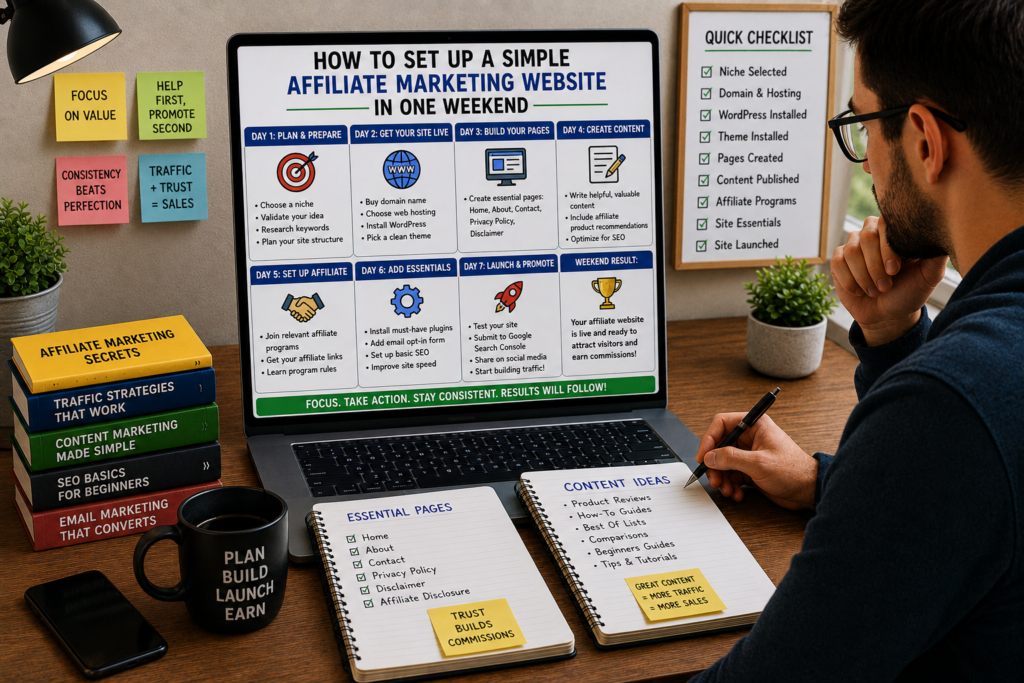
You don’t need months of preparation to launch an affiliate marketing website. You need a Saturday, a Sunday, and a clear plan.
Most people overcomplicate this. They spend weeks comparing WordPress themes, debating color palettes, and watching tutorial after tutorial without ever publishing a single page. Meanwhile, someone with a basic site and one solid article is already collecting clicks.
This guide walks you through the full build, hour by hour, across one weekend. By Sunday evening, you’ll have a live website with real content, affiliate links in place, proper legal pages, and the foundation for your first commission.
No coding required. No design degree. No experience assumed.
Let’s get into it.
Before the Weekend: Your 30-Minute Prep Session (Friday Evening)
The weekend will go faster if you handle a few decisions before you sit down Saturday morning. Spend 30 minutes on Friday evening getting these sorted.
Decision 1: Pick your niche.
If you’ve been thinking about affiliate marketing for any length of time, you probably already have a topic in mind. If not, answer these three questions:
- What do I spend time reading, watching, or talking about without anyone paying me to do it?
- What products have I bought in the last six months that I genuinely liked?
- Could I write 20 different articles about this topic without running dry?
Good weekend-build niches include home office gear, kitchen gadgets, fitness equipment, personal finance apps, photography gear, pet products, or software tools you use daily.
Don’t overthink this. You can always refine your focus later. Right now, you need a starting point.
Decision 2: Choose 1-2 products to promote first.
Pick one or two products you already use and like. Check whether they have an affiliate program by Googling “[product name] affiliate program.” Most companies link to their program in the website footer.
Write down:
- The product name
- The affiliate program URL
- The approximate commission rate
- Why you’d recommend it
Decision 3: Brainstorm 5-10 article ideas.
Grab a notepad and list potential articles. Focus on content with buying intent:
- “[Product] review: what I learned after 6 months”
- “Best [category] under $[price]”
- “[Product A] vs. [Product B]: which one is worth your money”
- “How to [solve a problem] using [product]”
- “The [number] best [tools/products] for [specific audience]”
You won’t write all of these this weekend. But having the list ready means you can pick your strongest idea Saturday morning without stalling.
Decision 3: Have your payment method ready.
You’ll need a credit or debit card for domain registration and hosting. Total cost for the weekend: roughly $15-60 depending on the hosting plan you choose.
That’s it for Friday. Close the laptop. Get some sleep. Tomorrow is build day.
Saturday Morning (9:00 AM – 12:00 PM): Foundation
This is the construction phase. By noon, you’ll have a live website with a professional appearance and all the structural pieces in place.
Hour 1 (9:00 – 10:00 AM): Domain and Hosting
Register your domain name.
Your domain is your website’s address. Keep it:
- Short (two to three words is ideal)
- Easy to spell and pronounce
- Related to your niche but not so specific that it boxes you in
- A .com if available (people still trust .com instinctively)
Examples:
- A home office niche: DeskSetupPro.com, RemoteGearGuide.com
- A pet niche: HappyPawsPicks.com, SmartPetChoices.com
- A tech niche: GadgetHonesty.com, ToolsTestedDaily.com
Avoid hyphens, numbers, and anything that requires explanation when you say it out loud.
Where to register and host:
For a weekend build, the fastest path is buying your domain and hosting together from one provider. This eliminates the step of connecting a separately purchased domain to a separate host.
Solid beginner-friendly options:
| Provider | Starting Price | What You Get |
|---|---|---|
| Bluehost | ~$2.95/month | Free domain for year one, one-click WordPress install, free SSL |
| SiteGround | ~$3.99/month | Free SSL, daily backups, staging environment |
| Cloudways | ~$14/month | Managed cloud hosting, faster performance, more control |
| Hostinger | ~$2.99/month | Free domain, one-click WordPress, beginner-friendly |
For your first affiliate site, Bluehost or Hostinger will get you live in under 20 minutes at minimal cost.
The purchase process (15-20 minutes):
- Go to your chosen host’s website
- Select the basic/starter plan (you can upgrade later)
- Enter your desired domain name and check availability
- Create your account and enter payment information
- Skip the upsells (domain privacy is worth keeping; most other add-ons can wait)
- Complete the purchase
You now own a domain and have hosting space. Time to install WordPress.
Hour 1.5 (10:00 – 10:30 AM): Install WordPress
Most hosting providers offer a one-click WordPress installation. The process typically looks like this:
- Log into your hosting control panel (cPanel or the host’s custom dashboard)
- Find the “Install WordPress” or “Website” button
- Choose your domain from the dropdown
- Set your site title (you can change this later)
- Create an admin username and strong password
- Click “Install”
WordPress installs in 2-5 minutes. Once complete, you can access your site’s admin dashboard at yourdomain.com/wp-admin.
Log in. You’re looking at a blank WordPress installation with a default theme. It’s not pretty yet, but it’s live. Anyone in the world could type your domain into a browser right now and see a real website.
Hour 2 (10:30 – 11:30 AM): Theme and Basic Design
You need a clean, fast-loading theme that looks professional without requiring design skills. Here are the best free options for affiliate sites:
Recommended free themes:
- GeneratePress: Lightweight, fast, and highly customizable. The free version is plenty for starting out.
- Astra: Comes with starter templates you can import with one click. Great for beginners who want something that looks polished immediately.
- Kadence: Modern design, good typography defaults, and built-in header/footer builder.
Installing your theme (10 minutes):
- In your WordPress dashboard, go to Appearance > Themes
- Click Add New
- Search for your chosen theme name
- Click Install, then Activate
Basic customization (30 minutes):
Go to Appearance > Customize and set up these elements:
- Site identity: Add your site title and tagline. Skip the logo for now (you can add one later; a clean text-based title works fine).
- Colors: Pick two colors max. One primary color for headings and buttons, one accent color. If you’re unsure, dark navy (#1a1a2e) with a blue or green accent is clean and professional.
- Typography: Choose one readable font for body text (system defaults, Open Sans, or Inter all work well). Set body text size to 16-18px for comfortable reading.
- Layout: Set your content width to around 1100-1200px. Choose a layout without a sidebar for a cleaner reading experience, or with a sidebar if you want space for an email signup form.
- Homepage: For now, set your homepage to display your latest posts (Settings > Reading > “Your latest posts”). You can create a custom homepage later.
Install a page builder (optional, 10 minutes):
If you want more control over page layouts without touching code, install the free Elementor plugin or use the built-in block editor (Gutenberg). For a weekend build, the default block editor is perfectly fine.
Don’t spend more than an hour on design. A clean, readable theme with default settings beats a heavily customized site that took you all day to build. Your content does the selling, not your color palette.
Hour 3 (11:00 AM – 12:00 PM): Install Plugins
Plugins add functionality to your WordPress site. You need a few, but not many. Every unnecessary plugin slows your site down and creates potential security vulnerabilities.
Go to Plugins > Add New and install these:
1. Yoast SEO (or Rank Math)
This plugin helps you optimize every page and post for search engines. It adds a simple interface below your content editor where you can set meta titles, descriptions, and see readability suggestions.
Setup: After activation, run the configuration wizard. Set your site type, enter your site name, and configure basic settings. This takes about 5 minutes.
2. Pretty Links (or ThirstyAffiliates)
This plugin lets you create clean, branded affiliate links instead of using long, ugly tracking URLs.
Instead of: www.amazon.com/dp/B08N5WRWNW?tag=yourID-20&linkCode=ogi
You get: yourdomain.com/recommends/product-name
Benefits: cleaner links, easier tracking, and if you ever switch affiliate programs, you update the link in one place instead of hunting through every article.
3. WP Super Cache (or LiteSpeed Cache)
A caching plugin makes your site load faster by serving stored versions of your pages instead of regenerating them for every visitor. Install, activate, and turn on basic caching. Default settings work well for a new site.
4. Wordfence Security (or Sucuri)
Basic security protection against common attacks. Install, activate, and run through the initial setup. Enable the firewall and login security features.
5. UpdraftPlus
Free backup plugin. Set it to back up your site weekly (or daily once you have more content). You can store backups on Google Drive or Dropbox for free.
That’s it. Five plugins. Resist the urge to install 15 more. You can add tools later as specific needs arise.
Quick plugin setup checklist:
- Yoast/Rank Math: complete setup wizard, set homepage SEO title and description
- Pretty Links: create your first branded link for the product you’ll promote
- Cache plugin: enable basic caching
- Security plugin: enable firewall, set up login protection
- Backup plugin: configure automatic weekly backups
Saturday Afternoon (1:00 PM – 5:00 PM): Structure and Pages
Lunch break is over. Now you’re building the pages that give your site credibility and legal compliance.
Hour 4 (1:00 – 2:00 PM): Create Your Core Pages
Every affiliate site needs these pages before you publish your first piece of promotional content. They build trust with readers and keep you compliant with advertising regulations.
Page 1: About Page
This is where visitors decide whether to trust you. Write it in first person, keep it honest, and focus on why you’re qualified to talk about your niche.
Structure:
- Opening line that explains what this site does (one to two sentences)
- A brief background on your experience with the niche (two to three paragraphs)
- What readers can expect from your content
- A personal photo (optional but builds trust significantly)
Example opening:
“I’ve spent the last three years testing every project management tool I could get my hands on. Some were brilliant. Some wasted my time. This site exists so you can skip the ones that aren’t worth it and find the ones that actually make your work easier.”
Keep it under 500 words. Friendly, honest, and specific.
Page 2: Affiliate Disclosure Page
This is legally required if you’re earning commissions from your content. The FTC (in the US) and similar bodies in other countries require clear disclosure of financial relationships.
What to include:
- A clear statement that your site contains affiliate links
- An explanation that you may earn a commission if readers purchase through your links
- Confirmation that the reader’s price is not affected
- A statement that you only recommend products you genuinely believe in
Sample disclosure:
“Some of the links on [Your Site Name] are affiliate links. This means that if you click on a link and make a purchase, I may receive a small commission at no extra cost to you. I only recommend products and services that I personally use or have thoroughly researched. Your trust means everything to me, and I will never recommend something just because it pays a commission.”
Create this as a standalone page and link to it in your site footer.
Page 3: Privacy Policy
Required by law in most jurisdictions, and required by Google if you plan to use Analytics or AdSense. You can use a free privacy policy generator (search “free privacy policy generator” and fill in your details) or write one that covers:
- What data you collect (email addresses, cookies, analytics)
- How you use that data
- Third-party services you use (Google Analytics, affiliate networks)
- How users can contact you about their data
Page 4: Contact Page
A simple page with a contact form or your email address. This adds legitimacy and gives affiliate program managers a way to reach you (some programs check for this during the application review).
The free WPForms Lite plugin or the built-in WordPress form block works perfectly here.
To create these pages:
- Go to Pages > Add New in WordPress
- Write the content for each page
- Publish each one
- Add them to your site’s footer menu (Appearance > Menus or the Customizer)
Hour 5-6 (2:00 – 4:00 PM): Write Your First Affiliate Content Piece
This is the centerpiece of your weekend build. One strong, detailed article designed to rank in search engines and convert readers into buyers.
Pick the strongest idea from your Friday brainstorm list. For your first piece, a product review or a “best of” comparison tends to perform best because these formats match what people search for when they’re close to making a purchase.
Writing a product review that converts (1,500-2,500 words):
Title formula: “[Product Name] Review [Year]: [Key Angle or Result]”
Example: “Breville Barista Express Review 2026: Is It Still Worth the Price?”
Section 1: The quick verdict (100-150 words)
Open with a brief summary. Who is this product for, what’s the bottom line, and what score or rating would you give it? Busy readers want the answer immediately. Give it to them, and they’ll stay to read the details.
Section 2: What this product does well (300-400 words)
Cover three to five specific strengths. Use concrete details and personal experience. “The grinder has 18 settings, and I found that setting 5 produces the right consistency for a double shot” is far more convincing than “it has a good grinder.”
Section 3: Where it falls short (200-300 words)
Every product has weaknesses. Covering them honestly makes your positive claims more believable. Readers can spot a review that’s 100% positive, and they’ll leave without clicking anything.
Section 4: Who should buy this (and who shouldn’t) (200-250 words)
“If you’re making espresso daily and want cafe-quality shots without spending $2,000, this is a strong pick. If you only drink drip coffee on weekends, this is overkill.”
Section 5: How it compares to the main alternatives (300-400 words)
Pick two to three competing products and briefly explain why you’d choose the reviewed product over each one (or why you wouldn’t). This section catches readers who are comparing options.
Section 6: Final recommendation with affiliate link (100-150 words)
Restate your recommendation, link to the product with your affiliate link, and mention any current deals or pricing.
Affiliate link placement guidelines:
- Include your affiliate link two to three times throughout the article (not every paragraph)
- Place the first link after you’ve established value (after the strengths section)
- Place a link in your final recommendation section
- Use descriptive anchor text: “check current pricing on Amazon” or “start your free trial here” rather than “click here”
- Make sure every affiliate link is disclosed (a disclosure statement at the top of the article)
Hour 7 (4:00 – 5:00 PM): On-Page SEO for Your First Article
Before you publish, spend 30-45 minutes optimizing the article for search engines.
Keyword targeting:
Open Ubersuggest (free tier), Google’s autocomplete, or AnswerThePublic. Type in your product name and look for search terms with buying intent:
- “[product name] review”
- “[product name] worth it”
- “best [product category]”
- “[product name] vs [competitor]”
Pick one primary keyword for the article. Place it in:
- The page title (H1)
- The URL slug (yourdomain.com/breville-barista-express-review)
- The first 100 words of the article
- One or two subheadings (H2)
- The meta description
Meta title and description (using Yoast/Rank Math):
Scroll below the content editor to the SEO plugin section.
- SEO Title: Keep it under 60 characters. Include your primary keyword and a compelling angle.
Example: “Breville Barista Express Review 2026 – Honest Take After 6 Months” - Meta Description: Keep it under 155 characters. Summarize the article and include a reason to click.
Example: “My honest review of the Breville Barista Express after daily use for 6 months. Here’s who it’s perfect for and who should skip it.”
Image optimization:
- Add two to four images (product photos, screenshots, or personal photos of the product)
- Compress images before uploading (use a free tool like TinyPNG)
- Add descriptive alt text to every image (“Breville Barista Express on kitchen counter brewing espresso”)
- Name image files descriptively (breville-barista-express-front-view.jpg, not IMG_4521.jpg)
Internal link preparation:
You only have one article right now, so there’s nothing to link to internally. But set a mental note: every future article should link back to relevant existing content. This builds a web of pages that helps search engines understand your site’s structure.
Publish the article. Click “Publish” in WordPress. Your first piece of affiliate content is live.
Sunday Morning (9:00 AM – 12:00 PM): Content and Monetization
Saturday built the structure. Sunday fills it with more content and gets your monetization pieces fully operational.
Hour 8 (9:00 – 10:30 AM): Write Your Second Article
One article is a start. Two articles make your site look like a real publication. Pick a different format from your first piece:
- If your first article was a product review, write a “best of” comparison
- If your first was a comparison, write a tutorial that solves a problem using your affiliate product
This second article should be 1,200-2,000 words. Follow the same SEO optimization process from Saturday afternoon.
Aim to have it published by 10:30 AM.
Hour 9 (10:30 – 11:30 AM): Apply to Affiliate Programs
Now that your site has real content, two articles, proper legal pages, and a professional appearance, it’s time to apply to affiliate programs.
Amazon Associates (if promoting physical products):
- Go to affiliate-program.amazon.com
- Click “Join Now for Free”
- Enter your account information, website URL, and preferred store ID
- Describe your website and how you plan to drive traffic
- Enter your payment and tax information
Amazon typically approves applications quickly, but you’ll need to make three qualifying sales within 180 days to keep your account active. Start promoting immediately.
Direct merchant programs:
Visit the websites of the products you reviewed and look for “Affiliate Program,” “Partner Program,” or “Referral Program” links (usually in the footer).
Application tips:
- Use a professional email (yourname@yourdomain.com if possible, or a clean Gmail address)
- In the application, mention that you’ve already published content about their product
- Link to your published review or comparison
- Describe your content strategy and target audience
- Be honest about your traffic (saying “I’m just starting but focused on SEO-driven content in [niche]” is better than inflating numbers)
Affiliate networks (for broader access):
Sign up for one or two networks where you can browse thousands of merchant programs:
- ShareASale: Large variety of merchants, beginner-friendly
- CJ Affiliate (Commission Junction): Strong roster of established brands
- Impact: Growing fast, popular with SaaS and tech companies
- Awin: Strong international presence
Network applications may take a few days for approval. While you wait, keep creating content.
Hour 10 (11:30 AM – 12:00 PM): Set Up Link Management
Once your affiliate applications are approved, you’ll receive affiliate links. It’s time to implement them properly.
Using Pretty Links or ThirstyAffiliates:
- Go to Pretty Links > Add New in WordPress
- Enter your ugly affiliate URL in the “Target URL” field
- Create a clean redirect: yourdomain.com/recommends/breville-barista-express
- Set the redirect type to 301
- Save
Now go back to your published articles and replace any placeholder product links with your branded affiliate links.
Link management best practices:
- Create a consistent naming convention: /recommends/[product-name]
- Track click counts through the Pretty Links dashboard
- Add the
rel="nofollow sponsored"attribute to all affiliate links (Pretty Links does this automatically when configured) - Test every link by clicking it yourself to confirm it lands on the correct product page with your tracking code intact
Sunday Afternoon (1:00 PM – 5:00 PM): Growth Systems
Your site is live, content is published, and affiliate links are in place. Sunday afternoon is about building the systems that will drive traffic and grow your site beyond this weekend.
Hour 11 (1:00 – 2:00 PM): Google Analytics and Search Console
These two free tools give you visibility into who’s visiting your site and how they’re finding you.
Google Analytics setup (20 minutes):
- Go to analytics.google.com and sign in with a Google account
- Click “Start measuring” and create an account
- Add your website as a property
- Copy the tracking code (GA4 measurement ID)
- In WordPress, paste the tracking code using your SEO plugin (Yoast or Rank Math both have fields for this) or install the free “Site Kit by Google” plugin
What you’ll track: visitor count, traffic sources, most-viewed pages, time on site, and geographic data.
Google Search Console setup (15 minutes):
- Go to search.google.com/search-console
- Add your property using the URL prefix method
- Verify ownership (the easiest method is through your SEO plugin or by uploading an HTML file to your site)
- Submit your sitemap (typically at yourdomain.com/sitemap_index.xml, auto-generated by Yoast or Rank Math)
What you’ll track: which search queries are bringing visitors, your average search position, click-through rates, and any crawl errors.
Submit your site to Google:
In Search Console, paste your homepage URL into the URL inspection tool and click “Request Indexing.” Do the same for each published article. This doesn’t guarantee immediate indexing, but it puts you in the queue.
Hour 12 (2:00 – 3:00 PM): Set Up an Email Collection System
An email list is the single most valuable asset you can build alongside your content. Search engine rankings can fluctuate. Social media algorithms change. But an email list is a direct connection to your audience that you control completely.
Quick email list setup:
- Sign up for a free email marketing platform:
- MailerLite: Free up to 1,000 subscribers, generous features
- ConvertKit: Free up to 10,000 subscribers
- Brevo (formerly Sendinblue): Free tier with 300 emails/day
- Create a simple lead magnet (a reason for people to subscribe):
- A checklist: “My Home Office Setup Checklist: Everything You Need Under $500”
- A comparison chart: “Quick-Reference Comparison Chart: Top 5 [Products]”
- A mini-guide: “The 3 Mistakes Everyone Makes When Buying [Product Category]” Your lead magnet doesn’t need to be elaborate. A one-page PDF with genuinely useful information is enough.
- Create an opt-in form in your email platform and embed it on your website:
- In the sidebar (if you have one)
- At the end of each article
- As a simple pop-up that appears after 30-60 seconds on the page
- Set up a welcome email that delivers the lead magnet and introduces yourself.
You might get zero subscribers this week. That’s fine. The system is in place, and it’ll start collecting addresses as your traffic grows.
Hour 13 (3:00 – 4:00 PM): Content Distribution and Social Profiles
Your articles need eyeballs now, not in three months when Google decides to rank them. Set up distribution channels and share your content.
Create basic social profiles (30 minutes):
You don’t need to be active on every platform. Pick one or two where your target audience is already spending time.
| Niche Type | Best Starting Platforms |
|---|---|
| Visual products (home, fashion, food) | Pinterest, Instagram |
| Tech and software | X (Twitter), LinkedIn, Reddit |
| Finance and business | LinkedIn, X (Twitter) |
| Hobbies and DIY | Pinterest, YouTube, Reddit |
| Health and fitness | Instagram, Pinterest, YouTube |
Set up profiles with:
- Your site name as the handle (consistency across platforms)
- A brief bio explaining what your site covers
- A link to your website
Share your first articles (30 minutes):
- Pinterest: Create two to three pins for each article using Canva’s free Pinterest templates. Pin them to relevant boards. Pinterest drives meaningful traffic for product-focused content, sometimes for months or years after you post.
- Reddit: Find two to three subreddits related to your niche. Read the rules carefully (many subreddits ban direct self-promotion). Contribute to discussions and share your content only when it genuinely answers someone’s question.
- Quora: Search for questions related to your article topics. Write thoughtful 200-300 word answers and include a link to your full article. Quora answers can rank in Google and drive traffic for years.
- Facebook Groups: Join groups where your audience hangs out. Spend the first week engaging with other posts. After that, share your content when it’s relevant to a discussion.
Don’t spam. Provide value. Mention your article as a resource, not as a pitch.
Hour 14 (4:00 – 5:00 PM): Create Your Content Calendar and Next Steps Plan
The weekend build is nearly complete. Use this final hour to set up the system that carries you forward.
Content calendar for the next 30 days:
Open a spreadsheet or free tool like Trello, Notion, or Google Sheets. Plan your next eight articles (two per week for four weeks).
Structure your calendar with these columns:
- Article title
- Target keyword
- Content format (review, comparison, tutorial, list)
- Affiliate product(s) featured
- Target publish date
- Distribution channels
Sample 30-day content calendar:
| Week | Article | Format |
|---|---|---|
| Week 1 | “[Product] vs [Competitor]: complete comparison” | Comparison |
| Week 1 | “How to [solve problem] with [product]” | Tutorial |
| Week 2 | “Best [category] under $[price] in 2026” | Best-of list |
| Week 2 | “[Number] mistakes to avoid when buying [product type]” | Informational |
| Week 3 | “[Product] review after [timeframe] of use” | Review |
| Week 3 | “[Product category] buyer’s guide for beginners” | Guide |
| Week 4 | “Is [product] worth it? Here’s what I found” | Review |
| Week 4 | “My [niche] setup: everything I use and why” | Personal roundup |
Mix commercial and informational content. Not every article needs an affiliate link. Informational posts build authority, attract backlinks, and support your money-making articles in search rankings.
Set a weekly publishing schedule:
Consistency beats volume. Publishing two quality articles per week is more effective than publishing seven mediocre ones in a burst followed by two weeks of silence.
Block two to three hours on specific days for writing. Treat these blocks like appointments that can’t be moved.
Your Weekend Build Checklist
Here’s a condensed checklist of everything you should have completed by Sunday evening:
Saturday Morning:
- [ ] Domain registered
- [ ] Hosting account set up
- [ ] WordPress installed
- [ ] Theme installed and customized
- [ ] Five core plugins installed and configured
Saturday Afternoon:
- [ ] About page published
- [ ] Affiliate disclosure page published
- [ ] Privacy policy page published
- [ ] Contact page published
- [ ] First affiliate article written, optimized, and published
Sunday Morning:
- [ ] Second article written and published
- [ ] Affiliate program applications submitted
- [ ] Affiliate links created and placed in content
Sunday Afternoon:
- [ ] Google Analytics installed
- [ ] Google Search Console set up and sitemap submitted
- [ ] Email marketing account created with opt-in form on site
- [ ] Social media profiles created
- [ ] First articles shared on one to two distribution channels
- [ ] 30-day content calendar drafted
The Technical Details People Always Ask About
“Do I need to buy an SSL certificate?”
No. Most hosting providers include a free SSL certificate (Let’s Encrypt). Your site should load with “https://” by default. If it doesn’t, check your hosting dashboard for an SSL toggle or contact support. SSL is required for Google rankings and for visitor trust, but you shouldn’t need to pay for it.
“Should I use www or non-www?”
Doesn’t matter for SEO. Pick one and stick with it. Most modern sites skip the www and just use yourdomain.com.
“What about site speed?”
Your caching plugin handles the basics. Beyond that: use compressed images, don’t install unnecessary plugins, and choose a lightweight theme (GeneratePress and Kadence are among the fastest). You can check your speed using Google’s PageSpeed Insights (pagespeed.web.dev) and fix any major issues it flags.
“Do I need a business entity to start?”
Not immediately. Most affiliate programs accept individuals. As your income grows, forming an LLC or equivalent business structure offers liability protection and may provide tax advantages. But for weekend one, your personal name and a PayPal account are enough.
“How do I handle affiliate links for products I haven’t been approved for yet?”
Write your content and link directly to the product page (non-affiliate link). Once you’re approved, swap in your affiliate link. This way, your content is live and indexing while you wait for approval.
“Can I copy product descriptions or images from the merchant’s website?”
Product descriptions: no. Write your own. Duplicate content hurts your search rankings and adds no value for readers.
Product images: check the affiliate program’s terms. Many programs provide approved images and banners in their affiliate dashboard. When in doubt, take your own photos or use screenshots (with appropriate context, like a review).
“What about mobile responsiveness?”
All three recommended themes (GeneratePress, Astra, Kadence) are mobile-responsive out of the box. Over 60% of web traffic comes from mobile devices, so this is non-negotiable. Test your site on your phone after setup to confirm everything looks clean.
Common Weekend Build Mistakes (and How to Avoid Them)
Mistake 1: Spending Saturday on the logo.
Your logo can be your site name in a clean font. That’s it. Canva has free logo templates if you want something visual, but limit yourself to 15 minutes. Nobody has ever decided not to buy a product because the blog recommending it didn’t have a fancy logo.
Mistake 2: Installing 20 plugins.
Every plugin is a potential security hole and a performance drag. If you can’t explain why a specific plugin is necessary for your site right now, don’t install it. Five to seven plugins is plenty for a new affiliate site.
Mistake 3: Writing a 300-word article and calling it done.
Short, thin content rarely ranks in search results for competitive product-related keywords. Aim for at least 1,500 words for review and comparison content. Depth and specificity are what separate content that ranks from content that sits on page seven.
Mistake 4: Skipping the disclosure and legal pages.
These aren’t optional. Affiliate programs check for disclosure compliance, and some will reject your application or terminate your account if you don’t have proper disclosures. The FTC has fined people for non-disclosure. Spend 30 minutes on this and protect yourself.
Mistake 5: Not telling anyone the site exists.
Publishing content without distribution is like opening a store in the desert. Your first articles need manual promotion through social channels, forums, and communities. SEO traffic takes weeks or months to build. Active distribution fills the gap.
Mistake 6: Choosing a niche you don’t actually care about.
“High CPC finance keywords” won’t motivate you to write two articles a week for the next six months. Pick a niche where creating content feels like sharing what you know, not grinding through homework.
What Happens After the Weekend
Your site is live. Content is published. Systems are in place. Now what?
Weeks 2-4: Content accumulation.
Stick to your publishing schedule. Two articles per week. Every piece should target a specific keyword and include at least one affiliate product recommendation where it fits naturally.
Month 2: Optimization.
By now, Google Search Console will show which queries are bringing impressions and clicks. Double down on topics where you’re appearing on page two (positions 11-20), as these are the easiest to push onto page one with updated content and a few internal links.
Month 3: Monetization expansion.
Apply to additional affiliate programs. Add a second income stream, perhaps an email sequence that promotes a product to your growing subscriber list. Experiment with different content formats to see what your audience responds to.
Month 4-6: Compounding.
This is when the work you did on weekends one through four starts paying off. Articles that were indexing slowly begin ranking. Pinterest pins that seemed to go nowhere start generating consistent traffic. Your email list has a few hundred subscribers. Commissions become less random and more predictable.
The critical rule: don’t stop after the weekend. The site you build in two days is a seed. The content you produce over the following months is the water, sunlight, and soil. The weekend gives you the foundation. Your ongoing effort builds the income.
Quick-Reference Cost Summary
| Item | Cost | When |
|---|---|---|
| Domain name | $0-15/year | Saturday morning (often free with hosting) |
| Web hosting | $3-10/month | Saturday morning |
| WordPress | Free | Saturday morning |
| Theme (GeneratePress/Astra/Kadence) | Free | Saturday morning |
| Plugins (all listed) | Free | Saturday morning |
| Email marketing (MailerLite/ConvertKit) | Free | Sunday afternoon |
| Google Analytics and Search Console | Free | Sunday afternoon |
| Canva (for images and pins) | Free | Sunday afternoon |
| Total weekend cost | $3-25 | One-time to get started |
Compare that to the cost of starting a physical retail business, a restaurant, or a franchise. Affiliate marketing has one of the lowest barriers to entry of any legitimate business model.
The Finish Line
By Sunday evening, you have a real business asset:
- A professional-looking website on a domain you own
- Two pieces of content targeting keywords that real buyers search for
- Affiliate links connected to products you genuinely recommend
- Analytics tracking every visitor and click
- An email collection system ready to capture subscribers
- A content calendar that keeps you on track for the next month
- Distribution channels set up to drive traffic while you wait for organic search to kick in
None of it is perfect. It doesn’t need to be. Perfect sites with zero content earn zero commissions. Imperfect sites with good content and consistent publishing earn real money.
Your weekend is the starting point. What you do with the following weeks and months determines whether that site becomes a real income stream or another unfinished project.
Start with Saturday morning. Register that domain. The rest follows from there.