Choosing a budgeting app feels a lot like choosing a gym. The “best” one is whichever one you’ll actually use consistently. A feature-packed app that sits unopened on your phone is worth less than a bare-bones app you check every day.
That said, these four apps are built on genuinely different philosophies. They approach money management from different angles, prioritize different behaviors, and work best for different types of people. Picking the wrong one doesn’t just waste your money (if it’s a paid app). It can sour you on budgeting entirely, which is a far bigger cost.
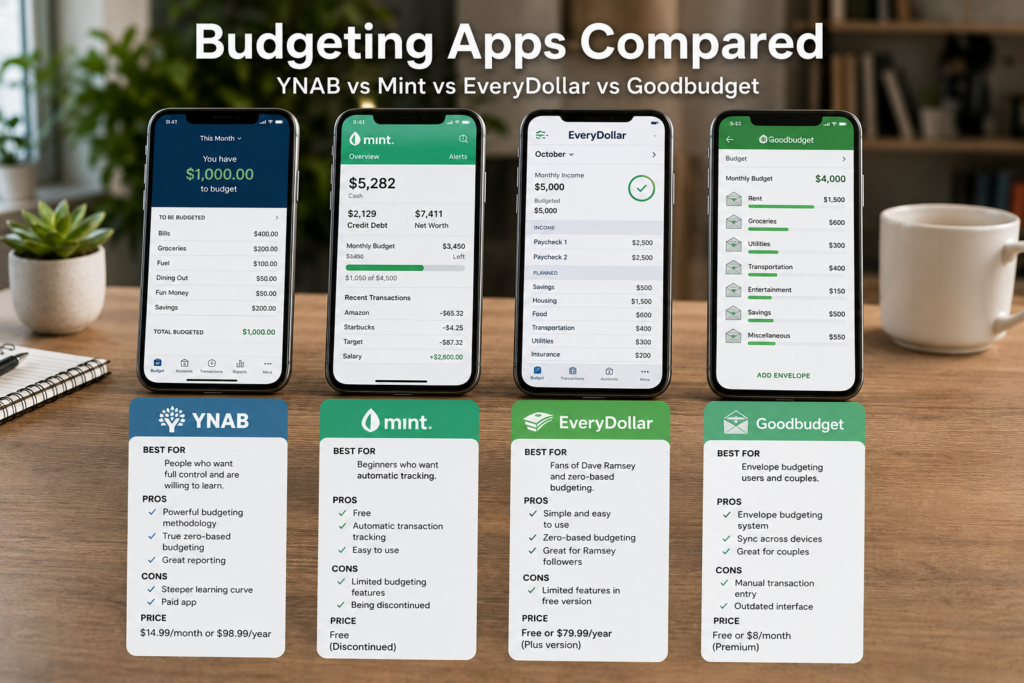
This comparison breaks down YNAB, Mint, EveryDollar, and Goodbudget across the categories that actually matter: budgeting philosophy, features, ease of use, bank syncing, pricing, and who each app is built for. No vague “it depends on your needs” conclusions. Specific, honest assessments so you can make a decision and move on.
A Quick Note About Mint
Intuit shut down Mint in March 2024, migrating its users to Credit Karma. Credit Karma offers some financial tracking features, but it is a fundamentally different product. It’s built around credit monitoring, loan recommendations, and financial product advertising, not active budgeting.
Mint is included in this comparison because millions of people used it for years, and many are still searching for a replacement. Understanding what Mint did well (and where it fell short) helps clarify what to look for in the alternatives. If you’re a former Mint user trying to figure out where to land, this comparison is written with you in mind.
The Four Philosophies at a Glance
Before comparing features, it helps to understand the core belief system behind each app. These philosophies shape everything, from how the app looks to what it asks you to do.
YNAB (You Need a Budget): Every dollar you currently have gets assigned a job. You only budget money you’ve already earned, not money you expect to earn. Proactive, forward-looking, behavior-changing. YNAB wants to transform how you think about money.
Mint: Track what you’ve already spent. Automatic categorization, passive monitoring, alerts when you go over budget. Reactive, low-effort, awareness-focused. Mint wanted to give you a clear picture of your financial life without asking much of you.
EveryDollar: Zero-based budgeting made simple. Build a plan where income minus expenses equals zero, then track spending against that plan. Straightforward, guided, action-oriented. EveryDollar wants you to tell every dollar where to go before the month starts.
Goodbudget: Envelope-based budgeting in digital form. Divide your income into virtual envelopes and spend from each one until it’s empty. Collaborative, visual, habit-driven. Goodbudget wants you and your household to manage spending together with clear, tangible limits.
These philosophies produce very different user experiences, even when the apps share surface-level features like bank syncing or spending reports.
YNAB: The Deep End of Intentional Budgeting
How it works
YNAB operates on four rules:
- Give every dollar a job. When money enters your account, you assign it to specific categories (rent, groceries, savings, debt payment) until your available balance reaches zero. You’re not forecasting future income. You’re allocating the money you have right now.
- Embrace your true expenses. YNAB encourages you to break large, infrequent expenses into monthly amounts. Car insurance due in six months? Divide by six and set aside that amount each month. This is the sinking fund concept built directly into the app.
- Roll with the punches. Overspent in one category? Move money from another instead of feeling like you’ve failed. The budget is a living document, not a rigid contract.
- Age your money. YNAB tracks how long your dollars sit in your account before you spend them. The goal is to spend money that’s at least 30 days old, meaning you’re living on last month’s income rather than this month’s. This single metric can change your financial trajectory.
Strengths
The “age of money” concept is genuinely powerful. No other app tracks this metric. When you see your money aging from 5 days to 15 to 30 to 45, you’re watching yourself build a real financial buffer in real time. It’s one of the most motivating indicators in personal finance.
Goal tracking is built into every category. You can set savings targets, monthly contribution goals, or target dates for any category. YNAB calculates what you need to contribute each month and shows your progress. This turns abstract goals into concrete monthly actions.
The learning resources are exceptional. YNAB offers free workshops, a detailed methodology guide, an active community forum, and a library of video tutorials. The app has a learning curve, and the company has invested heavily in helping people climb it.
Bank syncing works with thousands of institutions. Transactions import automatically, usually within a few hours. You still need to approve and categorize each one (which is intentional, YNAB wants you to see every transaction), but the manual entry burden is minimal.
Cross-platform support is strong. Web app, iOS, Android, Apple Watch, and even an Alexa skill. Your budget stays synced everywhere.
Reporting is detailed. Net worth tracking, spending by category over time, income vs. expense trends, and age of money history. You can see your financial trajectory over months and years.
Weaknesses
The learning curve is real. YNAB’s methodology takes time to internalize. The idea of only budgeting money you already have (not your expected monthly income) confuses many new users. Some people need 2-3 months before the system clicks.
It’s the most expensive option. YNAB costs $14.99/month or $109/year (as of 2024). There’s a 34-day free trial, and students get a free year, but there’s no permanently free tier.
It requires active participation. YNAB is not a “set it and forget it” app. You need to assign new income, approve transactions, adjust categories, and check in regularly. For people who want passive tracking, this feels like work.
No bill tracking or negotiation features. YNAB is purely a budgeting tool. It doesn’t track upcoming bills, monitor your credit score, or suggest ways to lower your expenses. It does one thing (budgeting) and does it well, but if you want an all-in-one financial dashboard, you’ll need to supplement it.
Best for
People who want to change their financial behavior, not just observe it. YNAB works best for people who are willing to spend 10-15 minutes a few times per week actively managing their budget. It’s particularly effective for people with irregular income, couples budgeting together, and anyone who wants to break the paycheck-to-paycheck cycle.
Mint: The Passive Financial Tracker (Now Defunct)
How it worked
Mint connected to your bank accounts, credit cards, loans, and investment accounts and pulled in transactions automatically. It categorized your spending, showed you where your money went, and let you set budgets for each category. When you exceeded a budget, Mint sent you an alert.
The app provided a comprehensive financial snapshot: net worth, spending trends, credit score, bill reminders, and investment performance, all in one place. The trade-off for getting all of this for free was advertising. Mint recommended credit cards, loans, and financial products based on your data.
What it did well
Zero effort to start. Link your accounts and Mint did the rest. No methodology to learn, no manual entry required, no budgets to build from scratch. For people who wanted a passive financial dashboard, Mint delivered immediately.
Comprehensive financial picture. No other free app aggregated bank accounts, credit cards, loans, investments, and credit scores in a single view. Your entire financial life lived on one screen.
Automatic categorization. Mint recognized merchants and categorized transactions on its own. It wasn’t perfect (a payment to “AMZ*Marketplace” might get filed under “Shopping” when it was actually a grocery order), but it handled 80-90% of transactions correctly without your input.
Free. Completely free. No premium tiers, no paywalls, no feature restrictions. The advertising model meant you never paid a subscription.
Bill tracking and reminders. Mint monitored upcoming bills and sent reminders before due dates. It could detect recurring charges, flag unusual ones, and show you a calendar view of your financial obligations.
Where it fell short
It was reactive, not proactive. Mint told you what happened after you spent the money. It didn’t ask you to plan before spending. For people who struggle with overspending, a rearview mirror isn’t as useful as a steering wheel.
Categorization errors were constant. Automatic categorization sounds great until your mortgage payment gets tagged as “Business Services” or a Venmo transfer gets labeled as “Shopping.” Fixing these errors required manual editing, and many users simply didn’t bother, which meant their reports were inaccurate.
The budgets were shallow. Mint’s budgeting feature let you set a spending limit per category, but it didn’t support the kind of detailed, intentional planning that YNAB or EveryDollar offer. There was no zero-based framework, no envelope system, no goal-based savings tracking within the budget.
Ad-driven recommendations created conflicts of interest. When your budgeting app suggests you open a new credit card, the advice isn’t coming from a place of financial best interest. Mint’s revenue model meant the app was constantly nudging you toward financial products.
Syncing issues plagued the app. Bank connections frequently broke, requiring re-authentication. Some users reported days-long gaps in transaction imports. When your financial dashboard is only as good as its data feed, syncing reliability matters enormously.
It’s gone. The biggest weakness is that the app no longer exists. Intuit’s decision to sunset Mint in 2024 left millions of users looking for alternatives, and Credit Karma (the designated successor) doesn’t offer the same budgeting functionality.
Who it was best for
People who wanted a low-effort financial overview without committing to active budgeting. Mint worked well for people who were generally responsible with money but wanted visibility into their spending patterns, or for people just starting their financial awareness and not ready for a hands-on budgeting tool.
If you used Mint, where should you go now?
That depends on what you valued most about it:
- If you liked the passive tracking: Credit Karma or Copilot (iOS) offer similar automated tracking, though neither matches Mint’s exact feature set.
- If you’re ready to actively budget: YNAB or EveryDollar will give you more control and better outcomes, but require more effort.
- If you want free and simple: Goodbudget’s free tier or EveryDollar’s free version are strong starting points.
EveryDollar: Zero-Based Budgeting Made Simple
How it works
EveryDollar, created by Ramsey Solutions (the company behind Dave Ramsey’s financial education brand), is built on one principle: give every dollar a name before the month begins.
You enter your monthly income at the top. Then you create budget categories and assign dollar amounts until your income minus your planned spending equals zero. Throughout the month, you log transactions and track them against your plan.
The app is organized around recommended budget percentages (housing: 25%, food: 10-15%, transportation: 10%, etc.), which gives new budgeters a framework for setting reasonable category amounts.
Strengths
Extreme simplicity. EveryDollar is the easiest budgeting app to set up and understand. There’s no methodology to learn, no rules to memorize. Enter income, create categories, assign amounts, hit zero. You can build your first budget in under 10 minutes.
Clean, intuitive interface. The design is uncluttered and straightforward. Categories are visual, with progress bars showing how much you’ve spent versus how much you planned. The “remaining” indicator at the top shows whether your budget is balanced at a glance.
The free version is functional. The free tier of EveryDollar lets you build a zero-based budget, create custom categories, and manually track spending. It lacks bank syncing (that’s a premium feature), but the core budgeting functionality is fully available at no cost.
Guided budget setup. The app suggests category percentages and walks you through the process of building a balanced budget. For someone who’s never budgeted before, this guided approach reduces the intimidation factor significantly.
Baby Steps integration (premium). If you follow the Dave Ramsey Baby Steps plan (build an emergency fund, pay off debt with the snowball method, save 15% for retirement, etc.), the premium version tracks your progress through each step and shows how your budget connects to your larger financial goals.
Drag-and-drop transactions. When you log a purchase, you can drag it into the right category, which is a small UX detail that makes daily tracking feel fast and satisfying.
Weaknesses
Bank syncing requires the premium plan. This is the biggest friction point. The free version requires you to manually enter every single transaction. For some people, that’s a deal-breaker. The premium plan (Ramsey+ membership) costs $49.99/quarter or $129.99/year and includes bank syncing, plus access to other Ramsey courses and content.
Limited reporting. EveryDollar’s reporting is basic compared to YNAB. You can see spending by category for the current month, but historical trends, net worth tracking, and detailed financial analytics are minimal.
No envelope or sinking fund features in the free version. While you can create savings categories, the app doesn’t have dedicated sinking fund tracking or envelope-style spending limits beyond the basic zero-based framework.
Opinionated approach may not suit everyone. The app is built around Dave Ramsey’s financial philosophy, which includes a strong anti-debt stance and specific recommendations about investing, insurance, and spending priorities. If you disagree with that philosophy, the app’s built-in guidance may feel preachy or limiting.
Household sharing is limited. While you can share a budget between two people, the collaborative features aren’t as developed as Goodbudget’s. There’s no multi-user login with separate permissions or individual spending views within a shared budget.
No investment or net worth tracking. EveryDollar focuses exclusively on budgeting. It doesn’t connect to investment accounts, track your net worth over time, or provide any financial picture beyond your monthly income and expenses.
Best for
Budgeting beginners who want a clear, straightforward system with minimal complexity. EveryDollar excels at getting people started quickly, and its guided approach makes it the least intimidating option for someone who has never used a budgeting app. It’s a strong choice for people following the Ramsey Baby Steps plan, and for anyone who values simplicity over advanced features.
Goodbudget: Envelope Budgeting for Households
How it works
Goodbudget is a digital version of the cash envelope system. Instead of physical envelopes stuffed with bills, you create virtual envelopes in the app and allocate your income across them. When an envelope is empty, spending in that category stops (or you make a deliberate transfer from another envelope).
The app is designed for households. Multiple people can share the same set of envelopes, and transactions sync across devices in real time. When one partner spends from the grocery envelope, the other sees the updated balance instantly.
Goodbudget does not sync with your bank. All transactions are entered manually. This is a deliberate design choice: manual entry creates the awareness and friction that automatic syncing removes.
Strengths
Built for couples and families. Goodbudget is the strongest option for shared budgeting. Both partners access the same envelopes from their own devices. Changes sync immediately. There’s no ambiguity about where the household stands in any category because everyone sees the same numbers.
The envelope metaphor is immediately intuitive. Even people who’ve never budgeted before understand the concept of putting money in an envelope and spending until it’s gone. There’s no learning curve for the core concept, which makes it easy to get a reluctant partner on board.
Manual entry forces engagement. This is both a feature and a trade-off, but Goodbudget’s creators argue (with behavioral science behind them) that manually entering transactions makes you more aware of your spending than automatic imports. You can’t ignore a purchase when you have to type it in.
Envelope history and reports. The app shows spending history for each envelope over time, so you can see whether your grocery spending is trending up, whether your entertainment budget has been consistently underspent (meaning you can reallocate), or whether a specific category needs adjustment.
Debt tracking envelopes. You can create special envelopes for debt payoff, tracking your balance and payments over time. The app shows progress toward becoming debt-free, which adds motivation to your payoff plan.
The free version is generous. The free tier supports 10 regular envelopes, 10 goal envelopes, one account, and one household member sharing. For a single person or a couple with a simple budget, this may be all you need.
Web and mobile access. Goodbudget works on iOS, Android, and the web. Your envelopes sync across all platforms.
Weaknesses
No bank syncing at all. This is non-negotiable in Goodbudget’s design. Every transaction must be entered by hand. For people who make dozens of small transactions per week, this can become tedious and lead to tracking gaps.
The free version limits you to 10 envelopes. If your budget has more than 10 categories (and most detailed budgets do), you’ll need the Plus plan at $10/month or $80/year. The Plus plan offers unlimited envelopes, 5 accounts, and up to 5 household members.
The interface feels dated. Compared to YNAB’s polished design and EveryDollar’s clean layout, Goodbudget’s UI looks functional but not modern. The app works well, but it doesn’t feel as refined as its competitors.
No net worth or investment tracking. Like EveryDollar, Goodbudget focuses purely on budgeting. It doesn’t connect to investment accounts or show your full financial picture.
Limited automation. No scheduled transactions, no recurring budget templates, no automatic roll-over rules (in the free version). Everything is manual, which keeps things simple but adds ongoing effort.
Reporting is basic. You can see spending by envelope and over time, but the analytics don’t approach YNAB’s depth. There are no spending heatmaps, no income vs. expense charts, no custom date ranges for analysis.
Best for
Couples and families who want to budget together with a shared, transparent system. Goodbudget is the best option when both partners need real-time visibility into household spending. It’s a strong choice for people who resonate with the cash envelope method but want a digital version. And it works well for anyone who believes that manual transaction entry keeps them more honest about spending.
Feature-by-Feature Comparison
| Feature | YNAB | Mint (Defunct) | EveryDollar | Goodbudget |
|---|---|---|---|---|
| Budgeting method | Zero-based (allocate what you have) | Spending limits by category | Zero-based (income minus expenses = 0) | Envelope-based |
| Bank syncing | Yes (included) | Yes (automatic) | Premium only ($129.99/yr) | No (manual entry only) |
| Manual transaction entry | Yes (optional) | Yes (optional) | Yes (required on free plan) | Yes (required) |
| Free tier | No (34-day trial) | Was free | Yes (limited) | Yes (10 envelopes) |
| Paid plan cost | $14.99/mo or $109/yr | Free | $49.99/quarter or $129.99/yr | $10/mo or $80/yr |
| Goal/savings tracking | Yes (detailed) | Basic | Premium only | Yes (goal envelopes) |
| Debt tracking | Yes | Yes | Premium (Baby Steps) | Yes (debt envelopes) |
| Net worth tracking | Yes | Yes | No | No |
| Credit score | No | Yes | No | No |
| Multi-user/household | Yes (shared login) | Limited | Yes (shared login) | Yes (up to 5 on Plus) |
| Platforms | Web, iOS, Android | Web, iOS, Android | Web, iOS, Android | Web, iOS, Android |
| Reporting depth | Detailed | Moderate | Basic | Basic |
| Learning curve | Steep | Low | Low | Low |
Pricing Breakdown: What You’re Actually Paying
Understanding the real cost helps clarify the value proposition.
YNAB: $109/year ($9.08/month effective) or $14.99 month-to-month
You get the full feature set at one price. No tiers, no feature gating. Bank syncing, goal tracking, reporting, multi-device access, everything is included. The 34-day free trial gives you enough time to build a budget, sync your accounts, and see if the methodology resonates. Students get a full year free with a valid .edu email.
YNAB claims its average new user saves $600 in the first two months and over $6,000 in the first year. If those numbers hold even partially true, the app pays for itself many times over. But those averages include highly motivated users who fully adopt the system. Your results depend on your engagement.
EveryDollar: Free (basic) or $129.99/year for Ramsey+ (premium)
The free version gives you zero-based budgeting with manual transaction entry. That’s a fully functional budgeting app at no cost. The premium tier (Ramsey+) adds bank syncing, the Baby Steps tracker, and access to Ramsey’s library of financial courses and tools (Financial Peace University, investment calculators, etc.).
If you only want bank syncing and don’t care about the Ramsey educational content, $129.99/year is steep for that single feature. But if you’re actively following the Ramsey plan and would use the courses, the bundle becomes more reasonable.
Goodbudget: Free (basic) or $80/year ($10/month effective) for Plus
The free version covers a single user with 10 envelopes and one account. For a student or a single person with a simple budget, this works. The Plus plan at $80/year unlocks unlimited envelopes, 5 accounts, up to 5 household members, and envelope history beyond 7 years.
At $80/year, Goodbudget Plus is the cheapest paid option in this comparison and offers strong value for families who share budgeting responsibilities.
Mint: Was free (ad-supported)
For reference, Mint never charged users directly. Its revenue came from financial product recommendations and advertising. The “cost” was your data and your attention. Some users were fine with that trade-off. Others found the constant product suggestions intrusive and distracting.
Scenarios: Which App Wins for Your Situation?
“I’ve never budgeted before and I want something easy.”
Pick: EveryDollar (free version)
The guided setup, clean interface, and zero-based methodology make this the least overwhelming starting point. You’ll build your first budget in 10 minutes, and the app walks you through the logic of making your income minus expenses equal zero. Manual transaction entry is actually an advantage here, since it builds awareness from day one.
If you outgrow it, you can upgrade to YNAB later.
“I want the most powerful budgeting tool available and I’m willing to invest time.”
Pick: YNAB
Nothing else in this category matches YNAB’s depth. The rule-based methodology, age-of-money tracking, detailed goal setting, and comprehensive reporting create a complete financial management system. Expect to spend a few weeks learning the ropes, but the payoff in financial clarity is significant.
“My partner and I fight about money and we need shared visibility.”
Pick: Goodbudget
The shared envelope system gives both partners real-time access to the same budget. When one person spends from the grocery envelope, the other sees it instantly. This transparency eliminates the “I didn’t know you spent that” conversations and creates a framework for financial teamwork.
The envelope metaphor makes it easy to have productive budget discussions. “We have $120 left in the dining-out envelope” is a clearer, less emotional statement than “You’re spending too much on restaurants.”
“I want to track my spending without doing much work.”
Pick: Copilot (iOS) or Monarch Money
With Mint gone, no app in this original comparison fills the pure passive-tracking role. If low-effort tracking is your priority, look at Copilot (iOS only, $79/year) or Monarch Money ($99/year). Both offer automatic bank syncing, smart categorization, net worth tracking, and a clean dashboard without requiring active budgeting.
If you want to stay within this comparison’s four apps, YNAB with bank syncing offers the closest thing to automated tracking, but it still expects active participation.
“I’m paying off debt and every dollar matters.”
Pick: YNAB or EveryDollar
Both apps force you to allocate every dollar, which means your debt payments get explicit line items in your budget. YNAB’s advantage is its flexibility and reporting: you can see how your debt balances decrease over time and track the “age” of your money as your financial health improves.
EveryDollar’s advantage is its integration with the Baby Steps methodology, which provides a clear, sequential plan for building an emergency fund and eliminating debt. If you respond well to structured plans with defined milestones, EveryDollar’s approach may keep you more motivated.
“I want a free app that actually works.”
Pick: EveryDollar (free) or Goodbudget (free)
EveryDollar’s free tier gives you full zero-based budgeting with manual entry. Goodbudget’s free tier gives you envelope budgeting with 10 categories. Both are genuinely useful without spending a cent.
Between the two, EveryDollar is simpler and better for individuals. Goodbudget is better for couples or anyone who prefers the envelope framework.
“I have irregular income (freelance, gig work, commissions).”
Pick: YNAB
YNAB was practically designed for irregular income. Because it only asks you to budget the money you currently have (not your expected monthly income), it works perfectly whether you earn $2,000 this month or $8,000. When money comes in, you assign it. When it doesn’t, you only work with what’s there.
Other zero-based apps expect you to input a monthly income figure at the top, which creates awkwardness when your income varies. YNAB sidesteps this entirely by focusing on current cash, not projected income.
The Hidden Factor: What Happens When You Stop Using the App?
This is worth considering before you commit to any tool.
If you stop using YNAB, you lose access to everything (it’s subscription-based). Your budget, your history, your reports, all locked behind a paywall you’re no longer paying. You can export your data as a CSV, but the active tool is gone.
If you stop using EveryDollar’s free version, your data remains accessible. You can log back in anytime and pick up where you left off. If you cancel the premium plan, you drop back to the free tier and lose bank syncing, but your budget structure stays intact.
If you stop using Goodbudget’s free version, same story, your data persists, and you can return anytime. If you cancel Plus, you revert to the free tier with its 10-envelope limit.
For apps you’re paying for, the question becomes: “Has this app changed my behavior enough that I could budget without it if I had to?” If the answer is yes, you might eventually graduate from the paid tool and manage your budget in a spreadsheet. If the answer is no, the subscription becomes a permanent fixture.
YNAB users tend to stay YNAB users for years because the methodology is deeply integrated into how they think about money. EveryDollar and Goodbudget users are more likely to move between tools over time because the underlying method (zero-based or envelope) can be replicated in any spreadsheet.
What About Spreadsheets?
No comparison of budgeting tools is complete without acknowledging the free option that’s been around since the 1980s: a simple spreadsheet.
Google Sheets or Excel can replicate every budgeting methodology discussed in this article. You can build a zero-based budget, create virtual envelopes with running balances, track your net worth, and generate charts, all for free, with unlimited customization.
The trade-off is time and discipline. Budgeting apps automate the structure. Spreadsheets require you to build and maintain that structure yourself. If you enjoy building systems and want total control, a spreadsheet might be all you need. If the friction of maintaining a spreadsheet would cause you to stop budgeting entirely, an app is worth the money.
A practical middle ground: start with a free app (EveryDollar or Goodbudget) to learn the habits, then consider moving to a spreadsheet once budgeting feels automatic. Or start with a spreadsheet and switch to an app if you find yourself skipping months.
How to Choose: Three Questions to Ask Yourself
If you’re still undecided after reading this far, these three questions will get you to an answer.
1. Do you want the app to change your behavior or just show you information?
- Change behavior → YNAB or EveryDollar
- Show information → Copilot, Monarch Money, or (previously) Mint
2. Are you budgeting alone or with a partner/household?
- Alone → Any of the four work; pick based on method preference
- With a partner → Goodbudget (best shared experience) or YNAB (more powerful, decent sharing)
3. How do you feel about paying for a budgeting app?
- Willing to invest in the best tool → YNAB
- Want a free option that works → EveryDollar (free) or Goodbudget (free)
- Willing to pay moderately → Goodbudget Plus ($80/year) or EveryDollar Premium ($129.99/year)
Answer those three questions honestly, and your best fit will be obvious.
Switching Between Apps: What to Expect
If you’re migrating from Mint (or any other app) to one of these three active options, a few things to keep in mind.
You won’t carry over historical data cleanly. Each app has its own data structure. Your two years of Mint transaction history won’t import into YNAB or EveryDollar in a usable format. Accept that you’re starting fresh. Export your old data for reference, but build your new budget from scratch.
The first month in a new app is always rough. You’ll miscategorize things, forget to log transactions, and second-guess your budget amounts. That’s normal. Commit to a full 60-day trial before evaluating whether the app works for you. One month isn’t enough to judge.
Your budgeting muscle transfers even if your data doesn’t. If you spent years tracking spending in Mint, you already have a sense of what you spend on groceries, gas, and dining out. That knowledge makes setting up a new budget much faster than starting from absolute zero.
Take advantage of free trials. YNAB’s 34-day trial is generous. EveryDollar and Goodbudget both have free tiers. Try two apps simultaneously for a month if you want. Run your budget in both, see which one feels right, and commit to one before the trial ends.
The Honest Bottom Line on Each App
YNAB is the most powerful budgeting app available. It changes how people relate to their money. But it demands your time and attention, and it costs more than the alternatives. If you’re serious about getting your finances in order and you’re willing to invest in learning the system, YNAB delivers results that justify the price.
Mint was the most accessible financial tool ever built, and its shutdown left a gap that no single app has fully filled. Its greatest contribution was bringing financial awareness to millions of people who wouldn’t have sought it out on their own.
EveryDollar is the fastest path from “I’ve never budgeted” to “I have a working budget.” Its simplicity is its superpower. The free version is surprisingly capable, and the premium version adds useful polish. It’s opinionated in a way that helps beginners and sometimes frustrates advanced users.
Goodbudget is the best app for shared household budgeting. The envelope metaphor clicks instantly, the shared access keeps partners on the same page, and the free tier is practical for simple budgets. Its lack of bank syncing is a deliberate feature that increases financial awareness, even if it adds daily effort.
Pick the one that matches your behavior, not the one with the most features. A budgeting app only works if you open it. And you’ll only open it if it fits the way you naturally think about money.
Start there. Adjust later. The best time to pick a budgeting app was six months ago. The second best time is right now.