There’s a cruel irony hiding inside most productivity advice: the systems designed to help you get more done can quietly push you toward exhaustion.
The Pomodoro Technique is one of the most popular time management methods on the planet. It’s simple. It’s proven. And for remote workers who follow it too rigidly, it can become a fast track to burnout.
That’s not a flaw in the method. It’s a flaw in how most people apply it. The original system was designed for a university student working on a thesis in the late 1980s, not for a remote knowledge worker juggling Zoom calls, Slack notifications, a shared home office, and the mental weight of never truly “leaving” work.
This guide shows you how to use the Pomodoro Technique in a way that actually fits remote work. You’ll learn the core method, where it breaks down for home-based workers, and how to modify it so it protects your energy instead of draining it.
What the Pomodoro Technique Actually Is
Francesco Cirillo developed the Pomodoro Technique in 1987 as a personal productivity experiment. He used a tomato-shaped kitchen timer (pomodoro is Italian for tomato), and the name stuck.
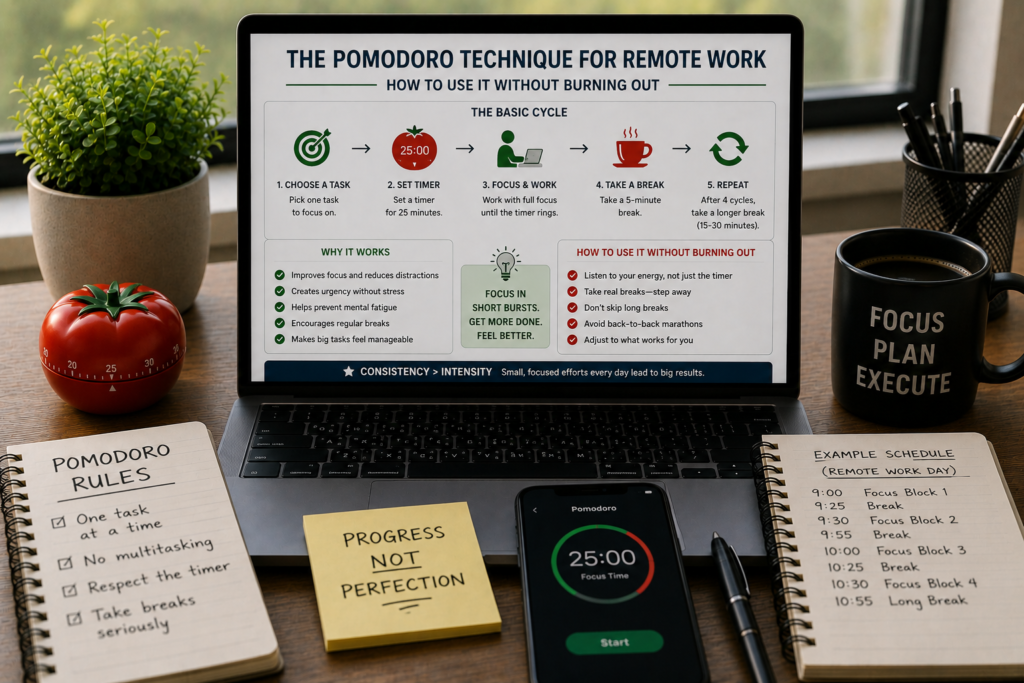
The classic method follows five steps:
- Choose a single task to work on.
- Set a timer for 25 minutes.
- Work on that task with full focus until the timer rings.
- Take a 5-minute break.
- After four completed cycles (called “pomodoros”), take a longer break of 15 to 30 minutes.
That’s the entire system. One task, one timer, full focus, scheduled rest.
The simplicity is what makes it appealing. There’s no app to configure, no complex framework to learn, no weekly review ritual. Just focused bursts followed by deliberate rest.
And it works. Research on interval-based work patterns consistently shows that alternating between focused effort and short recovery periods produces better output, fewer errors, and longer sustained attention than continuous marathon sessions.
But “works” and “works for remote workers in 2026” are two different things.
Why the Classic Pomodoro Method Breaks Down at Home
The traditional 25/5 format assumes a few things that don’t hold true for most remote workers.
It Assumes Uninterrupted Control Over Your Schedule
In a home environment, interruptions aren’t always digital. The doorbell rings. A partner asks a question. A child needs something. A pet demands attention at the worst possible moment.
When a 25-minute pomodoro gets broken at minute 18, the classic advice is to restart the timer from zero. That rule makes sense in theory, but in practice, it turns every small interruption into a failure. After three “broken” pomodoros in a row, most people give up on the system entirely.
It Doesn’t Account for Meeting-Heavy Days
Many remote workers spend two to four hours per day on video calls. On those days, the windows between meetings are often 10, 15, or 20 minutes, too short for a full pomodoro, too long to waste. The rigid 25-minute structure leaves those pockets unusable.
It Treats All Work the Same
A 25-minute block works beautifully for tasks like answering emails, writing short sections, or reviewing documents. But deep creative or technical work, writing a long proposal, debugging code, designing a complex layout, often requires 45 to 90 minutes of unbroken focus to reach a flow state. Cutting that off at 25 minutes can feel like ripping yourself out of the zone right when you’re getting somewhere.
It Can Become a Guilt Machine
Remote workers already struggle with proving they’re “really working.” Layering a strict timer system on top of that anxiety can turn the Pomodoro Technique into a scorecard. “I only completed six pomodoros today” becomes a self-criticism loop, even if you accomplished meaningful, high-quality work during those sessions.
It Ignores Screen Fatigue
The original method was designed for analog work. For remote workers who spend eight-plus hours staring at screens, the 5-minute breaks between pomodoros are often spent… staring at a different screen. Checking your phone during a break doesn’t give your brain or your eyes the recovery they need.
How to Adapt the Pomodoro Technique for Remote Work
The core principle behind the Pomodoro Technique is sound: focused work intervals plus deliberate rest. What needs adjusting is the structure around that principle.
Here’s how to rebuild it for how remote work actually functions.
Adjustment 1: Use Flexible Timer Lengths
Drop the idea that every work sprint must be exactly 25 minutes. Instead, match your timer length to the task type.
| Task type | Recommended sprint length | Break length |
|---|---|---|
| Email, Slack, admin | 15–20 minutes | 3–5 minutes |
| Writing, editing, planning | 25–35 minutes | 5–7 minutes |
| Deep creative or technical work | 45–60 minutes | 10–15 minutes |
| Post-meeting processing | 10–15 minutes | 5 minutes |
The principle stays the same: focused sprint, then rest. But the duration flexes based on what the work actually demands.
This approach respects the reality that writing a financial analysis and replying to a batch of Slack messages are fundamentally different cognitive activities. Giving them the same timer is like asking a sprinter and a marathon runner to train on the same schedule.
Adjustment 2: Create a “Broken Pomodoro” Protocol
Instead of restarting the clock every time you’re interrupted, use a three-tier approach:
Minor interruption (under 2 minutes): Handle it and continue your timer. Don’t reset. A quick “yes, I’ll grab milk on my way back” to a partner doesn’t erase the 15 minutes of focus you already built.
Medium interruption (2 to 5 minutes): Pause the timer, handle it, then resume where you left off. Jot a quick note about where you were in your task so you can pick up the thread without wasting mental energy remembering.
Major interruption (over 5 minutes): End the sprint, take a short break, then start a fresh one. No guilt. This is the system working as intended, protecting you from trying to refocus after a significant context switch.
This protocol removes the all-or-nothing pressure that makes the classic method frustrating at home. Interruptions become events you manage, not reasons to declare failure.
Adjustment 3: Make Breaks Actually Restorative
A 5-minute break where you scroll Instagram is not a break. It’s a different type of screen-based stimulation, and your brain doesn’t recover from it.
For remote workers, breaks need to involve a change of input. Here’s a simple rule: if your sprint was screen-based, your break should be screen-free.
High-quality break activities for remote workers:
- Stand up, stretch, or walk to a different room
- Step outside for fresh air, even 60 seconds on a balcony counts
- Drink water or make a hot drink (the act of preparing it is part of the break)
- Look out a window and let your eyes focus on something distant
- Do a quick physical reset: 10 squats, a plank, neck rolls
- Pet your dog or cat (scientifically shown to reduce cortisol)
- Sit quietly with your eyes closed and breathe slowly for two minutes
What to avoid during breaks:
- Checking social media
- Reading news
- Browsing Slack “just to see if anything happened”
- Starting a different work task
- Shopping online
- Watching short videos
The purpose of the break is cognitive recovery. If the break requires your brain to process new information, it’s not doing its job.
Adjustment 4: Build a Meeting-Compatible Schedule
Most remote workers can’t pomodoro through the whole day because meetings chop the schedule into irregular pieces. Instead of fighting this, design your pomodoro sessions around your meeting reality.
Step 1: At the start of each day, look at your calendar and identify the open blocks between meetings.
Step 2: Assign pomodoro sprints to those blocks based on their length:
- 60+ minute gap → one long sprint (45 min) + break
- 30–60 minute gap → one standard sprint (25 min) + break
- 15–30 minute gap → one mini sprint (15 min) + break
- Under 15 minutes → admin, email, or rest (don’t force a sprint)
Step 3: Accept that meeting-heavy days will have fewer sprints, and that’s fine. Three focused pomodoros on a day with five meetings is a win, not a failure.
This approach turns the gaps between meetings into productive windows instead of dead time. And it removes the frustration of trying to start a 25-minute timer when you know a Zoom call is 18 minutes away.
Adjustment 5: Track Energy, Not Just Pomodoros
The classic method encourages you to count completed pomodoros as a measure of productivity. For remote workers, that metric can become toxic.
Instead, track two things at the end of each day:
- Completion: Did I finish my top-priority task during my focused sprints?
- Energy: How do I feel right now, on a scale of 1 to 5?
If you’re consistently completing priorities but ending the day at a 1 or 2 on energy, the system is too intense. Reduce the number of sprints, lengthen your breaks, or shorten your work blocks.
If your energy is fine but you’re not finishing priorities, the issue is likely task selection or sprint length, not effort.
This dual metric keeps the system honest. Productivity without sustainability is just a slow path to collapse.
A Full-Day Pomodoro Schedule for Remote Workers
Here’s a realistic day that accounts for meetings, energy fluctuation, and the reality of working from home.
| Time | Activity | Sprint length |
|---|---|---|
| 8:00–8:15 a.m. | Morning planning: review tasks, set top 3 priorities | — |
| 8:15–9:00 a.m. | Deep work sprint (priority #1) | 45 min |
| 9:00–9:10 a.m. | Screen-free break | 10 min |
| 9:10–9:35 a.m. | Deep work sprint (priority #1 continued) | 25 min |
| 9:35–9:40 a.m. | Short break | 5 min |
| 9:40–10:00 a.m. | Email and Slack sprint | 20 min |
| 10:00–10:45 a.m. | Team standup (meeting) | — |
| 10:45–11:00 a.m. | Post-meeting processing sprint | 15 min |
| 11:00–11:10 a.m. | Break, walk around the house | 10 min |
| 11:10–11:50 a.m. | Deep work sprint (priority #2) | 40 min |
| 11:50 a.m.–12:00 p.m. | Break | 10 min |
| 12:00–12:45 p.m. | Lunch (fully offline) | — |
| 12:45–1:00 p.m. | Light admin sprint | 15 min |
| 1:00–1:45 p.m. | Client call (meeting) | — |
| 1:45–2:00 p.m. | Post-meeting notes sprint | 15 min |
| 2:00–2:15 p.m. | Break, fresh air | 15 min |
| 2:15–2:45 p.m. | Work sprint (priority #3) | 30 min |
| 2:45–2:50 p.m. | Short break | 5 min |
| 2:50–3:10 p.m. | Email and Slack sprint (final check-in) | 20 min |
| 3:10–3:15 p.m. | Break | 5 min |
| 3:15–3:45 p.m. | Learning or professional development | 30 min |
| 3:45–4:00 p.m. | Shutdown routine: review day, plan tomorrow | 15 min |
Total focused sprint time: approximately 4.5 hours. Total work window: 8 hours. The remaining time is meetings, breaks, planning, and transitions.
That might seem low, but research from Draugiem Group (creators of DeskTime) found that the most productive workers average about 4 hours and 12 minutes of focused work per day. The rest is recovery and low-intensity activity. This schedule matches that pattern.
The Burnout Warning Signs (and What to Do About Them)
Even with modifications, any timed productivity system can push you too hard if you’re not watching for warning signs. Here’s what to look for and how to respond.
Sign 1: You Dread the Timer
If the sound of the timer starting fills you with anxiety instead of focus, the intervals are too rigid or too frequent. Fix: Drop to three or four sprints per day for a week. Rebuild gradually.
Sign 2: Breaks Feel Like Wasted Time
If you skip breaks because “I’m on a roll” or “I don’t have time,” the system has become a productivity trap. The breaks are part of the system, not interruptions to it. Fix: Set a non-negotiable rule: every sprint must be followed by at least a 3-minute break, no exceptions.
Sign 3: You’re Counting Pomodoros Obsessively
If your self-worth on any given day is tied to hitting a number (“I need at least eight pomodoros or the day was wasted”), the metric has become the goal. Fix: Switch to tracking completed priorities instead of completed sprints. The work matters, not the timer count.
Sign 4: Evenings Feel Impossible
If you finish your workday with zero capacity for conversation, cooking, reading, or anything that requires mental engagement, you’re spending too much of your cognitive budget during work hours. Fix: Reduce your deep work sprints by 10 minutes each and add 5 minutes to your breaks.
Sign 5: Sunday Night Anxiety
If the thought of Monday’s pomodoro schedule makes you tense, the system feels like a cage, not a tool. Fix: Take a full week off from the timer. Work without structure and notice what you miss about the system. Then reintroduce only the parts that helped.
Tools for Pomodoro-Based Remote Work
You can run this system with nothing more than your phone’s built-in timer. But if you want dedicated tools, here are options that pair well with remote workflows.
Forest — A mobile app that grows a virtual tree during your focus session. If you leave the app (to check social media, for example), the tree dies. Simple gamification that works surprisingly well for building consistency.
Pomofocus — A clean, free, browser-based pomodoro timer with customizable sprint and break lengths. No account needed.
Focusmate — Pairs you with a virtual accountability partner for 25, 50, or 75-minute work sessions over video. You don’t talk; you just work silently while someone else does the same. Powerful for remote workers who miss the ambient motivation of an office.
Be Focused (Mac) — A menu-bar pomodoro timer that tracks your sprints across different task categories. Good for seeing where your focused time goes over a week.
Toggl Track — While not a pomodoro app per se, it lets you track time by task with a one-click timer. Combining Toggl with manual pomodoro sprints gives you both focus and reporting.
A physical kitchen timer — There’s something about the tactile click of winding a mechanical timer that a digital beep can’t replicate. It puts the commitment into your hands, literally.
Pomodoro Variations Worth Trying
If the standard format doesn’t click for you, these variations use the same underlying principle with different structures.
The 52/17 Method
Work for 52 minutes, break for 17 minutes. Based on the DeskTime study that analyzed the habits of the top 10% most productive users. This rhythm works well for deep work sessions and gives your brain meaningful recovery between rounds.
The 90-Minute Block
Based on the body’s ultradian rhythm, the natural 90-minute cycle of peak and rest that governs human energy throughout the day. Work in 90-minute focused blocks with 20 to 30-minute breaks between them. This approach suits remote workers who hate short timers and prefer extended flow states.
The Flowtime Technique
Start your timer when you begin a task, but don’t set an endpoint. Work until you naturally feel your focus fading, then stop and rest. Track how long your natural focus sessions last. Over time, you’ll discover your personal optimal sprint length, which might be 20 minutes, 40 minutes, or something else entirely.
The Two-Pomodoro Rule
Commit to just two pomodoros per day, focused on your single most impactful task. Once those are done, the rest of the day is unstructured. This is a great entry point for people who find full-day time blocking overwhelming, and it protects against burnout by design.
How the Pomodoro Technique Pairs with Other Remote Work Strategies
The Pomodoro Technique doesn’t have to operate in isolation. It integrates well with several other productivity approaches.
Time blocking + Pomodoro: Block your calendar into categories (deep work, communication, admin), then use pomodoro sprints inside each block. The time blocks define what you’re doing. The pomodoros define how you’re focusing during that window.
Eat the Frog + Pomodoro: “Eat the frog” means doing your hardest, most-dreaded task first. Combine it with the Pomodoro Technique by dedicating your first two sprints of the day to the task you least want to do. By 9:30 a.m., it’s done, and the rest of the day feels lighter.
Getting Things Done (GTD) + Pomodoro: Use GTD to capture, organize, and prioritize your tasks. Then use pomodoro sprints to execute them. GTD handles the “what” and “when.” Pomodoro handles the “how long” and “with what focus.”
The Eisenhower Matrix + Pomodoro: Sort your tasks by urgency and importance using the Eisenhower Matrix. Assign pomodoro sprints only to tasks in the “urgent and important” and “important but not urgent” quadrants. Everything else gets batched into a single admin sprint or delegated.
Making It Sustainable for the Long Run
The goal isn’t to pomodoro every minute of every day for the rest of your career. The goal is to have a reliable tool you can reach for when you need focused output and structured rest.
Some days, you’ll run a full schedule of sprints and feel great. Other days, you’ll abandon the timer by 10 a.m. because the work is flowing naturally and the timer feels like an interruption. Both are fine.
The best remote workers treat the Pomodoro Technique like a power tool, not a religion. They pull it out when it’s useful: when focus is scattered, when a deadline is tight, when motivation is low, when the day is chaotic. And they put it away when the work is already moving.
Sustainability comes from three commitments:
- Protect your breaks. They’re non-negotiable, not rewards you earn.
- Measure outcomes, not timer counts. Did the work get done? Good. The number of sprints is irrelevant.
- Listen to your body. If you’re exhausted, no timer will fix that. Rest is productive. Recovery is productive. Stopping on time is productive.
Remote work gives you the freedom to design your day around how you actually function, not around someone else’s office hours. The Pomodoro Technique, when adapted properly, is one of the best ways to use that freedom without losing yourself in it.
Start with two sprints tomorrow. Pick your hardest task. Set a timer. Work until it rings. Then stop, stand up, and look out the window for five minutes.
That’s it. That’s the whole system. Everything else is refinement.
Word Count: ~2,800 words
Target Reading Time: 12–14 minutes
Primary CTA: Start with the Two-Pomodoro Rule tomorrow morning. Pick your hardest task, run two focused sprints on it, and see how it feels before building a full schedule.