You published a blog post. You spent hours on it. The writing is solid, the topic is interesting, and you’re genuinely proud of how it turned out.
Then nothing happens.
No traffic. No comments. No sign that Google even knows the post exists. A week goes by, then a month. The post sits on page 7 of search results, buried under a pile of competitors who showed up first.
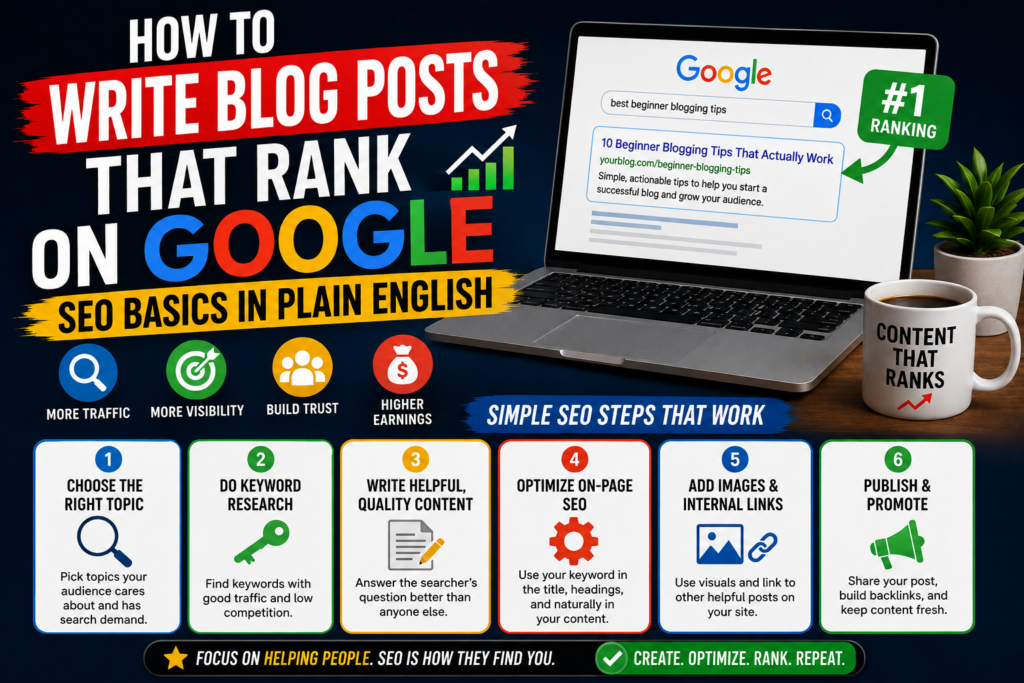
This is the experience that makes most bloggers believe SEO is some mysterious, technical puzzle that only marketing professionals can solve. It’s not. SEO (search engine optimization) is a set of straightforward principles that, once you understand them, change the way you think about every piece of content you create.
This guide explains those principles in language anyone can follow. No jargon without explanation. No assumptions about your technical background. Just the practical mechanics of writing blog posts that Google wants to rank, explained the way a friend would explain it over coffee.
What Google Actually Wants (And Why It Matters for Your Blog)
Before getting into tactics, it helps to understand what Google is trying to do. When you understand the goal, the rules make sense.
Google has one job: give searchers the best possible answer to their question, as fast as possible.
That’s it. Every algorithm update, every ranking factor, every penalty, all of it traces back to that single objective. Google wants people to search, find a great result, and think, “This is exactly what I was looking for.”
Your job as a blogger is to be that great result.
When you write a blog post that thoroughly answers a question, keeps readers engaged, and delivers on the promise of its headline, you’re aligned with what Google rewards. When you write thin content stuffed with keywords that doesn’t actually help anyone, you’re working against Google’s interests, and it will show in your rankings.
This alignment is the foundation of everything that follows. Every tactic in this guide serves one purpose: helping you create content that genuinely satisfies the person who searched for it.
How Google Decides What to Rank
Google uses hundreds of ranking signals, but you don’t need to memorize all of them. A handful of factors carry the most weight, and understanding these gives you 80% of the results.
Relevance
Does your content match what the searcher is looking for? If someone searches “how to repot a succulent,” Google looks for pages that specifically address repotting succulents, not pages about succulent care in general that briefly mention repotting in one paragraph.
Relevance is determined by your content’s topic, the words you use, and how closely your page matches the searcher’s intent.
Depth and Completeness
Does your content fully answer the question? A 200-word post that gives a surface-level answer will lose to a 2,000-word post that covers the topic from every angle, anticipates follow-up questions, and leaves the reader with nothing left to search for.
Google measures this partially through user behavior. If someone clicks your result and immediately hits the back button to try another link (called “pogo-sticking”), that signals your content didn’t satisfy their need. If they stay on your page for several minutes and don’t return to search results, that’s a strong positive signal.
Authority and Trust
Does Google have reason to believe your site is credible? Authority is built through backlinks (other websites linking to yours), consistent publishing in a focused topic area, and signals of expertise in your content.
A new blog starts with very little authority, which is why brand-new posts rarely rank immediately. Authority builds over time as you publish quality content, earn links, and establish your site as a reliable source in your niche.
User Experience
Does your page load quickly? Is it easy to read on a phone? Is the content organized in a way that’s scannable? Google factors in page speed, mobile responsiveness, and overall usability. A brilliant blog post on a slow, cluttered, hard-to-navigate website will rank lower than a good blog post on a fast, clean one.
Freshness
For certain queries, Google prioritizes recent content. “Best laptops 2026” demands current information. “How photosynthesis works” does not. Understanding whether your topic requires freshness helps you decide how often to update your posts.
Keyword Research: Finding What People Are Actually Searching For
Here’s where the practical work begins. Keyword research is the process of figuring out exactly what words and phrases your target readers type into Google, then building your content around those terms.
Why Keywords Matter
You might write the most helpful guide on the internet about indoor herb gardens. But if you title it “My Green Thumb Adventures” and never mention the phrase “indoor herb garden” in the post, Google has no reliable signal that your content matches what people are searching for.
Keywords are the bridge between your content and your audience’s search behavior. Using the right keywords doesn’t mean gaming the system. It means speaking the same language as the people you’re trying to reach.
How to Find the Right Keywords
Start with Google itself. Type your topic into Google’s search bar and watch what autocomplete suggests. These suggestions are based on real searches that real people perform. If you type “how to clean,” Google might suggest “how to clean a dishwasher,” “how to clean grout,” “how to clean a washing machine.” Each suggestion is a validated topic with proven search demand.
Check “People Also Ask.” After you search for something, Google often displays a box of related questions. These are gold. Each question represents a subtopic you can address in your post (or build a separate post around). They reveal the follow-up questions your readers have after finding your main topic.
Look at “Related Searches.” At the bottom of Google’s search results page, you’ll find a list of related search terms. These give you secondary keywords and variations to weave into your content naturally.
Use keyword research tools. Free and paid tools give you data on search volume (how many people search for a term monthly) and competition (how hard it will be to rank for that term).
Solid options include:
- Google Keyword Planner (free, designed for advertisers but useful for bloggers)
- Ubersuggest (limited free searches, shows volume and competition)
- KeySearch (affordable, built for bloggers and content creators)
- Ahrefs and Semrush (premium tools with deep competitive analysis)
- AnswerThePublic (visualizes questions people ask about a topic)
Understanding Search Volume and Competition
Every keyword has two key metrics:
Monthly search volume: How many times people search for that term each month. Higher volume means more potential traffic, but also more competition.
Keyword difficulty: How hard it will be to rank on page 1. This is usually scored on a 0-100 scale, with higher numbers indicating tougher competition.
For a new or growing blog, the sweet spot is keywords with:
- 200-2,000 monthly searches (enough traffic to matter, but not so much that you’re competing against massive sites)
- Low to medium difficulty (under 30-40 on most tools’ scales)
- Clear, specific intent (the searcher knows what they want)
Example: “Meal prep” gets 200,000+ monthly searches but has extreme competition. “Meal prep for one person on a budget” gets fewer searches but is far easier to rank for, and the searcher’s intent is crystal clear. Target the second version.
Long-Tail Keywords: Your Secret Weapon
Long-tail keywords are longer, more specific search phrases. They typically have lower search volume but higher conversion rates and lower competition.
Short-tail: “running shoes” (vague, competitive, hard to rank for)
Long-tail: “best running shoes for flat feet beginners” (specific, less competitive, clear intent)
Long-tail keywords are the fastest path to ranking for new blogs. Each individual long-tail keyword might bring in only 50-200 visitors per month, but publish 50 posts targeting different long-tail keywords, and you’re looking at 2,500-10,000 monthly visitors from search alone.
The Intent Behind the Keyword
Not all keywords are created equal because not all searchers want the same thing. Google categorizes search intent into four broad types:
Informational: The searcher wants to learn something. (“How to train a puppy,” “what causes migraines,” “how does compound interest work”)
Commercial investigation: The searcher is researching before a purchase. (“Best DSLR cameras under $1,000,” “Mailchimp vs ConvertKit,” “iPhone 17 review”)
Transactional: The searcher is ready to buy or take action. (“Buy organic coffee beans online,” “sign up for yoga class near me”)
Navigational: The searcher is looking for a specific website or page. (“Netflix login,” “Ahrefs blog,” “New York Times recipes”)
For blog content, you’ll primarily target informational and commercial investigation keywords. Match your content format to the intent: informational searches want guides and explanations, commercial searches want comparisons and reviews.
Structuring Your Blog Post for Google and Readers
How you organize your content matters as much as what you write. Structure affects readability, time on page, and Google’s ability to understand your content.
The Headline (H1)
Your blog post title is the first thing Google and readers evaluate. A strong title:
- Includes your primary keyword (naturally, not forced)
- Clearly states what the reader will get
- Creates enough curiosity or promise to earn the click
Weak: “Some Thoughts on Email Marketing”
Strong: “How to Write Marketing Emails That People Actually Open”
The first title is vague and gives Google no clear keyword signal. The second includes a keyword (“write marketing emails”), communicates a clear benefit (“that people actually open”), and tells the reader exactly what to expect.
The Introduction (First 100-150 Words)
Your introduction has two jobs: hook the reader and signal relevance to Google.
Hook the reader by addressing their problem, asking a question they relate to, or making a statement that piques curiosity. If your first sentence is boring, nothing that follows matters because nobody will read it.
Signal relevance to Google by including your primary keyword within the first 100 words. This doesn’t need to feel forced. If your post is about “how to clean a cast iron skillet,” naturally mentioning that phrase in your opening is easy: “Knowing how to clean a cast iron skillet properly is the difference between a pan that lasts a lifetime and one that ends up rusty in a garage sale.”
Subheadings (H2 and H3 Tags)
Subheadings serve three purposes:
- They help readers scan. Most people skim before they read. Subheadings let scanners find the section most relevant to their question.
- They help Google understand your content structure. Each subheading signals a subtopic within your post.
- They create natural places to include secondary keywords. If your post targets “how to start a vegetable garden,” your H2s might include keywords like “choosing the right soil,” “best vegetables for beginners,” and “when to plant seeds.”
Rules for effective subheadings:
- Use H2 for major sections and H3 for subsections within an H2
- Make each subheading descriptive enough that someone could understand the post’s structure by reading only the subheadings
- Include keyword variations where they fit naturally
- Avoid vague subheadings like “Things to Consider” or “More Information.” Be specific: “How Much Water Does a Tomato Plant Need?” is infinitely better
Paragraph Length and Readability
Online readers don’t tolerate dense blocks of text. On a phone screen (where over 60% of web traffic happens), a paragraph that looks short on desktop becomes a wall of text.
Keep paragraphs to 2-3 sentences. Break up long explanations with white space. Use single-sentence paragraphs for emphasis when appropriate.
Write at an 8th-grade reading level for most blog niches. This isn’t about dumbing down your content. It’s about clarity. Short sentences, common words, and direct language communicate faster and keep more readers engaged.
Tools like Hemingway Editor (free online) grade your writing’s readability and highlight overly complex sentences.
Lists and Bullet Points
Bulleted and numbered lists are SEO-friendly because:
- They’re scannable
- Google sometimes pulls them into featured snippets (the answer box at the top of search results)
- They break up text and improve page engagement
Use numbered lists for sequential steps and bullet points for non-sequential items. Don’t overuse them. A post that’s nothing but bullet points feels like an outline, not an article.
Internal Links
Internal links are hyperlinks from one page on your blog to another page on the same blog. They serve two purposes:
For readers: They guide visitors to related content they might find useful, keeping them on your site longer.
For Google: They help search engine crawlers discover your other pages and understand how your content relates to each other. A blog post about “how to brew French press coffee” that links to your post about “best coffee beans for French press” signals to Google that both posts are part of a connected content hub about French press coffee.
Best practices for internal linking:
- Link to 3-5 relevant posts within each new blog post
- Use descriptive anchor text (the clickable words) rather than generic phrases like “click here”
- Link to your most valuable or comprehensive posts frequently so they accumulate more internal link authority
- When you publish a new post, go back to older related posts and add links to the new one
External Links
Linking out to authoritative sources (studies, official documentation, established publications) signals to Google that your content is well-researched and connected to credible information.
Some bloggers avoid external links because they don’t want to “send traffic away.” This fear is misplaced. Google rewards posts that reference quality sources. And realistically, readers who find your content valuable will stay. A well-placed link to a university study that supports your claim doesn’t lose you a reader. It gains you credibility.
Aim for 2-5 relevant external links per post, pointing to high-authority sources.
Writing Content That Keeps Readers on the Page
Google watches how users interact with your page after clicking. If readers bounce immediately, your rankings suffer. If they stay and engage, your rankings improve. Writing content that holds attention is an SEO strategy, not just a writing preference.
Open With a Hook, Not a Dictionary Definition
The worst way to start a blog post: “According to Wikipedia, [topic] is defined as…”
No reader has ever thought, “I can’t wait to read a blog post that starts with a definition I could have found myself in two seconds.”
Strong openings pull readers in through:
A relatable frustration: “You’ve tried three different budgeting apps, and you’re still overspending every month.”
A surprising fact: “The average American throws away 40% of the food they buy. That’s roughly $1,600 a year in the trash.”
A direct promise: “By the end of this post, you’ll know exactly which type of running shoe matches your foot strike pattern, and you’ll never waste money on the wrong pair again.”
A quick story: “Last year, I accidentally killed every plant in my apartment. This year, I grew enough basil to supply a small Italian restaurant. Here’s what changed.”
Each of these makes the reader think, “I want to keep reading.” That’s the only job of an opening.
Use the Inverted Pyramid
Journalism has used the inverted pyramid for over a century, and it works brilliantly for blog posts. Put the most valuable information first, then expand with supporting details.
Many bloggers do the opposite. They write long build-ups, extensive backstories, and paragraphs of context before getting to the point. By the time the answer arrives, half the audience has left.
If your post is about “how to unclog a drain without chemicals,” give the method in the first few paragraphs. Then explain why it works, offer variations, cover edge cases, and answer related questions. The reader who only needed the quick answer leaves satisfied (and doesn’t bounce back to Google). The reader who wants depth keeps scrolling.
Make Your Content More Complete Than the Competition
Before publishing any post, search for your target keyword and read the top 5 ranking posts. Note what they cover, what they miss, and where they fall short.
Your post should include everything the top results cover (proving relevance) plus additional value they don’t provide. This might be:
- A section that answers a question the competitors skip
- Real examples or case studies instead of vague advice
- Updated information (if competitors’ data is outdated)
- Clearer explanations of complex concepts
- Visual aids, step-by-step screenshots, or embedded videos
- A downloadable resource or tool
You don’t need to write the longest post. You need to write the most complete one. If you can answer every question a reader might have about the topic so thoroughly that they never need to search for it again, Google will notice.
Add Original Insight
Google’s “Helpful Content” update specifically targets content that regurgitates information available everywhere else. Content that ranks well in 2026 brings something original to the table.
Original insight can come from:
- Personal experience. “I tested five different methods for removing pet hair from furniture. Here’s what actually worked.” First-hand testing adds value no aggregator can replicate.
- Original data. “We surveyed 500 freelancers about their invoicing habits. Here’s what we found.” Original research attracts backlinks and positions you as a primary source.
- A contrarian perspective. “Most guides tell you to post on social media every day. Here’s why I post three times a week and get better results.” A well-argued counter-opinion stands out in a sea of consensus.
- Expert interviews or quotes. Reaching out to practitioners in your field and incorporating their perspectives adds depth and credibility that pure desk research can’t match.
If you can remove your name from a post and it reads identically to 20 other posts on the same topic, it doesn’t have enough original insight to compete.
On-Page SEO: The Technical Checklist
On-page SEO refers to the optimizations you make directly on your blog post to help Google understand, index, and rank it. Think of this as the checklist you run through before hitting “publish.”
Title Tag
Your title tag is the clickable headline that appears in Google search results. It’s often the same as your blog post title but can be customized separately using an SEO plugin.
Rules for title tags:
- Keep it under 60 characters (Google truncates anything longer)
- Place your primary keyword as close to the beginning as possible
- Make it compelling enough to earn a click when displayed alongside nine other results
Example:
Instead of: “A Comprehensive Guide to Understanding How Solar Panels Work for Homeowners”
Try: “How Solar Panels Work: A Simple Guide for Homeowners”
The second version is shorter, puts the keyword upfront, and communicates the same promise more clearly.
Meta Description
The meta description is the short paragraph that appears below your title tag in search results. It doesn’t directly affect rankings, but it heavily influences click-through rate, which indirectly affects rankings.
Rules for meta descriptions:
- Keep it under 155 characters
- Include your primary keyword (Google bolds matching terms in search results, which attracts clicks)
- Communicate a clear benefit or reason to click
- Avoid generic phrases that could describe any post
Example:
Instead of: “Read this post to learn about solar panels and how they work.”
Try: “A plain-English breakdown of how solar panels convert sunlight to electricity, what affects their efficiency, and whether they’re worth the investment.”
The second version tells the searcher exactly what they’ll get, which increases the likelihood they’ll click your result over a competitor’s.
URL Structure
Your post’s URL (also called the slug) should be short, descriptive, and include your primary keyword.
Good: yourblog.com/how-solar-panels-work
Bad: yourblog.com/2026/06/13/a-comprehensive-guide-to-understanding-how-solar-panels-work-for-homeowners-in-2026
Short URLs are easier for Google to parse and for users to read. Remove unnecessary words (a, the, for, and) and keep only the core keyword phrase.
Image Optimization
Every image in your blog post is an SEO opportunity, and a potential speed problem if handled poorly.
File names: Rename image files before uploading. how-solar-panels-work-diagram.jpg tells Google what the image shows. IMG_4829.jpg tells Google nothing.
Alt text: Alt text describes the image for screen readers and search engines. Write a natural description that includes relevant keywords where appropriate. “Diagram showing how solar panels convert sunlight into electricity through photovoltaic cells” is useful. “Solar panels solar energy how solar panels work best solar panels” is keyword stuffing that helps nobody.
File size: Large image files slow down your page, which hurts rankings. Compress images before uploading using tools like ShortPixel, TinyPNG, or Imagify. Aim for images under 200KB when possible. Use modern formats like WebP for faster loading.
Dimensions: Upload images at the size they’ll be displayed. A 4000×3000 pixel photo displayed at 800×600 wastes bandwidth and slows your page.
Schema Markup (Structured Data)
Schema markup is code that helps Google understand what type of content is on your page. For blog posts, the most common types are:
- Article schema: Tells Google your page is a blog post and provides information about the author, publish date, and headline.
- FAQ schema: If your post includes a question-and-answer section, FAQ schema can display those Q&As directly in search results, taking up more visual space and increasing click-through rates.
- How-to schema: For step-by-step posts, this can display your steps directly in search results.
Most SEO plugins (Yoast, Rank Math) handle basic schema automatically. For FAQ and How-to schema, these plugins offer simple interfaces to add structured data without touching code.
Building Topical Authority: The Cluster Strategy
Single blog posts can rank, but clusters of related posts rank faster and more reliably. This is because Google evaluates topical authority: how deeply and comprehensively your site covers a subject.
How Content Clusters Work
A content cluster consists of:
One pillar post: A comprehensive, in-depth guide covering a broad topic. (“The Complete Guide to Indoor Gardening”)
Multiple supporting posts: Focused articles covering specific subtopics in depth. (“How to Grow Herbs Indoors Without Sunlight,” “Best Indoor Potting Soil for Beginners,” “How Often to Water Indoor Plants,” “Indoor Gardening on a Budget”)
Internal links connecting them all: The pillar post links to each supporting post, and each supporting post links back to the pillar. This creates a web of related content that signals to Google: “This site is a thorough authority on indoor gardening.”
Why Clusters Outperform Random Posts
Imagine two blogs:
Blog A has published 50 posts on 50 unrelated topics. One post about gardening, one about cooking, one about fitness, one about travel.
Blog B has published 50 posts, all focused on indoor gardening. Different plants, different techniques, different challenges, all connected through internal links.
Blog B will rank higher for indoor gardening queries because Google sees a concentrated body of expertise. Blog A’s single gardening post, no matter how good, lacks the supporting content that signals authority.
Planning Your First Cluster
- Choose a broad topic that can support 10-20 subtopic posts
- Write the pillar post first (3,000-5,000 words, covering the topic comprehensively)
- Identify 10-15 specific questions or subtopics within that broad theme
- Write one supporting post per subtopic, targeting long-tail keywords
- Link everything together as you publish
Over three to six months, a single content cluster can establish your blog as an authority in one specific area, even if the rest of your site is brand new.
The Role of Backlinks (And How to Get Them Without Begging)
Backlinks, links from other websites pointing to your blog, remain one of Google’s strongest ranking signals. A page with 50 quality backlinks will almost always outrank a page with zero backlinks, all else being equal.
But link building has a reputation for being sleazy, spammy, and exhausting. It doesn’t have to be.
How to Earn Backlinks Naturally
Create content worth referencing. Original research, data-driven posts, comprehensive guides, and free tools naturally attract links because other writers need sources to cite. A post titled “We Analyzed 10,000 Email Subject Lines: Here’s What Gets Opened” will earn links passively because other bloggers writing about email marketing will reference your data.
Write guest posts for established sites. Contributing articles to other blogs in your niche exposes your work to new audiences and typically includes a link back to your site. Focus on sites that have real readership, not sites that exist solely for guest post link exchanges.
Get mentioned in resource roundups. Many blogs publish “best resources for [topic]” posts. If your content genuinely belongs on those lists, reach out to the author with a polite suggestion. Don’t pitch aggressively. Simply point out your resource and explain why it might be useful for their readers.
Turn brand mentions into links. If someone mentions your blog or brand in their content without linking, a polite email asking for a link often works. They’ve already acknowledged your value. They just forgot the hyperlink.
Build relationships, not just links. Comment on other blogs, share their content, engage with them on social media, and collaborate on projects. Real relationships lead to natural link opportunities that no outreach template can manufacture.
What to Avoid
Buying links. Google’s algorithms detect paid link patterns, and the penalty is severe. A manual action from Google can tank your entire site’s rankings overnight.
Link exchanges. “I’ll link to you if you link to me” is detectable and ineffective. Occasional natural reciprocal links between sites that genuinely reference each other are fine, but systematic exchanges are a red flag.
Low-quality directories and comment spam. Dropping your URL in blog comments, forum signatures, and random directories wastes your time and can actively hurt your rankings.
Private blog networks (PBNs). Networks of fake websites built solely for link manipulation. Google has gotten very good at identifying and penalizing these.
The best link building strategy is also the simplest: create content so useful and original that other people want to reference it. Then make it easy for them to find.
Technical SEO Basics Every Blogger Should Know
You don’t need to become a web developer, but a handful of technical factors directly impact how well your blog posts rank.
Page Speed
Google has confirmed that page speed is a ranking factor, especially on mobile. A page that takes five seconds to load will rank lower than an identical page that loads in two seconds.
Quick wins for faster loading:
- Compress all images before uploading
- Use a caching plugin (WP Super Cache, LiteSpeed Cache, or W3 Total Cache)
- Choose a lightweight theme (GeneratePress, Kadence, Astra)
- Minimize plugins to only the ones you actively use
- Enable lazy loading for images (images below the fold load only when the reader scrolls to them)
- Use a CDN (content delivery network) to serve your content from servers closer to your readers
Test your speed with Google’s PageSpeed Insights tool (free) and aim for a score above 80 on mobile.
Mobile Responsiveness
Google uses mobile-first indexing, meaning it primarily uses the mobile version of your site for ranking and indexing. If your blog looks great on desktop but broken on mobile, your rankings will suffer.
Check every post on your phone after publishing. Look for:
- Text that’s too small to read without zooming
- Images that overflow the screen
- Buttons or links too close together to tap accurately
- Horizontal scrolling (never acceptable on mobile)
HTTPS (SSL Certificate)
Your site should load on https:// not http://. The “s” indicates a secure, encrypted connection. Google uses HTTPS as a ranking signal, and browsers display warning messages on non-HTTPS sites that scare visitors away.
Most hosting providers include free SSL certificates. If your site still loads on HTTP, contact your host to activate SSL.
XML Sitemap
An XML sitemap is a file that lists all the pages on your site, making it easier for Google’s crawlers to find and index your content. Most SEO plugins generate sitemaps automatically.
Submit your sitemap to Google Search Console so Google knows exactly where to find your content.
Fixing Crawl Errors
Google Search Console (free) reports errors that prevent Google from accessing your pages. Check it monthly for:
- 404 errors (broken links pointing to pages that no longer exist)
- Redirect issues (pages that redirect incorrectly)
- Mobile usability problems (pages that don’t work well on phones)
- Indexing issues (pages Google can’t or won’t index)
Fixing crawl errors is like removing roadblocks between Google and your content. The cleaner your site, the easier Google can find, crawl, and rank your posts.
How Long Does It Take to Rank?
This is the question every blogger asks, and the honest answer is: it depends.
Typical timeline for a new blog:
- Month 1-2: Google discovers and indexes your posts. Minimal organic traffic. Most posts won’t appear in the top 100 results yet.
- Month 3-4: Some posts begin appearing on pages 2-5 for long-tail keywords. Traffic starts trickling in. You might see 100-500 organic visits per month.
- Month 5-8: Posts that are well-optimized and covering low-competition keywords start reaching page 1. Traffic grows noticeably. 500-3,000 organic visits per month is realistic.
- Month 9-12: Your site has built some authority. Newer posts rank faster. Older posts that you’ve updated and improved climb higher. 3,000-10,000+ organic visits per month.
- Year 2+: Compounding kicks in. Your content library grows, your domain authority increases, and posts start ranking for keywords you didn’t specifically target because Google trusts your site’s topical depth.
Factors that accelerate ranking:
- Targeting low-competition, long-tail keywords
- Publishing consistently (2-4 posts per week builds authority faster)
- Earning backlinks from quality sites
- Writing in a focused niche (topical authority compounds)
- Updating and improving existing posts based on performance data
Factors that slow ranking down:
- Targeting extremely competitive keywords too early
- Publishing infrequently or inconsistently
- Writing about scattered, unrelated topics
- Ignoring technical SEO issues (slow site, broken links, no HTTPS)
- Thin content that doesn’t fully satisfy search intent
The biggest mistake bloggers make is giving up during months 2-4 when traffic is still flat. The work you do during those quiet months is what produces the traffic spike that comes later. SEO rewards patience and consistency.
Content Updates: The Ranking Strategy Nobody Talks About
Publishing new posts gets all the attention. Updating old posts is the strategy that quietly drives massive results.
Why Updating Works
Google favors fresh, accurate content. A post published two years ago with outdated statistics, broken links, and incomplete information will gradually lose rankings to newer, better posts.
Updating existing content is faster than writing from scratch, and it often produces bigger ranking improvements than a new post because your existing post already has some authority, backlinks, and indexing history.
What to Update
Check Google Search Console monthly for posts that:
- Rank on page 2 (positions 11-20). These are your biggest opportunities. They’re close to page 1 but need a push. Small improvements can move them up significantly.
- Have declining traffic. A post that used to bring in 500 visitors per month but now gets 200 is a candidate for a refresh.
- Target keywords where new competitors have appeared. If a new, more comprehensive post has outranked yours, update yours to be better than theirs.
How to Update Effectively
- Add new sections that cover subtopics competitors address but you don’t
- Update outdated statistics, links, and references
- Improve your introduction for a stronger hook
- Add internal links to newer posts on your site
- Improve image quality and add new visuals
- Strengthen subheadings with clearer, keyword-rich language
- Expand thin sections that gloss over important details
- Change the publish date (or add a “last updated” date) after making substantial improvements
A quarterly content audit, where you review and update your top 10-20 posts, can produce more traffic growth than publishing 10 new posts during the same period.
Measuring Your SEO Performance
You can’t improve what you don’t track. Two free tools give you everything you need to measure your blog’s SEO performance.
Google Search Console
Search Console shows you how your blog appears in Google search results. The data you should check regularly:
- Search queries: Which keywords bring visitors to your site, and what position you rank for each one
- Click-through rate (CTR): The percentage of people who see your result and click it. Low CTR on a high-ranking post suggests your title or meta description needs work.
- Impressions: How many times your posts appear in search results, even if nobody clicks. Rising impressions mean Google is showing your content to more people.
- Page performance: Which specific posts generate the most search traffic
Google Analytics
Analytics shows what happens after someone arrives on your site:
- Organic traffic: How many visitors come from search engines
- Bounce rate: The percentage of visitors who leave after viewing only one page. A high bounce rate on a blog post isn’t always bad (the reader might have found their answer), but if paired with low time on page, it suggests the content isn’t engaging.
- Average time on page: Longer is generally better for in-depth content. If your 3,000-word guide has an average time on page of 30 seconds, people aren’t reading it.
- Pages per session: How many pages visitors view during a single visit. Higher numbers suggest your internal linking is working.
Review cadence: Check Search Console weekly for new keyword opportunities and monthly for performance trends. Check Analytics monthly for engagement patterns.
Common SEO Mistakes (And How to Avoid Them)
Targeting keywords that are too competitive. A brand-new blog targeting “how to lose weight” is competing against WebMD, Healthline, and Mayo Clinic. Start with specific, low-competition terms and build authority before going after broad keywords.
Keyword stuffing. Repeating your keyword 47 times in a 1,000-word post doesn’t help. Google’s algorithms detect unnatural keyword density and penalize it. Use your keyword naturally, include variations, and focus on writing for humans.
Neglecting search intent. If someone searches “best CRM software,” they want a comparison article with recommendations, not a 5,000-word history of customer relationship management. Match your content format to what the searcher expects.
Ignoring mobile. If you only preview your posts on a desktop monitor, you’re missing how most of your audience experiences your content. Always check mobile before publishing.
Duplicating content across posts. Two posts on your site targeting the same keyword compete against each other (called keyword cannibalization). Each keyword should have one dedicated post. If you have overlap, merge the posts into one comprehensive piece.
Skipping meta descriptions. If you don’t write one, Google pulls a random snippet from your page. That random snippet is almost never the most compelling thing you could say. Take 60 seconds to write a meta description for every post.
Publishing and forgetting. SEO is not a “publish and pray” game. Posts need updates, optimization, and promotion over time. Your best-ranking posts a year from now will be ones you’ve revisited and improved multiple times.
Using generic stock photos. A blog post illustrated with the same stock photos that appear on 500 other sites doesn’t stand out visually or signal originality. Use custom graphics, screenshots, original photos, or at minimum, less commonly used stock images.
The SEO Blog Post Checklist
Run through this before you hit “publish” on any blog post:
Pre-writing:
- [ ] Identified a primary keyword with reasonable search volume and manageable competition
- [ ] Researched the top 5 ranking posts for that keyword
- [ ] Outlined a post that covers everything the top results cover, plus additional value
Writing:
- [ ] Headline includes the primary keyword and communicates a clear benefit
- [ ] Introduction hooks the reader and includes the primary keyword within the first 100 words
- [ ] Subheadings (H2, H3) are descriptive and include keyword variations where natural
- [ ] Content fully answers the searcher’s question and anticipates follow-up questions
- [ ] Paragraphs are short (2-3 sentences)
- [ ] Includes original insight, examples, or data
- [ ] Active voice and conversational language throughout
On-page optimization:
- [ ] Title tag is under 60 characters with the keyword near the front
- [ ] Meta description is under 155 characters, includes the keyword, and compels a click
- [ ] URL slug is short, descriptive, and contains the primary keyword
- [ ] Images have descriptive file names and alt text
- [ ] Images are compressed for fast loading
- [ ] 3-5 internal links to related posts on your site
- [ ] 2-5 external links to authoritative sources
Post-publish:
- [ ] Submitted the URL to Google Search Console for indexing
- [ ] Shared on your primary social channel
- [ ] Added internal links from older related posts to this new one
- [ ] Scheduled a content review for 3 months after publishing
Putting It All Together
Ranking on Google isn’t a trick. It’s a system. You research what people are searching for, create content that answers their questions better than anything else on page 1, structure that content so both readers and search engines can make sense of it, and then earn trust over time through consistency and quality.
The bloggers who complain that “SEO doesn’t work” are almost always the ones who tried one tactic for two weeks and gave up. The bloggers who report steady organic traffic growth are the ones who treated SEO as a discipline, not a shortcut.
Start with one blog post. Target one specific, low-competition keyword. Write the most helpful, thorough, engaging answer you can. Optimize the on-page elements using the checklist above. Publish it. Then do it again next week.
After three months, you’ll have a library of optimized content. After six months, Google will start sending you traffic you didn’t have to pay for. After a year, that traffic will compound in ways that make every hour of early effort feel like the best investment you’ve made in your blog.
The search bar on Google processes billions of queries every day. Some of those queries are about exactly what you know, exactly what you can help with, and exactly what you should be writing about.
Your next blog post could be the one someone finds tomorrow when they type a question into Google. Make it the best answer on the page.